This site is supported by our readers. We may earn a commission, at no cost to you, if you purchase through links.
Threading your first embroidery machine feels like defusing a bomb—one wrong move and you’re staring at a tangled mess of thread, wondering if you accidentally bought the expert model. Most beginners assume they’ll stitch perfect monograms within days, then reality hits: hoops won’t tighten, designs shift mid-stitch, and tension adjustments seem to follow no logical pattern.
Here’s the truth about the learning curve for using embroidery machines: it’s steeper than regular sewing but shorter than you’d expect. The shift from fumbling with hoops to confidently loading designs happens faster than most crafters realize, especially once you understand which skills matter most and which frustrations are just part of the first few projects.
Table Of Contents
Key Takeaways
- Most beginners gain embroidery machine proficiency within 2-8 weeks of consistent daily practice, with rapid early gains in threading, hooping, and tension control that plateau into gradual refinement as skills solidify.
- The learning curve depends heavily on machine complexity, fabric choices, and prior sewing experience—simpler single-needle machines with automatic features flatten the difficulty compared to multi-needle setups requiring manual tension adjustments.
- Three core skills drive success: mastering machine setup and threading mechanics, achieving drum-tight fabric hooping with proper stabilizer selection, and learning design file management through basic embroidery software operations.
- Common roadblocks like thread breaks, design misplacement, and software overwhelm all have straightforward fixes—starting with simple projects on forgiving cotton fabrics, using cut-away stabilizers for stability, and tapping into embroidery communities for real-time troubleshooting advice.
What is The Learning Curve for Embroidery Machines?
The learning curve for embroidery machines isn’t one-size-fits-all—it depends on your background, your machine, and how you approach the craft. Some folks pick it up in weeks, while others need a few months to feel comfortable.
Beginners often find that machines designed for simpler embroidery tasks help flatten that learning curve compared to jumping straight into multi-needle setups.
Let’s break down what “learning curve” actually means in embroidery, what makes it harder or easier, and how it compares to regular sewing.
Definition of Learning Curve in Embroidery
The learning curve in machine embroidery tracks your journey from fumbling beginner to confident stitcher. It’s simply how fast your speed and stitch consistency improve through practice. Most folks experience rapid gains early on, then gradual refinement as you master machine familiarity.
What you’ll notice as you progress:
- Threading becomes automatic instead of a 10-minute puzzle
- Your hooping technique shifts from wonky to perfectly taut
- Design loading evolves from “where’s that button?” to muscle memory
- Tension adjustments feel instinctive rather than mysterious
- Practice schedules naturally reveal your personal skill progression timeline
Developing a foundation in both software skills and is key to making the most of your embroidery machine experience.
Factors Affecting Difficulty Level
Your embroidery machine’s complexity makes a big difference. Higher-end models with LCD touchscreens and automatic needle threading simplify the user interface, while basic machines demand more manual thread tension adjustments.
Fabric selection and stabilizer choice also shift difficulty—knits need tearaway stabilizers and different handling than cotton.
Dense multi-color designs require precise thread management and embroidery software skills that stretch beginners more than simple one-color patterns.
Comparison to Traditional Sewing
If you’ve spent time at a sewing machine, you already know fabric handling and thread tension basics—but embroidery adds hoop management and machine calibration steps that regular sewing skips. Instead of guiding fabric by hand, you’ll stabilize it in a frame and let the embroidery machine control stitch quality.
These embroidery techniques and tips require fresh learning, making machine embroidery for beginners a distinct skill set.
Key Skills Needed for Machine Embroidery
Getting started with machine embroidery means building three core skills that work together every time you stitch. You won’t need to master everything at once, but these fundamentals set the foundation for every project you’ll create.
Starting with a basic embroidery machine helps you focus on these skills without getting lost in advanced features you don’t need yet.
Let’s break down what you’ll actually be doing at your machine.
Machine Setup and Threading
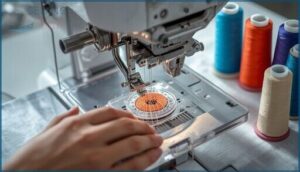
Threading your embroidery machine isn’t rocket science, but it’s the foundation of every great stitch. You’ll guide the embroidery thread from spool through tension discs to the needle, then tackle bobbin management by seating it properly in the case.
Getting thread tension balanced between upper and lower threads prevents loops—and choosing the right embroidery needles for your fabric reduces breaks immediately.
Hooping and Stabilizing Fabric
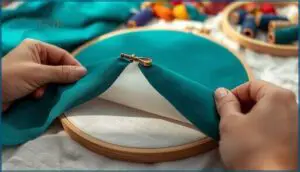
Getting fabric drum-tight in your embroidery frames isn’t optional—it’s everything. Proper embroidery hooping creates fabric tension that prevents puckering, and mastering thread management keeps your stitches crisp from start to finish.
Tight hooping creates the fabric tension that prevents puckering and ensures crisp stitches from start to finish
Pair your hoop selection with the right stabilizer types: cutaway stabilizer anchors dense designs permanently, while tearaway stabilizer peels away cleanly from woven fabrics. Water-soluble embroidery stabilizers dissolve completely, leaving zero trace.
Beginners can benefit from understanding to ensure they achieve the best possible results.
Loading and Editing Designs
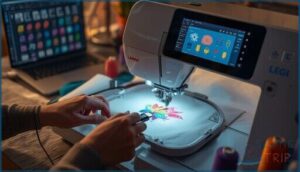
Once you’ve mastered hooping, you’ll face design file management—loading embroidery patterns from USB or transferring them through editing software.
Most embroidery digitizing tools let you resize embroidery designs, adjust stitch optimization, and handle thread color matching before sending files to your machine.
Hoop calibration ensures accurate placement, while basic embroidery software skills turn raw design files into polished projects that stitch exactly where you intend.
Timeframe to Achieve Proficiency
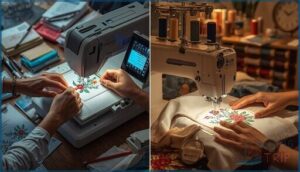
So how long does it actually take to get comfortable with your embroidery machine? Well, the answer isn’t one-size-fits-all—your timeline depends on how often you practice and what you’re trying to create.
Let’s break down what you can expect at each stage of your embroidery journey.
Initial Setup and First Projects
Your first embroidery project feels like stepping into a new craft world. You’ll start with machine threading, hoop selection around 4×4 or 5×7 inches, and fabric preparation using stable cotton.
Design loading from your embroidery software comes next—pick simple monograms to master embroidery hooping and embroidery stabilizers.
This beginners guide approach builds stitch quality without overwhelming you.
Typical Practice Periods for Beginners
Most beginners see real progress within 2 to 4 weeks of daily practice with their embroidery machine. This skill-building timeframe for learning machine embroidery depends on focused sessions—not marathon hours.
Here’s what typical embroidery basics practice looks like:
- Week 1-2: Simple beginner projects like monograms (30-45 minutes daily)
- Week 3-4: Multi-stitch designs using embroidery techniques for beginners
- Month 2+: Editing and loading custom designs confidently
Consistent learning strategies beat sporadic effort every time.
Milestones on The Path to Mastery
Your journey toward Machine Mastery unfolds through clear markers. Thread Control stabilizes after three practice runs—suddenly, those pesky thread breaks drop below one per 1,000 stitches. Design Optimization clicks when you’re loading patterns in under 60 seconds.
Here’s what Stitch Quality progression looks like:
| Achievement | Achievement Window |
|---|---|
| Consistent placement (1/8″ tolerance) | 5 practice attempts |
| Tension mastery prevents puckering | 3 projects on light cotton |
| Design edits (resize/reposition) | 2 minutes per change |
Embroidery Efficiency develops naturally as you master embroidery techniques for beginners—each success builds genuine confidence in machine embroidery for beginners and embroidery machine usage skills.
Common Challenges and How to Overcome Them
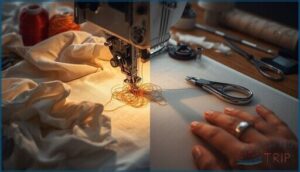
Even when you’ve got the basics down, machine embroidery throws a few curveballs your way. The good news? Most problems have straightforward fixes once you know what to look for.
Here are the three biggest hurdles beginners face—and exactly how to clear them.
Thread Breaks and Tension Issues
Thread breaks will test your patience early on. Upper thread tension that’s too tight shreds delicate embroidery thread on dense fabrics, while loose bobbin tension creates loops that snap mid-stitch.
Your needle quality matters more than you’d think—dull or bent needles pinch thread until it breaks.
The fix? Match your stabilizer choice to fabric weight, adjust thread tension gradually, and swap needles every eight hours of stitching.
Design Placement and Fabric Shifting
Design placement headaches often start with poor fabric alignment—your pattern sits two inches off-center when you expected flawlessness. Hoop selection and stabilizer choice determine whether fabric shifts during stitching, especially in curve embroidery where tension pulls unevenly.
Master embroidery hooping with proper fabric preparation, match embroidery stabilizers to your material’s weight, and adjust design orientation before you stitch. Test stitch density on scraps first.
Learning New Software and Features
Software tutorials can feel overwhelming when you’re already juggling fabric and thread, but mastering digital editing unlocks serious creative power. Most embroidery software includes design importing, machine connectivity, and thread management—essential embroidery techniques for beginners exploring embroidery digitizing.
Focus on these core tasks first:
- Importing DST and PES formats into your workspace
- Resizing designs while preserving stitch density
- Assigning thread colors to match your collection
- Connecting your embroidery machine via USB
Understanding embroidery designs and software transforms frustration into confidence.
Tips to Shorten The Learning Process

You don’t have to stumble through the learning process alone. There are proven strategies that’ll get you stitching confidently in far less time than trial and error.
Let’s look at two game-changing approaches that work for beginners at any skill level.
Practicing With Simple Projects
Your fastest path to confident stitching? Start small and build muscle memory with beginner-friendly project selection. Focus on tote bag patches, monogram initials, or simple pillow covers—they teach you machine embroidery fundamentals without overwhelming complexity.
Here’s your starter blueprint for embroidery techniques for beginners:
| Project Type | Recommended Hoop Sizes | Typical Time Investment |
|---|---|---|
| Tote bag patches | 4×4 to 5×7 inch | 1-2 hours |
| Monogram towels | 4×4 inch | 15-30 minutes |
| Pillow motifs | 5×7 inch | 6-8 minutes per pass |
| Pillowcase hems | 5×7 inch | Under 15 minutes |
| Practice hearts/stars | 4×4 inch | 5-10 minutes |
Why these projects work: They give you hands-on practice with essential fabric choices (cotton blends are forgiving), thread management basics, and core stitch techniques—all while using your embroidery machine confidently.
Smart fabric choices matter from day one. Cotton twill and cotton blends forgive mistakes better than slippery synthetics. Pair them with tear-away stabilizers for clean backs on your embroidery designs, and you’ll avoid the puckering that frustrates beginners.
Thread management gets easier when you stick to polyester or rayon threads initially—they’re affordable, strong, and don’t break as easily as metallic options. Pre-wind several bobbins before starting; it’ll save you interruptions mid-stitch.
Hoop sizes shouldn’t intimidate you. A 4×4 inch hoop manages most beginner embroidery supplies perfectly. Once you’re comfortable hooping fabric without wrinkles, you can graduate to 5×7 inch frames for slightly larger embroidery designs.
Keep your early projects simple—think high-contrast colors and straightforward satin stitches. You’ll see faster progress, and that momentum is everything when you’re learning your embroidery machine’s quirks.
Joining Embroidery Communities for Advice
You’ll cut months off your learning curve by tapping into embroidery communities for real-time mentor feedback and forum troubleshooting. Local guilds offer hands-on design exchange and group Q&A sessions, while online sewing and embroidery community forums connect you with machine embroidery for beginners advice, sewing projects and ideas, embroidery supplies and tools recommendations, and sewing and crafting inspiration—all free, accessible support when you’re stuck.
Frequently Asked Questions (FAQs)
How long does it take to learn machine embroidery?
Most beginners gain comfort with machine embroidery basics after two to eight weeks of regular practice, mastering thread control and fabric selection as confidence builds through hands-on experience.
What are the skills required for embroidery?
You’ll master machine operation, thread management, and fabric selection first. Then comes hooping with embroidery stabilizers, loading embroidery designs, and understanding embroidery techniques—from simple monograms to complex embroidery digitizing.
What are the 6 basic tools for embroidery?
Your embroidery machine needs six essentials: embroidery needles sized for fabric, embroidery thread in polyester or rayon, hoop frames to hold material taut, embroidery stabilizers like tear-away varieties, fabric cutters, and a seam ripper for mistakes.
Which stabilizer works best for stretchy fabrics?
Think of your stabilizer as the anchor holding your stretchy fabric steady. You’ll need cut-away or fusible backings for knits—they stretch with the fabric while keeping embroidery tension perfect and preventing puckering.
How do I maintain my embroidery machine?
Keep your gear running smoothly with regular machine cleaning, proper lubrication tips, and smart thread management.
Don’t skip hoop calibration checks, firmware updates, or swapping embroidery needles and stabilizer when needed.
Can I create custom embroidery designs myself?
Yes, you can create custom embroidery designs using digitizing software like Hatch Embroidery Digitizer.
You’ll transform artwork into tailored patterns with embroidery fonts and custom threads, controlling every detail of your unique embroidery designs.
What thread types suit different project needs?
Thread selection depends on your fabric and project goals. Polyester thread suits most needs with durability and colorfast qualities, while rayon thread adds luxury sheen. Cotton gives traditional charm on natural fabrics.
How do I troubleshoot skipped stitches effectively?
When your embroidery machine hiccups and skips stitches, check needle selection first. Fresh, correctly sized embroidery needles paired with proper thread tension and stabilizer can transform stitch quality.
Rethread carefully, test fabric choice, and adjust tension for error correction.
Conclusion
Here’s what nobody tells you: the learning curve for using embroidery machines isn’t about becoming perfect—it’s about knowing which mistakes don’t matter. Your first projects will have wobbly letters and slightly off-center designs. That’s expected.
What separates beginners who quit from those who thrive? Understanding that tension hiccups and thread breaks aren’t failures—they’re just data points. Master the fundamentals, practice with purpose, and suddenly you’re the one making it look easy.