This site is supported by our readers. We may earn a commission, at no cost to you, if you purchase through links.
The difference between a good embroidery result and a great one often comes down to the machine doing the work. Thread breaks mid‑design, limited hoop sizes, and single‑needle setups that force you to stop and rethread every color change—these aren’t minor annoyances, they’re productivity killers.
Professional sewists know this, which is why the jump from a hobbyist machine to a commercial‑grade setup changes everything about what’s possible. Professional sewists understand the impact.
machine capability on output quality.
Modern embroidery machines for professional sewists now deliver up to 1,200 stitches per minute, multi‑needle configurations, and wireless design transfer that would’ve seemed excessive just a decade ago. Knowing which machine fits your workload, budget, and skill level separates a smart investment from an expensive mistake.
Table Of Contents
- Key Takeaways
- Best Embroidery Machines for Professionals
- 1. Brother SE600 Sewing Embroidery Machine
- 2. Brother PE800 Embroidery Machine LCD
- 3. Brother SE700 Sewing Embroidery Machine White
- 4. Brother SE1900 Sewing Embroidery Machine
- 5. Brother PE535 Embroidery Machine 80 Designs
- 6. Janome MB7 7 Needle Embroidery Machine
- 7. Janome Memory Craft 500E Embroidery Machine
- 8. Brother PE550D Embroidery Machine Disney
- 9. Singer Legacy SE300 Sewing Embroidery Machine
- 10. Janome MB4S Four Needle Embroidery Machine
- Key Features in Professional Embroidery Machines
- Choosing The Right Embroidery Machine
- Maintenance and Longevity Tips
- Top Brands for Professional Embroidery
- Frequently Asked Questions (FAQs)
- Conclusion
Key Takeaways
- Switching from a single-needle to a multi-needle machine (like the Janome MB7 or MB4S) can cut your project time by up to 70%, since automatic color-switching means you’re not stopping to rethread after every color change.
- Hoop size is a hard ceiling on what you can create, so matching your embroidery field to your actual project types—not just your wishlist—is one of the most important buying decisions you’ll make.
- The real cost of a machine goes well beyond the sticker price: factor in annual upkeep (roughly 5–10% of machine cost), digitizing software, replacement parts, and the break-even timeline before committing.
- Automation features like auto thread cutting, real-time tension control, and wireless design transfer aren’t just conveniences—they’re what keep your output consistent and your workflow scalable as your business grows.
Best Embroidery Machines for Professionals
Finding the right embroidery machine can feel overwhelming, with so many options on the market.
A solid beginner’s guide to choosing the right sewing machine can help you cut through the noise and focus on what actually matters for your skill level.
Whether you’re running a small studio or scaling up production, the machine you pick shapes everything from your workflow to your finished results.
Here are ten of the best embroidery machines worth your attention in 2026.
1. Brother SE600 Sewing Embroidery Machine
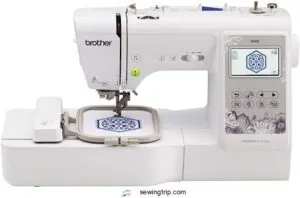
The Brother SE600 is a solid starting point if you want a machine that manages both sewing and embroidery without overwhelming you.
It comes with 80 built-in designs, 103 stitches, and a 3.2" color touchscreen that makes editing genuinely easy. The 4×4" embroidery field keeps things compact, perfect for monograms, logos, and custom accessories.
You can import custom.PES files via USB, which opens up your design options considerably.
It’s not built for high-volume work, but for home studios and side hustles, it punches well above its weight.
| Best For | Home crafters, beginners, and small side-hustle owners who want a reliable machine that handles both sewing and embroidery without a steep learning curve. |
|---|---|
| Built-in Designs | 80 |
| Embroidery Field | 4×4 inches |
| Touchscreen Display | 3.2 inch LCD |
| USB Connectivity | Yes |
| Brand | Brother |
| Machine Weight | 26.2 lbs |
| Additional Features |
|
- Tons of built-in options — 80 embroidery designs and 103 stitches give you plenty to work with right out of the box
- The color touchscreen makes navigating settings and editing designs way easier than older button-heavy machines
- USB import support means you’re not locked into built-in designs — bring in your own.PES files and get creative
- The 4×4" embroidery field is pretty limiting if you want to tackle bigger projects or full-back jacket designs
- At 26 pounds, it’s not exactly grab-and-go — finding a permanent spot for it is kind of a must
- It’s a domestic machine at heart, so don’t expect it to keep up if you’re running high-volume or commercial-level work
2. Brother PE800 Embroidery Machine LCD
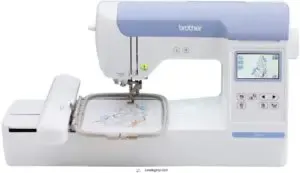
step up your hoop size, the PE800 is worth a serious look.
It gives you a 5" x 7" embroidery area — noticeably larger than the SE600 — along with 138 built-in designs and 11 font styles for monogramming work.
The 3.2" color touchscreen lets you rotate, mirror, and resize designs before a single stitch drops.
USB import keeps your custom files accessible.
It’s a dependable home machine that manages detail work without much fuss.
| Best For | Home embroiderers who want more hoop space and an easy-to-use touchscreen for monogramming, quilting, and custom design work. |
|---|---|
| Built-in Designs | 138 |
| Embroidery Field | 5×7 inches |
| Touchscreen Display | 3.2 inch LCD |
| USB Connectivity | Yes |
| Brand | Brother |
| Machine Weight | 17.64 lbs |
| Additional Features |
|
- Big 5" x 7" hoop area gives you room to work on larger, more detailed projects
- 138 built-in designs plus USB import means you’re never short on options
- The 3.2" color touchscreen makes editing and previewing designs simple before you stitch
- On-board editing is limited, so complex customization usually needs outside software
- Hoops don’t cross over with other Brother models like the PE770, which can be frustrating
- Getting consistent results takes practice — and the machine really does need quality thread and backing to perform its best
3. Brother SE700 Sewing Embroidery Machine White
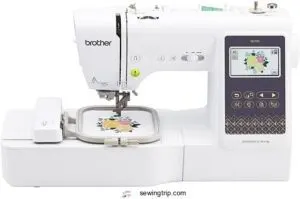
If wireless freedom matters to you, the SE700 takes things a step further. It connects via Wi‑Fi, so you can push designs straight from your phone using the Artspira app — no cables, no fuss.
You get 135 built‑in embroidery designs, 103 sewing stitches, and a 3.7" touchscreen that makes editing feel natural.
The 4" x 4" hoop keeps it compact, but the 710 stitches‑per‑minute speed and automatic needle threader keep your workflow moving without interruption.
| Best For | Beginners and hobbyists who want a versatile machine that handles both sewing and embroidery with modern, app-connected convenience. |
|---|---|
| Built-in Designs | 135 |
| Embroidery Field | 4×4 inches |
| Touchscreen Display | 3.7 inch LCD |
| USB Connectivity | Yes (+ WiFi) |
| Brand | Brother |
| Machine Weight | 15.6 lbs |
| Additional Features |
|
- Wi-Fi connectivity lets you send designs straight from your phone via the Artspira app — no cables needed.
- Packed with 135 embroidery designs, 103 stitches, and a 3.7" touchscreen that makes navigating everything feel simple.
- The automatic needle threader and jam-resistant bobbin keep frustration low and your momentum high.
- The 4" x 4" embroidery field is on the smaller side, so bigger projects will hit a wall fast.
- Limited throat space can make bulky or large fabric pieces tricky to maneuver.
- You’ll need a solid Wi-Fi connection to get the most out of it — no network, no app features.
4. Brother SE1900 Sewing Embroidery Machine
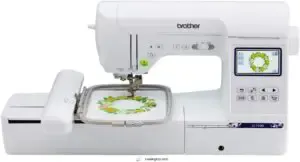
When you need more room to work, the SE1900 steps up. Its 5" x 7" embroidery field means fewer interruptions mid‑project — less rehooping, more stitching.
You get 138 built‑in designs, 11 font styles, and 240 sewing stitches, so there’s real range here.
The 3.2" LCD touchscreen keeps editing straightforward, and USB import lets you pull in custom files whenever you’re ready to go beyond the built‑ins.
It’s a solid all‑rounder for anyone juggling sewing and embroidery in the same workflow.
| Best For | Crafters and hobbyists who want a capable machine that handles both sewing and embroidery without needing two separate setups. |
|---|---|
| Built-in Designs | 138 |
| Embroidery Field | 5×7 inches |
| Touchscreen Display | 3.2 inch LCD |
| USB Connectivity | Yes |
| Brand | Brother |
| Machine Weight | 22 lbs |
| Additional Features |
|
- Big 5" x 7" embroidery field means you can tackle larger designs with a lot less rehooping
- Tons of built-in options — 138 designs, 11 fonts, and 240 stitches — so you’re not starting from scratch
- USB import and a touchscreen make it easy to bring in custom files and edit on the fly
- No extension table included, so you’ll need to buy one separately if you do a lot of flat sewing
- Large thread spools need a separate spindle holder, which is a small but annoying extra purchase
- Only works at 120V in the US — using or selling it elsewhere voids the warranty
5. Brother PE535 Embroidery Machine 80 Designs
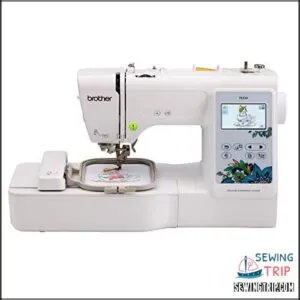
Eighty built-in designs sound modest until you see what they cover — floral patterns, holiday motifs, kids themes, and decorative borders, all optimized for the 4" x 4" hoop.
The PE535 keeps things focused: it’s embroidery only, no sewing functions competing for your attention. The 3.2" LCD touchscreen lets you preview and reposition designs before a single stitch drops. USB import expands your options fast. If you’re tackling smaller personalization projects, this machine earns its place at the table.
| Best For | Beginners and hobbyists who want a dedicated embroidery machine for personalizing clothing, accessories, and small home decor projects. |
|---|---|
| Built-in Designs | 80 |
| Embroidery Field | 4×4 inches |
| Touchscreen Display | 3.2 inch LCD |
| USB Connectivity | Yes |
| Brand | Brother |
| Machine Weight | 14.99 lbs |
| Additional Features |
|
- 80 built-in designs plus USB import means you’ve got plenty to work with right out of the box
- The 3.2" LCD touchscreen makes it easy to preview and position designs before you commit
- Simple, focused setup — embroidery only, so there’s no learning curve from extra sewing features
- The 4" x 4" hoop is pretty limiting if you want to tackle bigger or more complex projects
- The touchscreen can be unresponsive at times, which gets frustrating mid-project
- Digitizing software isn’t included, so adding custom designs costs extra on top of the machine
6. Janome MB7 7 Needle Embroidery Machine
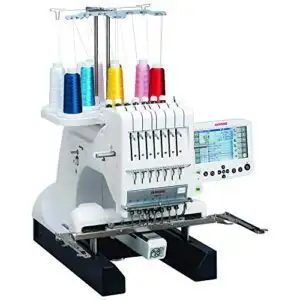
Seven needles. That’s the Janome MB7‘s opening statement — and it delivers.
You can load up to seven thread colors at once, and the machine switches between them automatically, cutting your project time by up to 70 percent compared to single-needle setups.
The 9.4" x 7.9" embroidery field accommodates jackets, banners, and quilt blocks with ease.
Add a jumbo bobbin, 800 stitches per minute, and a 5.7" editing screen, and you’ve got a commercial-grade workhorse built for serious output.
| Best For | Embroiderers and small business owners who need fast, high-volume output with multi-color designs and don’t want to babysit a single-needle machine all day. |
|---|---|
| Built-in Designs | N/A |
| Embroidery Field | 9.4×7.9 inches |
| Touchscreen Display | 5.7 inch RCS |
| USB Connectivity | Yes |
| Brand | Janome |
| Machine Weight | 65 lbs |
| Additional Features |
|
- Seven needles loaded at once means fewer interruptions and way faster project completion
- The 5.7" editing screen lets you tweak designs right on the machine — no laptop required
- Commercial-grade build handles everything from monogramming to light upholstery with solid stitch quality
- Thread jams and tension issues have tripped up some users, so expect a learning curve and regular upkeep
- At 65 pounds, this isn’t something you’re moving around easily — it needs a dedicated spot
- Customer support has been hit or miss, which is frustrating when you’re dealing with a machine at this price point
7. Janome Memory Craft 500E Embroidery Machine
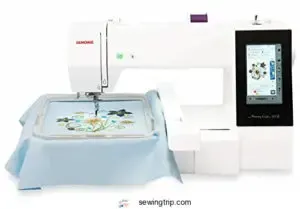
The Janome Memory Craft 500E is built for embroiderers who want to focus purely on the craft. It’s embroidery-only, so every inch of that flat bed exists to support your hoop — no sewing functions competing for space.
You get 160 built-in designs, 6 fonts, and a 7.9 × 11‑inch maximum field.
Thread sensors stop the machine if something breaks, and the automatic cutter manages trim work between color changes.
USB connectivity and 3 MB of internal memory keep your custom designs close at hand.
| Best For | Hobbyists and small business owners who want a dedicated embroidery machine that’s approachable for beginners but capable enough for more experienced sewers. |
|---|---|
| Built-in Designs | Pre-loaded |
| Embroidery Field | N/A |
| Touchscreen Display | N/A |
| USB Connectivity | Yes |
| Brand | Janome |
| Machine Weight | 20 lbs |
| Additional Features |
|
- Comes loaded with 160 built-in designs and 6 fonts, so you can hit the ground running without needing extra software right away
- The automatic thread cutter and thread sensors make the whole process smoother and less hands-on between color changes
- USB connectivity and internal memory mean you can bring in custom designs without a lot of hassle
- The needle threader has a bit of a learning curve, which can be frustrating when you’re just getting started
- The included instructions are pretty bare-bones, so expect to do some extra digging on your own
- Converting custom patterns may require additional software that doesn’t come with the machine
8. Brother PE550D Embroidery Machine Disney
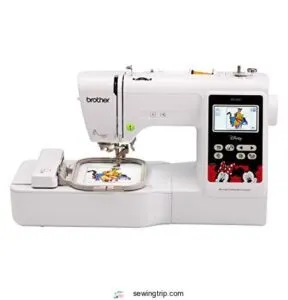
The Brother PE550D punches above its weight for a single‑needle machine. It ships with 125 built‑in designs — 45 of them Disney and Disney‑Pixar characters — making it a go‑to for custom gifts, kids’ apparel, and themed projects.
The 3.2" color touchscreen lets you preview and rotate designs before a single stitch drops.
USB import, automatic threading, and a built‑in thread cutter keep your workflow tight.
Note that the 4" x 4" hoop is the ceiling here, so plan your projects accordingly.
| Best For | Beginners and Disney fans who want to personalize gifts, kids’ clothes, and small projects without a steep learning curve. |
|---|---|
| Built-in Designs | 125 |
| Embroidery Field | 4×4 inches |
| Touchscreen Display | 3.2 inch LCD |
| USB Connectivity | Yes |
| Brand | Brother |
| Machine Weight | 24 lbs |
| Additional Features |
|
- Comes loaded with 125 built-in designs, including 45 Disney and Disney-Pixar characters — ready to stitch right out of the box
- The 3.2" color touchscreen makes it easy to preview, rotate, and edit designs before you commit
- USB port lets you bring in custom designs, and the automatic needle threader saves a ton of frustration
- The 4" x 4" embroidery area is a hard limit, so larger or more complex projects aren’t really an option
- It’s an embroidery-only machine — you can’t use it for regular sewing
- Custom designs need to be converted to PES format first, and decent digitizing software can get pricey
9. Singer Legacy SE300 Sewing Embroidery Machine
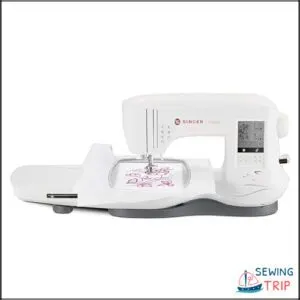
The Singer Legacy SE300 is a solid all-rounder that doesn’t ask you to choose between sewing and embroidery. You get 250 built-in stitches, 200 embroidery designs, and six font options — enough variety to handle apparel, home décor, and custom gifts without switching machines. Automatic stitch optimization and self-adjusting tension take the guesswork out of tricky fabrics.
The LCD touchscreen keeps controls accessible, and USB transfer means your custom designs are always within reach. Just note the black-and-white screen can make visualizing colorful designs a little tricky.
| Best For | Home sewers and hobbyists who want one machine that handles both everyday sewing and embroidery without a steep learning curve. |
|---|---|
| Built-in Designs | 200 |
| Embroidery Field | N/A |
| Touchscreen Display | LCD touch screen |
| USB Connectivity | Yes |
| Brand | SINGER |
| Machine Weight | 20.5 lbs |
| Additional Features |
|
- 250 stitches and 200 embroidery designs give you plenty to work with right out of the box
- Auto tension and stitch optimization make it forgiving on different fabrics
- USB transfer lets you load custom designs quickly and easily
- The LCD screen is black and white, so previewing colorful embroidery designs is harder than it should be
- Some users have run into thread jamming, bobbin tension issues, and motor problems over time
- The embroidery unit is bulky — make sure you’ve got the desk space for it
10. Janome MB4S Four Needle Embroidery Machine
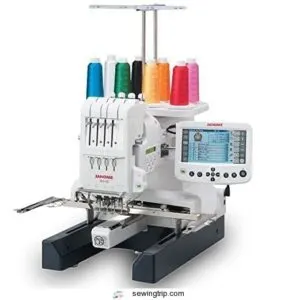
Four needles don’t sound like much — until you realize you can stitch through a multi-color design without stopping to rethread.
The MB4S is built around that idea.
Its 9.4 x 7.9-inch embroidery field supports serious projects, and the 5.7-inch Remote Computer Screen lets you edit designs right on the machine.
Jumbo bobbins mean fewer interruptions, and automatic jump-thread trimming keeps everything clean.
If you’re ready to work at a professional pace, this machine keeps up.
| Best For | Serious embroidery enthusiasts and small business owners who want to tackle multi-color designs with professional-grade speed and fewer interruptions. |
|---|---|
| Built-in Designs | N/A |
| Embroidery Field | 9.4×7.9 inches |
| Touchscreen Display | 5.7 inch RCS |
| USB Connectivity | Yes |
| Brand | Janome |
| Machine Weight | 65 lbs |
| Additional Features |
|
- Four needles mean you can run through multi-color designs without constantly stopping to rethread — huge time saver
- The 5.7" Remote Computer Screen lets you edit designs right on the machine, no extra software needed
- Jumbo bobbins (40% larger than standard) and auto jump-thread trimming keep your workflow smooth and clean
- It’s loud — you’ll want to slow the stitch speed down if that’s a problem
- Threading and loading new colors has a steep learning curve, especially for beginners
- Designs with more than four colors still require rethreading, so complex projects take more planning
Key Features in Professional Embroidery Machines
Not all embroidery machines are built the same, and the right features can make or break your workflow.
If you’re investing in a professional setup, knowing what to look for puts you ahead of the pack.
Here are the key features that separate a capable machine from a truly great one.
Multi-Needle Functionality
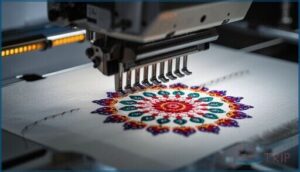
Multi-needle functionality is the backbone of serious embroidery machine selection. With the right needle configuration, you can run complex, multi-color designs without stopping to rethread.
Here’s what commercial-grade embroidery machine technology delivers:
- Automatic color switching between four to eighteen needles mid-design
- Thread trimming systems that cut cleanly after every color stop
- Tension control discs calibrated per needle for metallics and specialty threads
- Speed optimization reaching up to 1,000 stitches per minute
- Smooth industrial embroidery production with zero manual intervention
These machines also feature automatic thread trimmers that cut threads as needed.
Large Embroidery Area
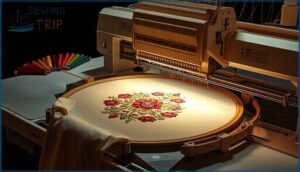
multi-needle machines handle your thread changes, hoop size becomes your next bottleneck.
commercial-grade field like the Janome MB7’s 9.4 by 7.9 inches or the Brother PR1055X’s 8 by 12 inches means fewer rehooping reduction strategies and more one‑pass wins.
Magnetic hoop benefits — faster setups, zero fabric marks — make project fit advantages real.
Pair that with proper fabric stability techniques, and your design capacity scales fast.
Consider the benefit of automatic thread trimming for smooth operation.
Built-in Design Library and Editing
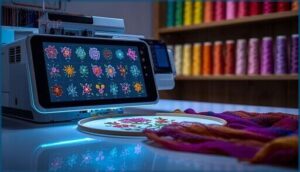
Once you’ve nailed down hoop size, your built-in design library becomes your real creative engine. The Brother SE1900 and PE800 each pack 138 designs with solid font variety — 11 fonts per machine.
Computerized embroidery tools like design resizing, pattern rotation, and drag-drop combining let you customize on‑screen before a single stitch drops, making embroidery machine selection far easier when design capacity actually matches your workflow.
Automation and Connectivity Options
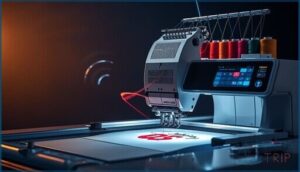
Your design library only goes so far — automation is where production really clicks.
Auto Thread Cutting on the Brother PE800 and Janome MB7 trims after every color change, while Multi‑Needle Color Change keeps multi‑needle machines running without re‑threading stops. USB Design Transfer loads custom files instantly. Wireless LAN and Wireless Monitoring apps let you track progress remotely, and Real‑Time Tension Control keeps Computerized Embroidery consistent across every stitch.
- Auto Thread Cutting after each color section
- USB Design Transfer directly to machine memory
- Wireless Connectivity and Wireless LAN for remote monitoring
- Automatic Threading paired with Real‑Time Tension Control
Speed and Precision Stitching
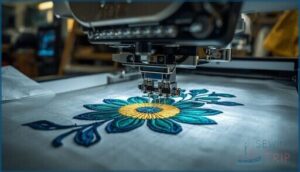
Speed is only half the equation — precision is what separates good work from great work.
Machines like the Ricoma MT-1501-7S hit 1,200 stitches per minute, while Stitch Rate Optimization and Real-time Speed Monitoring keep quality locked in at every stage.
Stepper Motor Accuracy ensures ±0.1mm hoop positioning, and Hoop Vibration Damping prevents distortion on dense fills.
Thread Tension Calibration and servo motor technology handle the rest automatically.
Choosing The Right Embroidery Machine
Picking the right embroidery machine comes down to more than specs on a page.
The best fit depends on how you work, what you’re building, and where you want to go.
Here are the key things worth thinking through before you decide.
Matching Machine Capabilities to Business Needs
Think of your machine as a business partner — it needs to match your workload, not just your wishlist.
Production Volume Alignment starts with honest answers: are you running 20 pieces weekly or 2,000? Item Size Compatibility, Design Complexity Handling, Speed Capacity Matching, and Automation Level Selection all feed into this. The right fit turns commercial embroidery production from a grind into a system that actually scales.
Match your machine to your actual volume, or your workflow will never truly scale
Evaluating Budget and Long-Term Value
Budget isn’t just the price tag — it’s the full picture. Total Cost Ownership means factoring in maintenance, depreciation rate, and resale retention from day one.
- Brother PE535 at ~$380 entry cost
- Annual upkeep runs 5–10% of machine price
- Ricoma EM-1010 breaks even after 550 items
- Strong ROI Timeline through per-item savings
- Multi-needle models offer better Resale Retention
Maintenance Savings compound fast when you own commercial-grade equipment outright.
Ease of Use and Learning Curve
A steep learning curve can kill your momentum before you even start.
Machines like the Brother SE600 and SE700 win on Setup Simplicity — automatic threading, LCD tutorials, and Touchscreen Navigation make your first session feel manageable. Onscreen Editing tools let you adjust designs without separate Embroidery Software.
For beginners, these built‑in Beginner Learning Aids turn machine embroidery from intimidating into genuinely natural.
Availability of Support and Training
Good support can make or break your experience with any machine.
Brother’s phone support runs Monday through Friday, 9 AM to 9 PM Eastern, covering everything from basic setup to complex troubleshooting.
Dealer Workshops give you hands‑on time with your exact model, while Online Tutorials and Community Forums fill the gaps between them.
Warranty Services and solid Embroidery Machine Reviews round out a network that actually has your back.
Maintenance and Longevity Tips
great embroidery machine is only as good as the care you put into it.
Skipping maintenance is the fastest way to turn a reliable workhorse into a frustrating headache.
keep your machine running strong for years to come.
Routine Cleaning and Upkeep
Your machine runs best when you treat maintenance as a daily habit, not an afterthought.
End each session with a lint brush sweep around the bobbin and hook area, then follow up with vacuum cleaning along the feed dogs.
Keep needle replacement on a six-to-eight-hour schedule, apply oil with precision, and always use machine covering when idle to protect thread tension and internal components.
Sourcing Replacement Parts and Accessories
Once your cleaning routine is locked in, keeping parts stocked is the next smart move.
Use Online Parts Catalogs from sites like Sewing Parts Online to search by model number and confirm Model‑Specific Compatibility before ordering.
Third‑Party Accessories — hoops, bobbins, needles — often cost less without sacrificing quality.
Smart Inventory Management Strategies keep your studio running:
- Stock extra bobbin cases and needles
- Keep spare Thread Tension components on hand
- Order bulk prewound bobbins by machine class
- Bundle Embroidery Tools and Sewing Notions in one shipment
- Track part numbers for Warranty Part Replacement claims
Manufacturer Support and Warranties
Parts stock manages the hardware side, but knowing your warranty coverage is what protects your investment long‑term.
Brother covers machine chassis up to 25 years, with shorter terms on electronics and labor — Warranty Lengths vary, so read the fine print.
Service Channels include phone, chat, and email, and Repair Turnaround usually runs about five days.
Extended Plans like Brother Assure add Regional Coverage worth considering for Professional Sewing Equipment.
Troubleshooting Common Issues
Even with solid warranty coverage, day-to-day hiccups still happen.
Thread Breaks usually trace back to tension or incorrect threading — rethreading with the presser foot raised fixes most cases fast. Tension Adjustment, Needle Issues, and Hooping Errors each have clear fixes too.
For Connectivity Problems, switching to a 2.4 GHz network or updating firmware often does the trick.
Top Brands for Professional Embroidery
Regarding professional embroidery, the brand you choose shapes everything — from stitch quality to how much support you get down the road.
A few names have earned real trust in this industry by consistently delivering machines that perform under pressure. Here are the top brands worth knowing.
Brother Embroidery Machines
Brother has long been the go-to name in professional embroidery, and for good reason.
From the entry-level Brother SE600 to powerhouses like the Brother PR680W and Brother PR1055X, there’s a machine for every workflow.
You get solid User Interface Customization, smart Design Transfer Methods, reliable Thread Color Management, Stitch Density Control, and strong Warranty Service Plans — everything serious embroidery work demands.
Janome Professional Series
Janome’s Professional Embroidery lineup is built for sewists who refuse to compromise.
The MB7 and MB4S deliver Needle Change Automation and Thread Tension Control that handle multicolor designs without breaking your rhythm.
Their LCD Interface Design keeps your workflow straightforward, while Software Compatibility with.jef, .dst, and Tajima hoops means fewer limitations.
Solid Warranty Services back every Machine Embroidery investment you make.
Singer Embroidery Solutions
SINGER brings a lot to the table with its Computerized Embroidery lineup, and the Legacy SE300 connectivity stands out immediately. WiFi design transfer keeps your workflow moving without fussing over cables, while touchscreen editing tools make adjustments feel smooth.
You also get large hoop options, automatic thread cutting, and reliable thread tension — everything a professional needs from a capable Embroidery Machine with solid Embroidery Software built in.
Brand-Specific Innovations and Benefits
Each brand brings something distinct to the table. Brother’s Ten Needle Design and InnovEye Camera technology set a high bar for precision, while Wireless Transfer keeps your workflow smooth.
Janome’s Seven Needle System with Remote Screen Editing gives you real production control. SINGER and AVERMA round out the field with solid multineedle options, and the Brother SE600 remains a reliable entry into professional‑grade work.
Frequently Asked Questions (FAQs)
Who makes the best commercial embroidery machines?
In the case of commercial-grade embroidery, Brother, Janome, and SINGER lead the field.
Each offers strong warranty services, solid software compatibility, customer training programs, and global distribution — making them reliable partners for serious production work.
What fabrics work best for professional embroidery?
Cotton weight matters most — medium quilting cotton, linen blends, denim stability for structured pieces, canvas durability for bags, and silk delicacy for fine textile art.
Match your fabric to the design density.
How do embroidery machines handle thick or layered materials?
As the saying goes, the right tool makes light work.
Presser foot adjustment, magnetic hoop systems, and torque motor handling let commercial-grade machines tackle thick or layered materials without skipping a stitch.
Can embroidery machines stitch metallic or specialty threads?
Yes, embroidery machines handle metallic and specialty threads well with the right needle selection, thread tension, and speed settings.
Use metallic needles, lower tension, and run between 650–750 SPM for clean, professional results.
What software is compatible with professional embroidery machines?
Popular embroidery software like Wilcom, Hatch, and Embrilliance offer cross‑brand converters, cloud design management, and design file formats such as PES, DST, and JEF for smooth computerized embroidery across most professional machines.
How long does it take to embroider a complex design?
Complex designs generally take 30 minutes to over 2 hours, depending on stitch count impact, thread change delays, hoop setup time, stitch type speed, and design complexity factors like density and color switches.
Conclusion
You don’t need every feature on day one—the right machine grows with your skills and workload.
What matters is choosing embroidery machines for professional sewists that match where your business is headed, not just where it stands today.
Multi-needle setups cut your production time, larger hoops open new project possibilities, and reliable automation keeps quality consistent across every order.
Invest with intention, and the machine that fits your workflow now will still be earning its place years from now.
- https://www.fujamachine.com/a-the-top-picks-for-the-best-multi-needle-embroidery-machines-of-the-year.html
- https://www.hooptalent.com/el/blogs/news/multi-needle-embroidery-machines-ultimate-guide-for-beginners-and-businesses
- https://www.zsk.de/en/zsk-news/zsk-news-2022-02/zsk-news-r-head-112022.php
- https://www.ajstitch.com/blog-post
- https://wilcom.com/embroiderystudio