This site is supported by our readers. We may earn a commission, at no cost to you, if you purchase through links.
Most schools still treat embroidery as a rainy-day activity—something you pull out when the main lesson runs short. But programs that take it seriously, with the right machines and a real curriculum behind them, are turning it into one of the most skill-dense courses on the schedule.
Students learn precision, patience, file management, and design thinking all at once.
The trick is matching the machine to the environment—because a tool built for a home studio behaves very differently on a classroom desk with thirty students rotating through it.
These seven embroidery machines for schools and classrooms are worth your serious attention.
Table Of Contents
- Key Takeaways
- Top 7 Embroidery Machines for Schools
- 1. Smartstitch S1001 Commercial Embroidery Machine
- 2. Brother SE700 Sewing Embroidery Machine
- 3. Brother Skitch Single Needle Embroidery Machine
- 4. PooLin EOC06 Embroidery Machine Touchscreen
- 5. Brother SE700 Embroidery Sewing Machine
- 6. Brother PE900 Embroidery Machine Bundle
- 7. Fokuse Commercial Touch Screen Embroidery Machine
- Classroom Features That Matter
- Safety and Durability Priorities
- Budget and Buying Considerations
- Classroom Setup and Teaching Use
- Frequently Asked Questions (FAQs)
- Conclusion
Key Takeaways
- Matching the machine to your classroom’s actual workload—not just its feature list—is what separates a smooth program from constant downtime and frustrated students.
- Commercial-grade options like the Smartstitch S1001 and Fokuse FKS-1001 bring real production power to vocational programs, while beginner-friendly picks like the Brother SE700 work better for mixed-skill groups just finding their footing.
- Safety and durability aren’t extras—metal frames, needle guards, jam-resistant bobbins, and non-slip bases are what keep a classroom running through daily student use without eating your repair budget.
- Smart buying means looking beyond the sticker price: factor in consumables, warranty coverage, bulk discounts, teacher onboarding, and long-term maintenance before you commit to any machine.
Top 7 Embroidery Machines for Schools
Finding the right embroidery machine for your classroom doesn’t have to feel like guesswork. The seven machines below cover everything from beginner-friendly basics to commercial-grade powerhouses — so there’s something here no matter your budget or skill mix.
If you’re starting from scratch, knowing the typical price range for commercial embroidery machines helps you set realistic expectations before you buy.
Here’s what made the cut.
1. Smartstitch S1001 Commercial Embroidery Machine
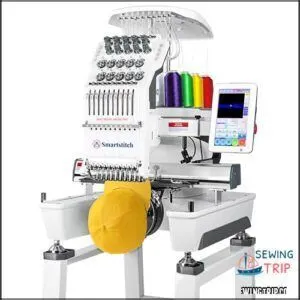
The Smartstitch S1001 means business. This 10-needle commercial machine stitches at 1,200 stitches per minute, auto-changes thread colors, and covers a 9.5" × 14.2" work area — plenty of room for caps, bags, and shirts.
Its 7-inch touchscreen makes design selection fast, even for first-timers. Laser-guided hoop positioning takes the guesswork out of alignment.
At $3,999, it’s a serious investment, but the self-lubricating system and thread-break detection keep classroom downtime low.
| Best For | Small business owners, boutique shops, and side-hustlers ready to take on real commercial embroidery orders across apparel, accessories, and promotional goods. |
|---|---|
| Embroidery Area | 9.5″ × 14.2″ |
| Connectivity | USB, Wi-Fi |
| Touch Display | 7-inch |
| Price | $3,999.00 |
| File Formats | DST, DSB |
| Machine Weight | 93 lb |
| Additional Features |
|
- 10 needles with auto thread-changing means you can run multi-color jobs without stopping to re-thread by hand.
- 1,200 stitches per minute plus a 100-million stitch memory keeps big batch orders moving fast with minimal downtime.
- The 7-inch touchscreen and laser hoop positioning make setup quick — even if you’re just getting started.
- The 9.5" × 14.2" work area is solid for most jobs, but large back panels or oversized designs might feel cramped.
- No built-in design tools — you’ll need to create or source files on a computer and transfer them via USB or Wi-Fi.
- Returns require the original wooden pallet and all original packaging, so hold onto those boxes if you’re still deciding.
2. Brother SE700 Sewing Embroidery Machine
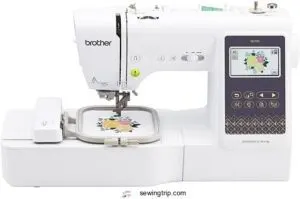
Not every classroom needs a 10-needle powerhouse. The Brother SE700 hits a sweeter spot — $579.99, beginner-ready, and genuinely adaptable.
Its 3.7-inch color touchscreen lets students preview and edit designs before a single stitch drops. Wireless LAN plus a USB port means no scrambling to transfer files.
You get 103 sewing stitches, 135 built-in embroidery designs, and a 4×4 inch hoop — perfect for monograms, patches, and small class projects. Auto-threader and drop-in bobbin? Less fussing, more creating.
| Best For | Beginners and hobbyists who want one machine that handles both sewing and embroidery without a steep learning curve or a steep price tag. |
|---|---|
| Embroidery Area | 4″ × 4″ |
| Connectivity | USB, Wi-Fi |
| Touch Display | 3.7-inch LCD |
| Price | $579.99 |
| File Formats | PES (Brother) |
| Machine Weight | 15.6 lb |
| Additional Features |
|
- The 3.7-inch touchscreen makes editing designs easy — you see exactly what you’re getting before you stitch
- Wireless LAN and the Artspira app let you pull in custom designs without hunting for cables or a laptop
- Auto-threader, auto thread cutter, and drop-in bobbin keep the workflow smooth and frustration low
- The 4×4 inch embroidery hoop is pretty limiting — bigger projects or large-scale quilting just won’t fit
- Setting up wireless transfer can be a headache at first, and software updates sometimes have to go through USB anyway
- A small number of users run into needle breakage and bobbin jams, usually when tension isn’t dialed in just right
3. Brother Skitch Single Needle Embroidery Machine
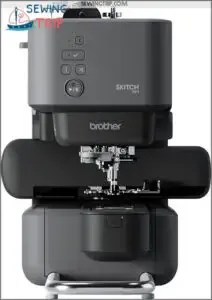
If the SE700 is the Swiss Army knife, the Brother Skitch is the scalpel — built for one job and surprisingly good at it.
At $379.99, it’s your most affordable Bluetooth-first option. Students connect through the free Artspira app, skip the USB hassle, and start stitching.
The magnetic 4×4 hoop loads fast with no screw clamps.
Speed tops out at 400 spm — slower, yes, but that’s actually a win when you’re teaching beginners to slow down and get it right.
| Best For | Beginners and hobbyists who want a simple, app-driven entry into embroidery without a steep learning curve. |
|---|---|
| Embroidery Area | 4″ × 4″ |
| Connectivity | Bluetooth |
| Touch Display | None |
| Price | $379.99 |
| File Formats | PES, PHC, PHX, DST |
| Machine Weight | 22 lb |
| Additional Features |
|
- Bluetooth-first setup means no USB fumbling — just open the Artspira app and go
- Magnetic hoop snaps on fast, no clamps, no fuss
- Compact size fits easily in a small craft space or home office
- 4×4 hoop limits design size, and bigger projects mean stitching in awkward sections
- Full functionality requires a stable phone connection and a compatible device — no app, no machine
- Only 20 custom designs on the free plan; more storage means paying for Artspira
4. PooLin EOC06 Embroidery Machine Touchscreen
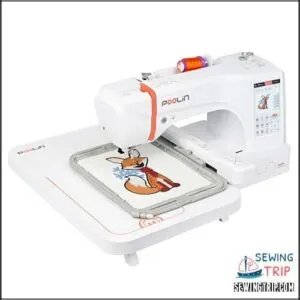
Want to step up from single-needle basics? The PooLin EOC06 brings a 7-inch full-color touchscreen to the classroom — drag, rotate, and resize designs right on screen without touching a laptop.
It ships with 200 built-in designs, four hoops (up to 11×7.9 inches), and Wi-Fi plus USB connectivity.
At $1,395, it’s a serious investment — but for experienced students ready to go beyond patches and pocket logos, the design flexibility and active online support community genuinely pay off.
| Best For | Experienced embroidery students or serious hobbyists ready to tackle bigger, more complex projects beyond basic patches and logos. |
|---|---|
| Embroidery Area | 11″ × 7.9″ |
| Connectivity | USB, Wi-Fi |
| Touch Display | 7-inch LCD |
| Price | $1,395.00 |
| File Formats | DST, DSB |
| Machine Weight | 35 lb |
| Additional Features |
|
- 7-inch touchscreen makes it easy to drag, resize, and position designs without needing a separate computer
- Four hoop sizes (up to 11×7.9 inches) plus Wi-Fi and USB connectivity give you real flexibility for a wide range of projects
- Comes with 200 built-in designs, thread, bobbins, and stabilizers so you can get stitching right out of the box
- Single-needle setup means multicolor designs require manual thread changes, which slows things down
- Only reads DST and DSB files, so you’ll need to convert anything in a different format before you can use it
- At $1,395, it’s a significant investment that may be hard to justify for casual or occasional use
5. Brother SE700 Embroidery Sewing Machine
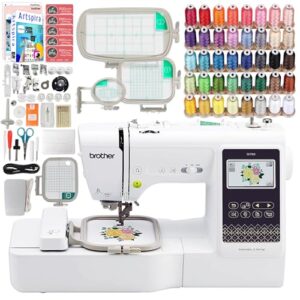
The Brother SE700 pulls double duty — and that’s exactly what makes it worth a second look for classrooms. Students get 103 built-in sewing stitches alongside 135 embroidery designs, all accessible through a 3.2-inch color touchscreen.
Before diving into all those stitches, it helps to walk beginners through some kids’ sewing machine tutorials so they’re not overwhelmed on day one.
Wireless LAN transfer means no fumbling with USB drives mid-lesson.
The bundle includes four hoops, 40 thread spools, and multiple feet, so you’re not scrambling for extras on day one.
At $669.99, it’s a solid mid-range pick for mixed-skill groups ready to create.
| Best For | Beginners and hobbyists who want one machine that handles both everyday sewing and embroidery without buying two separate tools. |
|---|---|
| Embroidery Area | 4″ × 4″ |
| Connectivity | Wi-Fi |
| Touch Display | 3.2 × 1.8-inch LCD |
| Price | $669.99 |
| File Formats | PES (Brother) |
| Machine Weight | 15 lb |
| Additional Features |
|
- Comes loaded out of the box — four hoops, 40 thread spools, and multiple feet mean you can start projects right away
- Wi-Fi design transfer keeps things smooth; no hunting for USB drives or cables
- Touchscreen makes editing stitches and resizing designs surprisingly easy, even for newcomers
- The 4"×4" embroidery area is pretty limiting if you want to stitch larger designs
- No USB port means you’re stuck if your Wi-Fi setup isn’t cooperating
- A few buyers report the 500 design cards weren’t included in their shipment, so double-check yours when it arrives
6. Brother PE900 Embroidery Machine Bundle
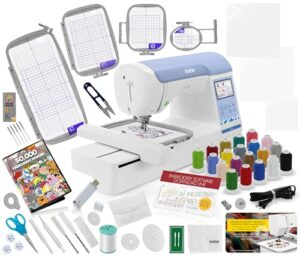
Step up your classroom’s embroidery game with the PE900 Bundle — it’s built for students who are ready to go beyond the basics.
You get a 5×7 inch embroidery area, 193 built-in designs, and a 3.7-inch color touchscreen that makes editing feel instinctive, not intimidating.
Wireless LAN transfer keeps lessons moving without USB hassles.
The bundle packs in four hoops, thread sets, and stabilizers right out of the box.
At $1,249.99, it’s a serious investment — but one that delivers serious results.
| Best For | Students and hobbyists who are ready to move past entry-level machines and want a full setup without hunting down accessories separately. |
|---|---|
| Embroidery Area | 5″ × 7″ |
| Connectivity | Wi-Fi |
| Touch Display | 3.7-inch LCD |
| Price | $1,249.99 |
| File Formats | PES (Brother) |
| Machine Weight | 17.6 lb |
| Additional Features |
|
- Big 5×7 embroidery area gives you room to work on real projects — patches, monograms, appliqué — without constantly re-hooping.
- Comes loaded out of the box with four hoops, thread, stabilizers, and 50,000 designs, so you’re stitching on day one.
- Wireless design transfer and a touchscreen interface make it genuinely easy to bring custom artwork into the classroom.
- Connecting to iPads or phones through the Brother app can be finicky — expect some troubleshooting before it plays nice.
- At 17.6 lbs and $1,249.99, it’s heavy on the desk and heavy on the budget.
- On-board editing is pretty basic — if you want to do anything complex, you’ll need to lean on outside software.
7. Fokuse Commercial Touch Screen Embroidery Machine
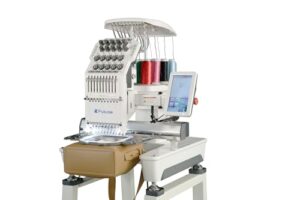
The Fokuse FKS-1001 means business — and your classroom can handle it.
This 10-needle commercial machine covers a 14.2×9.5 inch embroidery field, so bigger designs don’t require constant re-hooping. The 7-inch touchscreen keeps navigation simple, even for first-timers. With Wi-Fi, USB, and LAN connectivity, transferring student designs is painless. Auto thread trimming and built-in LED lighting reduce setup headaches.
It’s a step up in complexity, but the included starter kit and remote support get your students producing real work, fast.
| Best For | Vocational programs, makerspaces, or small classrooms ready to step into commercial-grade embroidery with real production capability. |
|---|---|
| Embroidery Area | 14.2″ × 9.5″ |
| Connectivity | USB, Wi-Fi, LAN |
| Touch Display | 7-inch |
| Price | Not listed |
| File Formats | DST, DSB |
| Machine Weight | 93–288 lb |
| Additional Features |
|
- Big 14.2×9.5" embroidery field means students can tackle larger designs without constantly re-hooping
- The 7-inch touchscreen makes the learning curve way less steep for beginners
- Comes with everything you need out of the box — stand, hoops, cap rings, and more — so you’re not hunting for accessories on day one
- Weight discrepancy in the specs (93 lb vs. 288 lb) needs clarifying before you plan delivery or floor placement
- On-site tech support costs extra, so budget for that if your students hit a wall
- Customer support runs on China time, which can mean slower response times depending on where you are
Classroom Features That Matter
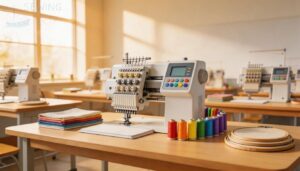
Not every machine belongs in a classroom — and the features really do make the difference. When you’re managing a room full of students at different skill levels, the right controls and tools keep things moving smoothly.
Here’s what to look for.
Beginner-friendly Controls for Student Use
Your students don’t need to decode a manual just to get started. Today’s student-friendly sewing machines use an Iconic Button Layout with Color-Coded Icons — green means go, red means stop.
One-Tap Tutorials and Audible Guidance walk beginners through each step hands-free. Emergency Stop Access sits front and center.
These safety features in sewing machines for students make classroom management genuinely easier.
Hoop Sizes Suited to School Projects
Pick the right hoop and your class runs smoothly. Age-appropriate hoops make all the difference. Refer to the hoop-to-frame matchup guidelines for ideal fit.
- 4×4 inch — perfect for beginners and simple classroom sewing projects
- 5×7 inch — ideal for upper elementary with adjustable hoop usage
- 6×8 inch — addresses fabric type considerations like knits or canvas
- Project complexity matching keeps hoop size labeling clear and chaos-free
Built-in Stitches and Editing Functions
Built-in stitches are your classroom’s silent curriculum. With Stitch Library Access, your students explore satin, fill, running, and zigzag without redigitizing from scratch.
Editing Precision Tools let them move, delete, or insert individual stitches. Color Sequence Management keeps thread order clean. Custom Stitch Templates save time across lessons.
| Feature | Beginner Use | Expert Use |
|---|---|---|
| Stitch Library | Basic satin/fill | Custom imports |
| Live Stitch Preview | Error checking | Color layout review |
| Editing Precision Tools | Single stitch moves | Layer locking |
USB Design Transfer and File Compatibility
Once your students nail stitch editing, getting those designs onto the machine is next. USB Version Speed matters — USB 3.0 moves files fast. Always format drives using exFAT for Cross Platform Compatibility; FAT32 blocks files over 4GB. Follow Design Naming Rules — no special characters. Run Cable Integrity Checks regularly.
- Use exFAT for File System Formatting
- Stick to DST or PES formats
- Avoid spaces in file names
- Check cables weekly for damage
- Test transfers before each class
Speed Control, Auto Threader, and Bobbin Systems
Once files are on the machine, smooth operation takes over.
A Variable Speed Dial lets you set the pace — slow for beginners, faster as confidence builds. Foot Pedal Sensitivity adds natural control. Programmable Speed Profiles handle different fabrics automatically.
The Integrated Auto Threader keeps fingers safe. A Transparent Bobbin Cover shows thread levels at a glance, making Winding the bobbin and Threading the upper thread straightforward for every student.
LED Lighting and Touchscreen Visibility
Good lighting changes everything at the machine. Built-in LED systems paired with Glare Reduction Coatings keep details sharp without eye strain. High Brightness Nits and Optical Bonding Clarity maintain screen readability even in sunny rooms:
- Ambient Light Sensors auto-adjust display brightness
- Touch Sensitivity Calibration keeps controls accurate under bright overhead lights
- Clear screens support sewing machine instructional materials for schools
Your students stay focused, not squinting.
Safety and Durability Priorities
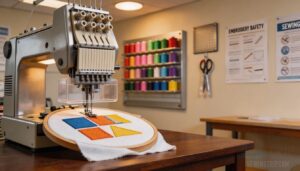
When you’re running a classroom full of students, safety isn’t optional — it’s the whole game. A machine that breaks down or causes accidents doesn’t just cost money; kills momentum and trust.
In a classroom, safety isn’t optional — a broken machine doesn’t just cost money, it kills momentum and trust
Here’s what to look for when durability and safety are non‑negotiable.
Finger Guards and Needle Safety Features
Needle injuries don’t have to be part of the learning curve. Your classroom machines should come with solid Guard Material Choice — think clear polycarbonate shields that let students see the needle tip without removing anything.
The Shield Deployment Mechanism snaps automatically after each stitch, while the Interlock Alert System lights up if guards shift. Needle Clamp Design prevents wobble, and Tool-Free Guard Replacement keeps downtime short between classes.
Stable Bases for Classroom Desks
A wobbly machine is a safety hazard waiting to happen.
Non-slip Footcaps grip vinyl and wood floors so your machines stay put, while Vibration Dampening Feet absorb the buzz of active stitching. Adjustable Height Legs and Crossbar Bracing keep everything rigid and student-friendly. Anti-creep Fasteners lock tabletops in place — reliable, cost-effective classroom tools built for daily use.
Metal Frames Versus Plastic Construction
Metal frames win on Weight vs Stiffness, Heat Management Efficiency, and Vibration Noise Reduction — Steel holds alignment past 1,000 hours of classroom use. Plastic offers lighter handling but risks Material Creep Resistance failure over time.
For Long-Term Service Life and Durability, and longevity of classroom sewing machines, Metal costs more upfront but saves replacement budget later.
Jam-resistant Bobbins and Thread Management
Thread jams don’t just frustrate students — they kill momentum mid-lesson. That’s why Jam-Resistant Bobbin Design matters so much in school settings.
A Spring-Loaded Tension Disk keeps thread tension steady, while Bi-Directional Groove Alignment and Anti-Friction Bobbin Surfaces prevent tangles before they start. Integrated Thread Channels reroute thread away from snag points.
Follow bobbin winding instructions closely, and your rotary hook system stays clean all semester.
Reinforced Parts for Daily Student Use
Daily student use is tough on equipment — that’s just the reality. Student-friendly sewing machines built with an Aircraft Aluminum Frame, Stainless Steel Joints, and Ceramic Needle Guides hold up where cheaper builds fail. Durability and longevity of classroom sewing machines start here.
- Rubber Dampened Motor reduces vibration and noise
- Impact-Resistant Storage protects accessories between classes
- Reinforced steel gear train manages heavy daily cycles
Easy-to-find Replacement Parts and Repairs
A broken machine mid-term doesn’t have to derail your whole unit.
Most classroom models offer strong OEM Part Availability — belts, bobbins, and needle sets ship year-round, often with Same-Day Shipping on orders placed before 3 PM.
| Resource | What It Helps With |
|---|---|
| Parts Identification Tools | Match exact model numbers fast |
| Repair Video Guides | Step-by-step visual walkthroughs |
| Teacher Replacement Kits | Pre-stocked classroom essentials |
| Machine Maintenance Guides | Scheduled upkeep routines |
| Sewing Machine Tutorials | Student and staff skill-building |
Budget and Buying Considerations
Buying embroidery machines for a classroom isn’t just about picking the coolest features — it’s about making every dollar count. Whether you’re outfitting one room or five, the right purchasing decisions can save your school serious money over time.
Here’s what to think through before you buy.
Entry-level Versus Commercial Classroom Machines
Entry-level machines like the Brother PE900 keep costs down, but come with tradeoffs — single-needle setups, 650 SPM stitch rate, and smaller hoop dimensions mean slower student output.
Commercial options like the Smartstitch S1001 offer 10-needle count, 1200 SPM, and a larger touchscreen for interface simplicity.
Build materials differ too: plastic versus metal frames.
Choose based on your classroom’s actual daily workload.
Cost Per Machine for Multi-classroom Setups
Scaling up costs money — but smart planning keeps it manageable.
- Bulk Purchase Discounts drop 8–15% on five or more units
- Financing Lease Terms spread costs over 36–60 months
- Extended Warranty Costs add $100–$400 per machine annually
- Consumables Per Machine run $25–$60 monthly
- Maintenance Expense Forecast averages $60–$180 yearly per unit
Technical education budgeting rewards schools that plan ahead.
Included Accessories, Bundles, and Starter Kits
What ships with your machines matters just as much as the machines itself.
| Item | Classroom Benefit |
|---|---|
| Standard Accessory Pack | Power cord, foot pedal, manual included |
| Color-Coded Bobbins | Students distinguish threads quickly |
| USB Design Library | Plug-and-play beginner templates ready |
| Portable Carry Cases | Safe room-to-room movement |
| Maintenance Tool Sets | Brush, screwdriver, spool pin included |
Sewing machine instructional materials for schools, student-friendly sewing machines, and cost-effective classroom tools make your program launch-ready from day one.
Warranty Coverage for School Environments
Accessories set you up — a solid warranty keeps you running.
- Accidental Damage Coverage protects against student mishaps during class.
- Extended Service Contracts cover motors, boards, and embroidery heads long-term.
- Onsite Repair Options mean less downtime for your educational sewing equipment.
- A clear Loaner Machine Policy keeps lessons on track during repairs.
- Complete the Warranty Registration Process the day your machines arrive.
Training, Support, and Teacher Onboarding
A solid warranty covers the hardware — but who trains your teachers?
Vendor onboarding spans four weeks, blending hands-on setup with self-guided modules. Your staff earn Professional Development Badges and complete a printed Onboarding Checklist. Mentor Coaching Sessions and an Online Knowledge Base support ongoing growth. Certification Renewal keeps skills current every two years.
| Support Resource | What You Get |
|---|---|
| Teacher Training on Sewing Machines | 2-hour safety and setup orientation |
| Sewing Machine Instructional Materials for Schools | Lesson kits and video tutorials |
| Educational Downloads for Sewing Classes | Printable guides and machine posters |
| Teacher Resources for Sewing Curriculum Development | Grade-aligned project templates |
| Machine Maintenance Guides | Troubleshooting flowcharts and laminated quick-reference cards |
Long-term Maintenance and Ownership Costs
Once you’ve budgeted the purchase price, the real math begins. Depreciation Schedules, Spare Parts Logistics, and Energy Consumption all factor into your Lifecycle Cost Analysis.
Machines drawing 120–180 watts add up across stations. Service Contract Management cuts repair downtime to 1–3 days. Smart Maintenance practices for school sewing machines — cleaned after every class — protect Durability and Reliability, keeping Budget considerations for school sewing equipment firmly under control.
Classroom Setup and Teaching Use
Getting the machines into your classroom is just the first step. How you set things up — and how you teach with them — makes all the difference between chaotic lessons and students who actually learn.
Here’s what works best across skill levels, project types, and daily routines.
Best Machines for Beginners and Mixed Skill Levels
Not every student walks in ready to thread a needle. That’s why matching the machine to your classroom mix matters.
The Smartstitch S1001’s large icons and built-in tutorials ease beginners quickly. The Brother SE700 accommodates mixed skill levels well with its LCD touchscreen and compact footprint.
Both offer quiet operation and curriculum integration without overwhelming students or your teacher dashboard.
Teaching Threading, Bobbin Winding, and Tension
Threading clicks faster when students can see exactly where the thread goes. Use Thread Path Visualization charts and Color-Coded Guides so every step registers visually.
Bobbin Winding Drills build muscle memory without guesswork — adjustable winding speeds prevent overfill. Tension Balance Exercises on scrap fabric show imbalance instantly.
Your teacher sewing curriculum gets traction when Automatic Thread Trimming keeps multi-color runs moving smoothly.
Managing Fabric Handling and Stitch Quality
Good fabric handling separates clean results from frustrating restarts. Teach Fabric Pre-wash first — finishes cause skipped stitches.
Match Stabilizer Choice to fabric weight, then reinforce with Underlay Stitching before fills. Walking Foot Technique keeps layers tracking evenly. Stitch Density Adjustment prevents stiffness on knits.
These fabric handling and stitching technique resources build real skills your students can see immediately in every finished piece.
Designing Age-appropriate Embroidery Projects
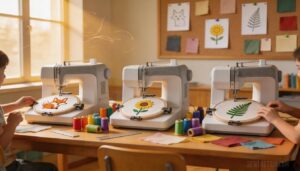
Pick the right project and half of your classroom management problems disappear.
- Start with curriculum-aligned motifs — animals, seasons, plants — matched to grade level
- Use culturally inclusive designs that reflect your students’ own communities
- Follow skill progression steps: straight stitch first, satin fills later
- Apply assessment rubrics to measure technique without stifling creativity
Project time management matters too — design sessions to fit 45–60‑minute class periods.
Organizing Supplies and Machine Storage
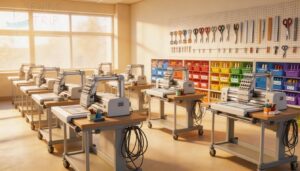
A well-organized classroom runs itself — almost.
Use labeled bins for threads and bobbins, and mount wall pegboards above each station for scissors and snips. Cable hooks keep cords untangled. Store cleaning kits nearby. Roll machines safely on mobile carts between rooms.
| Storage Item | Purpose |
|---|---|
| Labeled bins | Sort threads by color/type |
| Wall pegboards | Hang scissors and rulers |
| Cable hooks | Organize power cords |
| Cleaning kits | Quick lint removal access |
| Mobile carts | Safe machine transport |
Maintenance Routines for Consistent Classroom Performance
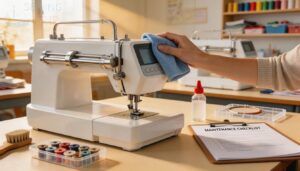
Keep machines running strong with a simple routine:
- Daily Lint Removal after every class
- Weekly Sensor Wipe with a damp microfiber cloth
- Lubrication Intervals every 20–40 hours of use
- Hoop Alignment Checks monthly for accurate stitching
- Part Inventory Audits each quarter
Log everything. Your machine maintenance guides and sewing machine tutorials make classroom sewing machine maintenance and operation easy to delegate.
Frequently Asked Questions (FAQs)
Which embroidery file formats work best in schools?
DST is your safest bet. Universal DST Format works across nearly every machine.
Use PES Color Sequencing for Brother, JEF Brand Compatibility for Janome, and EMB Editable Master, when teachers need to revise designs later.
How many students can share one embroidery machine?
Usually, 2 to 4 students can share one machine per session. Student Rotation and Role Assignment keep things moving — one designs, one stitches, one preps fabric.
Are embroidery machines suitable for special needs students?
Yes. Customizable interfaces, adaptive tools, and sensory-friendly operation make embroidery machines genuinely accessible. Tactile feedback, auto-threaders, and stable bases support students with diverse needs beautifully.
What certifications or standards should school machines meet?
Look for UL Certification, CE Marking, RoHS Compliance, and CSA Listing.
These confirm your machine meets electrical safety and hazardous material standards — essentials for any sewing machine safety tips checklist in schools.
Conclusion
Just as a needle weaves threads into fabric, the right embroidery machine can stitch together a student’s skills and creativity.
When choosing embroidery machines for schools and classrooms, consider durability, ease of use, and curriculum alignment. A well-selected machine can become an extension of your teaching tools.
With the right equipment, students can bring their ideas to life. Effective integration can strengthen your program. Make an informed decision to support your students’ growth.
- https://www.faytech.us/touchscreen-monitor/high-brightness/sunlight-readable/understanding-sunlight-readable-touch-screen-monitors-enhancing-visibility/
- https://www.uico.com/sunlight-readable-touchscreens-high-brightness
- https://www.ledscreenparts.com/nine-factors-affecting-the-performance-of-led-display/
- https://www.delve.com/insights/development-considerations-for-products-with-an-led-touch-user-interface
- https://luxmage.com/news/factors-affecting-led-screen-brightness-685.html