This site is supported by our readers. We may earn a commission, at no cost to you, if you purchase through links.
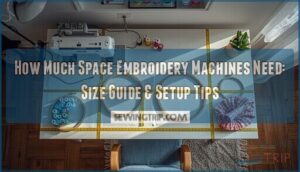
Your new embroidery machine arrives tomorrow, but here’s the question nobody asks until it’s too late: where exactly will it go? Most beginners eyeball a corner of their craft room and assume the machine’s listed dimensions tell the whole story, only to discover that a 24-inch-wide machine actually needs 48 inches of operational space once you factor in hoop swing, thread spool clearance, and elbow room for loading fabric.
The difference between cramming equipment into available space and designing a workspace around functional requirements determines whether you’ll spend your first week wrestling with tangled threads and awkward reaches, or whether you’ll start stitching with the kind of ease that makes production feel seamless.
Understanding the real spatial footprint of embroidery machines—from compact single-head units to synchronized multi-needle systems—gives you the control to set up a workspace that protects your investment and fosters mastery from day one.
Table Of Contents
Key Takeaways
- Embroidery machines require 40-60% more floor space than their listed dimensions suggest because you need clearance for hoop swing, thread spool positioning, and operator movement—a 24-inch-wide machine typically demands 48 inches of operational space.
- Single-head machines occupy 6-8 square feet total (including clearances), while multi-head commercial units extend linearly with each additional head and require reinforced mounting to support weights ranging from 93 to 391 pounds.
- Your embroidery field size directly determines workspace needs, with larger hoops (6×10 inches or 8×12 inches) demanding an additional 5-7 square feet of lateral clearance beyond the machine footprint for fabric handling and hoop repositioning.
- Proper workspace planning requires dedicated zones for specific tasks, vertical storage solutions to reclaim up to 40% of floor space, and environmental controls maintaining 500-1000 lux lighting with 40-60% humidity for thread accuracy and operator comfort.
Key Factors Affecting Embroidery Machine Space
You can’t pick the right embroidery machine without understanding how much real estate it’ll claim in your workspace. The space you need depends on several interconnected factors, from the machine’s physical configuration to the size of designs you’ll be producing.
Larger embroidery areas typically come with higher price tags, so reviewing commercial embroidery machine prices helps you balance workspace requirements with your budget.
Let’s break down the key variables that determine your actual floor space requirements.
Machine Type and Configuration
Your machine’s footprint starts with its fundamental design, which determines how you’ll approach workspace planning and machine installation.
SingleHead machines occupy the most compact profile, requiring minimal floor space and simplified access routes, while MultiHead machines, particularly ribbon embroidery machine models with multiple embroidery heads, demand notably larger allocations to accommodate synchronized needle config systems, expanded field sizes, and multi-needle threading zones that operate in parallel formation.
Single-Head Vs Multi-Head Requirements
When comparing a SingleHead Machine to a MultiHead Machine, the Space Requirements shift dramatically—single heads usually fit within 6 to 8 square feet, while multi-head configurations extend linearly with each additional embroidery head.
This Head Configuration directly affects your Cost Analysis, Machine Installation footprint, and overall Space Efficiency in your production facility, demanding greater Production Capacity allocations and more complex Workspace Planning.
Additional Features and Attachments
Beyond the baseline footprint, your embroidery machine’s attachments and features can expand space demands by 15 to 30 percent, particularly when you add wireless connectivity modules, quick-change presser feet, and sophisticated thread management systems.
Key space-impacting additions include:
- USB and SD card ports for design import (up to 9,999 stitches)
- Built-in needle threaders and thread snips reducing setup times by 20 percent
- Optional wireless modules operating within a 30-meter range for remote design transfer
Impact of Hoop and Embroidery Field Size
Hoop size and embroidery field directly shape your machine’s spatial footprint, with common hoops spanning 4×4 inches to 6×10 inches. Larger field capacities demand proportional clearance around the stitching area for fabric handling and operator access.
| Hoop Dimension | Field Capacity | Workspace Addition |
|---|---|---|
| 4×4 inches | Small motifs | +2 sq ft clearance |
| 5×7 inches | Medium designs | +3.5 sq ft clearance |
| 6×10 inches | Large patterns | +5 sq ft clearance |
| 8×12 inches | Commercial runs | +7 sq ft clearance |
Larger embroidery fields improve stitch density control and fabric tension consistency but require 40 to 60 percent more lateral space for hoop mounting, thread trim access, and repositioning between passes. This directly affects your floor plan and ergonomic workflow efficiency. For guidance on selecting the best hoop diameter, review these common embroidery hoop sizes for project fit and fabric stability.
Measuring and Planning Your Embroidery Workspace
Before you bring an embroidery machine into your workspace, you need to map out the physical reality of where it’ll live and how you’ll move around it. This isn’t just about the machine’s footprint—it’s about creating a functional zone that accounts for operator comfort, supply accessibility, and environmental factors that directly impact your work quality.
A sturdy industrial sewing table design can stabilize your machine and provide ample surface area for handling larger embroidery projects efficiently.
The following sections break down the specific measurements and planning considerations that’ll help you build a workspace that actually works.
Calculating Floor Space Needs
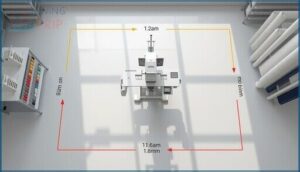
Start your workspace planning and design by establishing the machine footprint, which includes the base dimensions plus operational clearances. You’ll need to account for front, side, and rear access zones that guarantee safe maintenance and workflow analysis.
For accurate floor planning and space optimization, measure these critical elements:
- Base footprint of your embroidery machine (width and depth to outermost enclosure)
- Front working space of at least 1.2 meters for setup and material handling
- Side clearance of 0.6 meters minimum for control panel and thread rack access
- Rear space of 0.8 meters to accommodate spool systems and waste bins
- Aisle widths between equipment rows (1.0 meter minimum for safe passage)
These clearance standards form the foundation of your production facility layout and optimization, guaranteeing your embroidery space meets both safety requirements and efficiency goals for space requirements in any commercial or home setting.
Allowing for Operator Movement
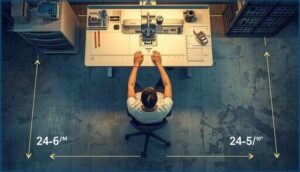
You’ll need to design circulation zones that balance operator safety with production facility layout and optimization.
Position your workstation so you can reach primary controls within 15 inches from the front edge, maintaining workspace ergonomics throughout long sessions.
Reserve clearance zones of 24 to 36 inches around equipment accessibility points, creating movement paths that support both seated monitoring and standing tasks while preventing fatigue during routine workflow.
Proper setup of your workspace should also include attention to ergonomics and comfort essentials.
Storage for Hoops, Threads, and Supplies

Dedicated storage zones transform your embroidery workspace efficiency by preventing tool scatter and reducing setup delays between projects. You’ll want your thread management and supply organization systems positioned within arm’s reach of the machine head, ensuring smooth workflow during complex pattern execution.
Here are key organizational strategies:
- Hoop storage on wall-mounted pegboards with labeled slots for quick diameter selection
- Thread management in transparent drawer units organized by color family
- Embroidery accessories in rolling carts with compartmentalized tiers
- Storage containers with moisture-absorbing packets to protect thread integrity
- Organizing craft spaces using vertical racks that optimize floor clearance zones
Planning for Lighting and Ventilation
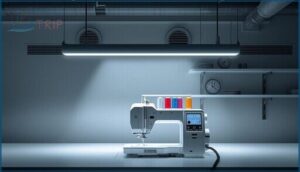
Proper lighting design and ventilation systems directly impact thread color accuracy and operator comfort in your embroidery workspace. You’ll need task lighting between 500 to 1000 lux at the needle zone, paired with LED fixtures above 90 CRI for natural light optimization.
Lighting between 500 to 1000 lux and LED fixtures above 90 CRI ensure thread color accuracy and operator comfort in embroidery workspaces
Air quality control requires 15 to 20 air changes hourly, while maintaining 40 to 60 percent humidity prevents fabric distortion in your production facility.
Top 5 Embroidery Machines and Their Space Needs
Now that you’ve measured your workspace and planned the layout, it’s time to look at specific machines and what they’ll actually demand from your floor plan.
Each embroidery machine comes with its own footprint, clearance requirements, and operational space needs that you’ll need to account for during setup.
Below, you’ll find five popular embroidery machines with detailed space specifications to help you make an informed choice for your available area.
1. Poolin Computerized Embroidery Machine
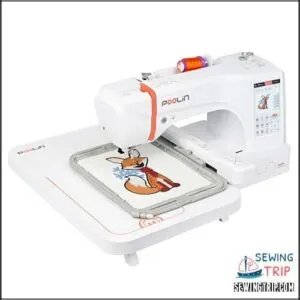
The Poolin computerized embroidery machine occupies approximately 23 inches deep by 27 inches wide, requiring roughly 4.3 square feet of dedicated floor space for the unit itself.
You’ll need to account for the 7.9-by-11-inch embroidery field, which extends during operation, plus clearance for the touchscreen interface and thread spool positioning.
Factor in an additional 2 to 3 square feet around the perimeter for operator access, material handling, and the corded power connection, bringing your total footprint to about 6.5 to 7.5 square feet.
| Best For | Crafters and small business owners who need a reliable embroidery machine with a large work area and modern connectivity options, whether you’re just starting out or already experienced. |
|---|---|
| Embroidery Area | 7.9″ x 11″ |
| Display Type | 7″ touchscreen |
| Connectivity | USB and wireless |
| Weight | 35 pounds |
| Thread Trimming | Automatic |
| Built-in Designs | 200 designs |
| Additional Features |
|
- 7.9″x11″ hoop handles bigger projects like jackets and home decor without constant repositioning
- Wireless and USB connectivity plus 200 built-in designs mean you can start creating right away
- Automatic threading and trimming features speed up workflow and reduce setup headaches
- At 35 pounds and needing about 7 square feet of space, it’s not easy to move or store
- Thread breakage issues pop up for some users, though customer support can usually help
- Regular maintenance and lubrication are required to keep it running smoothly
2. Commercial Embroidery Machine
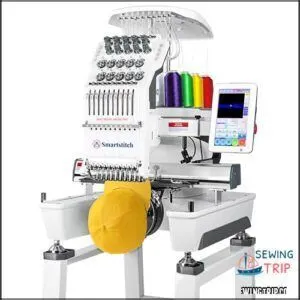
The Smartstitch S-1001 commercial embroidery machine measures 25 by 34 by 33 inches, which translates to a baseline footprint of roughly 5.9 square feet on your production floor. You’ll want to allocate an additional 2 to 3 square feet around the perimeter for operator movement, thread spool access, and laser positioning adjustments, bringing your total workspace requirement to approximately 8 to 9 square feet.
Single-head commercial units like this model benefit from compact aluminum construction that weighs just 93 pounds, making relocation and layout adjustments manageable without heavy lifting equipment.
| Best For | Small business owners and entrepreneurs who need a reliable commercial embroidery machine that’s easy to learn but powerful enough for professional production work on diverse materials like leather, denim, and caps. |
|---|---|
| Embroidery Area | 25″ x 34″ |
| Display Type | Physical buttons |
| Connectivity | USB |
| Weight | 93 pounds |
| Thread Trimming | Automatic |
| Built-in Designs | Starter pack included |
| Additional Features |
|
- Compact 93-pound aluminum design fits in about 9 square feet of workspace, making it ideal for smaller production floors or home-based businesses
- Auto thread trimming, color changing, and self-lubrication system reduce manual intervention and keep your workflow moving efficiently
- Complete support package with one-on-one training and technical assistance helps beginners get up to speed quickly
- Requires careful assembly and regular maintenance to maintain optimal performance over time
- 100 million stitch memory limit may not be sufficient for businesses with extremely large or complex design libraries
- Some users report minor unboxing issues, and you’ll need to keep all original packaging in case you need to process a return
3. Brother Sewing And Embroidery Machine
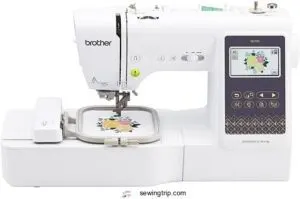
Brother’s SE700 sewing and embroidery machine requires notably less floor space than commercial units, measuring just 16.5 by 7.76 by 12.09 inches for a footprint of approximately 0.9 square feet.
You’ll need to allocate an additional 2 to 3 square feet around the unit for fabric handling, accessing the 4 by 4 inch embroidery field, and operating the 3.7 inch touchscreen interface.
At 15.6 pounds, you can easily reposition this compact dual-function machine on any sturdy worktable without compromising stability during high-speed stitching operations.
| Best For | Beginners and hobbyists looking for a space-saving machine that handles both everyday sewing projects and small embroidery designs without taking up an entire room. |
|---|---|
| Embroidery Area | 4″ x 4″ |
| Display Type | 3.7″ touchscreen |
| Connectivity | Wireless LAN |
| Weight | 15.6 pounds |
| Thread Trimming | Manual |
| Built-in Designs | 135 designs |
| Additional Features |
|
- Combines sewing and embroidery in one compact unit that fits on most tables and weighs just 15.6 pounds
- Wireless LAN and Artspira app compatibility let you send custom embroidery designs straight to the machine
- Auto needle threader and 3.7″ touchscreen make setup easier, especially if you’re new to embroidery
- 4″ x 4″ embroidery area is pretty limiting if you want to work on larger designs or big quilt blocks
- Auto threader can be temperamental and doesn’t always work smoothly
- You’ll need to budget extra for threads, needles, and potentially design software beyond what’s included
4. Bai Multi Needle Embroidery Machine
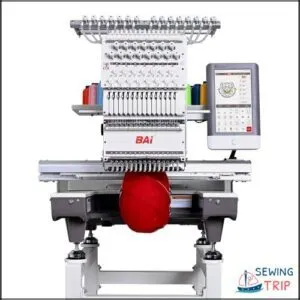
BAi’s Mirror 15-needle embroidery machine demands considerably more room than home models, with physical dimensions of 27.6 by 29.5 by 33.2 inches for a footprint of approximately 5.6 square feet.
You’ll want to add 4 to 6 square feet of clearance around the unit to accommodate the expansive 20 by 14 inch embroidery field, fabric placement, and access to the 10 inch touchscreen control panel.
At 391 pounds, you’ll need a reinforced workbench or dedicated floor mounting to support this commercial-grade unit during 1200 stitches per minute operation.
| Best For | Small business owners, custom embroidery shops, and Etsy sellers who need professional multi-color embroidery capabilities without jumping to industrial-scale equipment. |
|---|---|
| Embroidery Area | 20″ x 14″ |
| Display Type | 10″ touchscreen |
| Connectivity | Wi-Fi and USB |
| Weight | 391 pounds |
| Thread Trimming | Automatic |
| Built-in Designs | Design software included |
| Additional Features |
|
- 15-needle system with a massive 20×14″ embroidery area lets you tackle complex designs and larger projects that single-needle machines can’t handle
- 1200 SPM speed with intuitive 10″ touchscreen and free design software means you can start producing quality work fast, even as a beginner
- Strong support system including free training, local tech help, and active community makes the learning curve much easier to manage
- 391-pound weight requires a reinforced workbench or dedicated mounting setup, so you can’t just plop it on any table
- Needs about 10-12 square feet of total space when you factor in the machine footprint plus clearance for the large embroidery field
- Regular maintenance and oiling required to keep it running smoothly, which adds to your ongoing time commitment
5. Poolin Embroidery Machine For Home Use
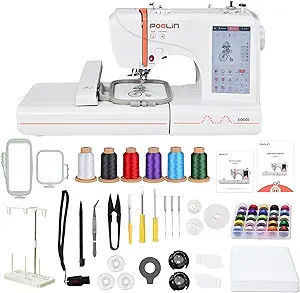
For smaller workspaces and hobbyists, the Poolin EOC05V2 offers a compact alternative at 8.27 by 22.44 by 12.2 inches, requiring only 2.9 square feet of table surface.
You’ll need an additional 22 inches of front clearance for fabric loading and hoop positioning, plus 28 inches of vertical space to access the top-loading spool area.
At just 22 pounds, this embroidery-only unit fits standard worktables without reinforcement, making it ideal for home DIY projects with its 4 by 9.25 inch embroidery field.
| Best For | Beginners and home hobbyists working on small personalized projects like shirts, bags, and gifts who want an easy-to-use, space-saving embroidery machine. |
|---|---|
| Embroidery Area | 4″ x 9.25″ |
| Display Type | 7″ touchscreen |
| Connectivity | WiFi |
| Weight | 22 pounds |
| Thread Trimming | Automatic |
| Built-in Designs | Design software access |
| Additional Features |
|
- Compact 22-pound design fits standard worktables without reinforcement and only needs 2.9 square feet of space
- WiFi design transfer and 7-inch color touchscreen with Institch OS2 make it beginner-friendly with zero prior experience needed
- Includes free embroidery design software for creating and editing custom designs
- Embroidery-only machine that can’t function as a sewing machine
- Limited 4 by 9.25 inch embroidery area means larger designs need to be resized or won’t fit
- Some users report threading issues and needle problems that require tension and stabilizer adjustments
Tips for Organizing and Optimizing Embroidery Space
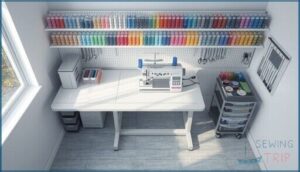
Your embroidery workspace won’t reach its full potential without a deliberate organizational strategy that tackles storage, workflow, and safety.
Smart space optimization reduces wasted motion, protects your equipment from damage, and keeps supplies accessible when you need them most.
The following strategies will transform even a cramped setup into an efficient production environment.
Zoning for Tasks and Equipment
Think of your production facility as a well-orchestrated assembly line—each embroidery workspace deserves dedicated zones for specific tasks. You’ll want to separate your equipment placement into color-coded areas: one for machine operation, another for hoop changes, and a third for material handling.
This task segmentation approach cuts cross-movement by 20 percent, while zone labeling with step-by-step SOPs ensures your workflow optimization and safety protocols work together seamlessly.
Vertical Storage Solutions
Maximizing vertical height transforms your embroidery workspace into a high-capacity production zone without eating up floor space. You can reclaim up to 40 percent of usable area with these workspace optimization strategies:
- Vertical shelving systems with adjustable heights hold storage containers for threads, stabilizers, and hoops
- Modular storage towers organize needles and accessories in stackable units
- Compact racks mounted on walls keep supplies within arm’s reach
Ergonomic Setup and Safety Considerations
Comfort and injury prevention demand purposeful workspace optimization when you’re operating embroidery equipment for extended sessions. Position your machine on ergonomic workstations where controls stay within two feet of your primary reach zone, reducing wrist strain and repetitive motion risks.
Install workspace lighting at 300 to 500 lux to minimize eye fatigue, maintain safety protocols with accessible emergency stops, and guarantee maintenance access around all equipment sides.
Maintenance and Daily Workspace Routines
Daily inspections of needles and threads prevent breaks before they occur, while machine cleaning with lint-free cloths maintains performance across all surfaces.
You’ll need accessible maintenance access zones for lubrication every eight hours of operation, and thread management systems for tension checks before each job.
Workspace sanitation protocols should address embroidery machine maintenance and repair needs while supporting machine operator safety and comfort within your planned space requirements.
Frequently Asked Questions (FAQs)
How big of a design can an embroidery machine do?
Most embroidery machines laugh at your big dreams—entry models trap you in a 4×4 inch embroidery field, while commercial beasts reach 7×5 inches, proving design size limits depend entirely on machine capacity and hoop size.
Can embroidery machines fit in small apartments?
Yes, compact embroidery machines fit in small apartments when you use space-saving techniques like folding carts, vertical thread storage, and corner workspaces, with most models needing just 4×4 to 5×7 foot work areas.
Do commercial embroidery setups require climate control?
Industrial sewing and embroidery production facilities benefit from climate control that keeps humidity between 45 and 65 percent, regulates temperature from 60 to 80 degrees Fahrenheit, and maintains proper ventilation systems to protect equipment longevity and thread consistency.
What ceiling height is needed for embroidery machines?
Think of headroom as your machine’s breathing room—without it, you’re stuck.
You need 8 to 9 feet of ceiling height for standard setups, ensuring safe clearance above hoops, attachments, and operator reach during embroidery work.
Are there portable embroidery machines for travel?
You’ll find lightweight handheld units weighing under five pounds that pack easily for trips, with compact embroidery fields from 4×4 to 5×7 inches, battery power, WiFi connectivity, and foldable cases for portable embroidery machines.
How much space for packaging finished embroidery items?
A packing station for finished embroidery work usually needs 20 to 35 square feet when you account for the work surface, shipping labels, packaging supplies, and enough clearance for safe operator movement around your production facility.
Conclusion
Like a telegraph operator who needed elbow room to send clean signals, you need operational clearance to execute perfect stitches. The listed dimensions of your machine tell only half the story—hoop swing, thread management, and workflow access demand their own territory.
When you plan how much space embroidery machines need before unboxing day, you’re not just arranging furniture, you’re engineering conditions where precision becomes routine and production flows without friction.
- https://academy.hatchembroidery.com/
- https://www.open.edu/openlearn/mod/oucontent/view.php?id=19173§ion=4
- https://blog.kimberbell.com/thekimberbellablog/essential-supplies-for-every-machine-embroidery-enthusiast
- https://hatchembroidery.com/resources/blog/setting-up-work-area-for-your-embroidery-business
- https://hoopingstation.com/blogs/articles/buying-your-first-embroidery-machine-without-regret-hoop-size-workspace-flow-and-the-projects-that-actually-pay-off