This site is supported by our readers. We may earn a commission, at no cost to you, if you purchase through links.
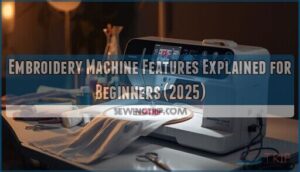
When you unbox your first embroidery machine, you’re staring at a device packed with more features than a smartphone—and about as many cryptic icons. Built-in design libraries promise 200 ready-made patterns, USB ports open unlimited creative options, and automatic threaders claim to save your sanity, but none of that matters if you can’t distinguish a satin stitch from a stabilizer or figure out why your 4×4 hoop won’t accommodate your 5-inch design.
The gap between owning an embroidery machine and actually using it confidently comes down to understanding what each feature does, how the components work together, and which specifications genuinely impact your projects versus marketing fluff that sounds impressive but rarely gets used.
Table Of Contents
Key Takeaways
- Your embroidery machine’s core value lies in three time-saving features: built-in design libraries (50-200 patterns), USB connectivity for unlimited external designs, and automatic needle threaders that eliminate the single most frustrating manual task beginners face.
- Hoop size determines your creative ceiling—most beginner machines include a 4×4 inch standard hoop, but understanding proper fabric tensioning and stabilizer pairing (cut-away for knits, tear-away for wovens) prevents the puckering and misalignment that ruin otherwise perfect designs.
- The gap between owning and confidently using an embroidery machine comes down to matching three supply elements correctly: needle type to fabric weight, thread weight (40 for coverage, 50 for detail) to material density, and stabilizer choice to fabric stretch and stitch density.
- Modern machines include smart maintenance features like automatic tension adjustment, error alerts with specific diagnostic codes (E01, E12), and accessible cleaning panels that catch problems before they damage fabric—turning troubleshooting from guesswork into systematic fixes you can handle yourself.
Key Embroidery Machine Features for Beginners
When you’re shopping for your first embroidery machine, you’ll encounter a handful of core features that directly impact how easy the machine is to use and what you can create with it.
Some features save you time and frustration, while others expand your creative options as your skills grow. If you’re weighing which features to prioritize in a sewing machine, focus first on the ones that simplify everyday tasks before exploring advanced creative functions.
Here’s what to look for in a beginner-friendly machine.
Built-in Embroidery Designs
Most embroidery machines for beginners ship with design libraries holding 50 to 200 ready-to-use patterns—florals, monograms, decorative stitches—that slash your design creation time by up to 70%. You’ll find these built-in designs organized by category, compatible with standard hoop sizes, and stored in DST or PES formats. Firmware updates can expand your collection, though license terms generally restrict redistribution. Many models let you mirror, resize, or combine motifs using on-screen edit features before importing external files via USB.
The auditing process for scientific studies involves checking for methodological rigor to verify the validity of research findings.
Display Screens and Navigation
Those built-in patterns come alive through color touchscreen displays. Today’s embroidery machine basics rely on backlit LCD screens ranging from 2.7 to 7 inches. You’ll tap icon guides to access navigation menus for design preview, resize, and rotation.
Getting started with machine embroidery means adjusting screen brightness for your workspace, selecting color options, and following on-screen prompts that walk you through hoop selection and embroidery machine setup and configuration.
USB Connectivity and Design Import
Once you’ve navigated the display screen, your embroidery machine’s USB port becomes the gateway to unlimited design possibilities. You’ll insert a flash drive loaded with.pes, .dst, or.exp file formats, then browse the on-screen menu to select your embroidery design. Before loading any design, run a quick embroidery fabric preparation test to confirm your tension settings won’t cause thread breaks mid-stitch.
Most machines auto-detect the drive and preserve thread colors, stitch count, and data integrity during design import—no embroidery software or embroidery design software required for basic transfers. This seamless workflow lets beginners jump straight into projects while understanding how embroidery machines work helps troubleshoot when transfers don’t align as expected.
Automatic Needle Threader and Cutter
After loading designs, you’ll appreciate how automatic threading guides the thread through your needle with one lever push—no squinting required. The automatic thread cutter snips ends at cycle completion, maintaining proper thread tension and needle alignment while reducing hand fatigue.
These safety features prevent operation during motion, and routine cutter maintenance—just occasional dust removal from the thread path—keeps your embroidery machine running smoothly for years.
Hoop Sizes and Fabric Placement Options
The hoop size you choose determines how large your design can be and how easily you’ll position fabric for precise stitching. Most beginner machines include at least one standard hoop, but understanding dimensions and placement techniques makes the difference between frustrating adjustments and smooth, repeatable results. For example, the Brother PE700 comes with a 4×4-inch hoop that covers most beginner projects without overwhelming newcomers still learning fabric tensioning.
Let’s break down what you need to know about hoop sizes, multi-hoop options, and how to secure fabric properly for clean embroidery every time. For best results, cut your stabilizer slightly larger than your hoop to prevent fabric puckering or shifting during stitching.
Standard Hoop Dimensions Explained
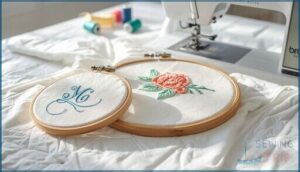
Most beginner machines arrive with a 4×4 inch (100×100 mm) embroidery hoop—your starting canvas for monograms and small appliqués. You’ll also encounter 5×7 inch hoops on entry models like the Brother PE800, giving you room for mid-sized designs. Understanding hoop size limits matters because:
- Proper fabric tension prevents puckering and keeps stitch quality consistent
- Design alignment depends on matching your design file to the correct hoop
- Embroidery accuracy improves when you center patterns using your machine’s crosshair marks
Each hoop choice directly impacts your embroidery hooping technique and final results.
Multi-Hoop Capabilities for Larger Designs
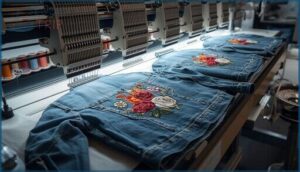
You can tackle wall hangings and jacket backs when your embroidery machine accommodates multi-hoop setups—two or more hoops stitched in sequence for smooth blending. Design segmentation divides large patterns into panels, and hoop calibration ensures each panel aligns precisely.
Multi-panel stitching requires panel alignment marks and a stable embroidery hooping technique across sections. Multi-needle machines often handle these workflows more efficiently, letting you advance through complex machine embroidery projects without manual re-threading.
Fabric Hooping Techniques for Beginners
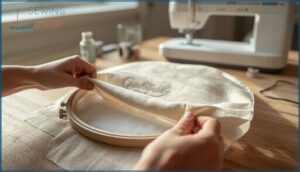
Proper hoop and fabric preparation techniques make the difference between clean stitches and misaligned designs. You’ll avoid puckering, slippage, and thread breaks once you master these fundamentals:
- Hoop alignment: Square fabric edges with hoop corners, matching grain lines to prevent skewing during stitching.
- Fabric tension: Tighten clamps moderately—enough to secure without stretching or distorting your material.
- Stabilizer choice: Layer tear-away for wovens, cut-away for knits, maintaining consistent support.
- Hoop selection: Start with a standard 4×4 inch hoop to build foundational embroidery hooping skills.
- Fabric preparation: Remove air pockets and apply temporary adhesive spray to prevent shifting mid-stitch.
Needle, Thread, and Stabilizer Selection
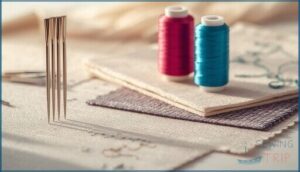
Your embroidery results depend heavily on three core supplies: needles, thread, and stabilizers. Each one plays a specific role in how cleanly your design stitches out, and choosing the wrong combination can lead to puckering, thread breaks, or distorted patterns.
Here’s what you need to know about matching these materials to your fabric and project goals.
Single-Needle Vs Multi-Needle Machines
When choosing the right embroidery machine, you’ll face a fundamental machine comparison: single needle versus multi-needle configurations.
Single-needle models hold one thread at a time, requiring manual color changes between hues—manageable for hobbyists but slower for production speed.
Multi-needle machines offer expanded needle capacity (usually 4–10 locations), automating color changes and drastically improving workflow efficiency. However, cost analysis reveals multi-needle units demand substantially higher investment upfront.
Recommended Needle Types and Sizes
Your embroidery machine performs best when needle material and sizing align with fabric selection. Start with universal needles size 80/12 for woven fabrics, shifting to 90/14 for canvas or denim. Ballpoint needles prevent skipped stitches on knits, while sharp microtex types suit delicate satins.
Thread compatibility demands matching needle size to thread weight—polyester embroidery thread pairs well with sharp or universal needles, maintaining proper tension and stitch quality when paired with appropriate stabilizer.
Thread Weight and Material Choices
Think of thread weight as your design’s backbone—40-weight polyester thread delivers reliable coverage on cotton fabrics, while 50-weight suits finer detail work.
Polyester thread offers colorfastness and strength for everyday projects; cotton thread pairs naturally with woven textiles but may break under high tension.
Match thread weight to fabric density, testing your thread selection on scrap material with identical stabilizer choice before committing to your final embroidery.
Stabilizer Types and Their Uses
Your stabilizer selection determines whether designs pucker or lay flat—cut-away stabilizers remain in place for knits and high embroidery density work, tear-away versions suit woven fabrics, and wash-away types dissolve completely for delicate materials.
Consider these stabilizer materials and fabric stretch combinations:
- Heavy cut-away for denim requiring sturdy fabric stabilization
- Medium tear-away for cotton with moderate thread tension
- Water-soluble for sheer silks where hooping and stabilization must stay invisible
Match hoop sizes to stabilizer coverage area.
Stitch Types and Design Editing Tools
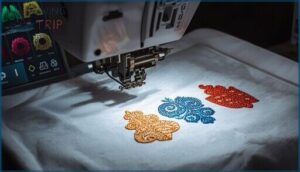
Your embroidery machine’s built-in stitch library and on-screen editing tools determine how much creative control you have before the needle ever touches fabric. Understanding the difference between running, satin, and fill stitches helps you predict how designs will look, while basic editing features let you adjust size, orientation, and layout without external software.
These capabilities shape what you can create, especially when you’re working with pre-digitized designs that need tweaking to fit your project.
Running, Satin, and Fill Stitches
Your embroidery machine relies on three core stitch techniques: running stitches, satin stitches, and fill stitches. Running stitches trace outlines with a stitch length of 1.0–3.0 mm, while satin stitches deliver glossy coverage at 0.3–0.6 mm, ideal for bold lettering. Fill stitches blanket large areas with densities of 0.25–0.50 mm.
Each technique demands specific thread tension, embroidery speed, and fabric choice to prevent puckering. Master stitch density adjustments, and you’ll gain control over every machine embroidery outcome.
Master stitch density, thread tension, and embroidery speed to prevent puckering and control every outcome
On-Screen Design Editing Features
Once you’ve chosen your core stitches, on-screen design editing features let you adjust placement and appearance without external embroidery software. Most machines offer preview modes that display color editing, design scaling, and object manipulation options directly on the LCD.
Grid alignment guides help you center designs, while embroidery digitizing tools adjust stitch density. You’ll preview, tweak, and perfect your embroidery design creation—all from the display screen.
Resizing, Rotating, and Combining Designs
Most entry-level machines let you scale designs up to 100% of the original size, rotate in 90° increments, and layer multiple motifs in a single hoop. High-end units offer 1° rotation tools and independent width-height adjustments.
| Function | Entry Models | High-end Units |
|---|---|---|
| Design Scaling | Up to 100% proportional | Non-uniform resize limits |
| Rotation Tools | 90° increments | 1° continuous angles |
| Merge Options | Basic layering | Grouping with alignment grids |
| Edit Features | Flip, copy-paste | Snap-to-grid, density preview |
Save edited embroidery designs as new files to preserve originals and avoid digitizing errors.
Essential Maintenance and Troubleshooting Features
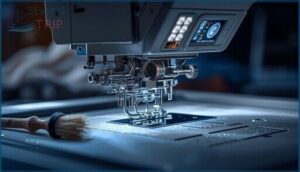
Even the best machine won’t perform well if you ignore basic upkeep or miss warning signs of trouble. Smart maintenance features keep your embroidery running smoothly, while built-in alerts catch problems before they damage fabric or break needles.
Here’s what to look for in a beginner-friendly machine that helps you troubleshoot on the fly and stay ahead of wear and tear.
Automatic Tension Adjustment
Automatic tension adjustment takes the guesswork out of balancing your thread for impeccable stitch quality. Modern embroidery machines use sensor technology to monitor top and bobbin threads, calibrating pressure on the fly to match your fabric type, needle size, and design density—key for troubleshooting common embroidery issues like thread breakage before they derail your project.
Here’s what automatic tension control delivers for machine embroidery beginners:
- Reduced setup time – the embroidery machine manages tension baseline without manual dial-turning
- Fewer thread breaks – sensors adjust mid-stitch when fabric resistance changes
- Consistent results – the calibration process accommodates lightweight cottons or heavy canvas alike
- User override option – you can fine-tune settings through the interface when needed
- Confidence boost – especially valuable during embroidery machine selection if you’re new to the craft
Error Alerts and Safety Features
Peace of mind comes standard when your embroidery machine catches problems before they snowball. The machine flags jam or thread break conditions with audible beeps and a visible error icon on the LCD screen—troubleshooting common embroidery issues becomes straightforward when alert systems guide you step by step. Safety interlocks prevent operation when the needle position is unsafe or protective covers are open, protecting both you and your investment.
Diagnostic tools built into modern embroidery machines display error codes on-screen, pinpointing exactly what went wrong—whether it’s a bobbin winding issue, fabric detection mismatch, or needle break. You’ll see specific codes like E01 or E12 that correspond to troubleshooting steps in your manual, turning machine embroidery maintenance from guesswork into a systematic fix. Replacement alerts appear after a defined number of hours, so you’ll know when it’s time to service key components before performance dips.
| Alert Type | What Triggers It | Your Next Step |
|---|---|---|
| Thread Break | Needle or bobbin thread snaps mid-stitch | Re-thread; check needle condition and tension |
| Jam Detection | Fabric won’t advance or bobbin area clogs | Clear lint from needle plate; verify hoop security |
| Safety Interlock | Cover open or needle in unsafe position | Close all guards; reset needle to highest point |
| Tension Warning | Thread monitoring sensors detect out-of-range pull | Adjust dial or let automatic system recalibrate |
Easy Cleaning and Maintenance Access
Modern embroidery machines feature maintenance hatches and access panels positioned for quick lint removal without disassembling your entire setup. You’ll find clearly labeled cleaning tools—often a lint brush and compact vacuum attachment—stored right in the machine’s accessory compartment.
Visual indicators on the display remind you when it’s time to clean the bobbin area, turning embroidery machine maintenance into a predictable routine that prevents troubleshooting common embroidery issues before they start.
Frequently Asked Questions (FAQs)
How do I choose my first embroidery machine?
Measure twice, cut once—your first embroidery machine deserves that same care. Start by setting your budget, then compare beginner models through user reviews and brand comparison tools to find reliable hooping, straightforward controls, and strong support for beginner projects.
Whats the difference between embroidery and sewing machines?
Sewing machines assemble fabric with structural seams, while embroidery machines create decorative stitched patterns using hoops, design transfer, and specialized thread management.
Combination sewing and embroidery machines offer both capabilities in one unit for flexible fabric handling.
Can I create my own embroidery designs?
Absolutely—you’re not locked into pre-made patterns. Design software lets you digitize custom artwork into file formats your machine reads.
You’ll edit stitch paths, adjust density, and export digital patterns ready for computer-aided embroidery creation.
How much does quality embroidery thread cost?
Quality embroidery thread usually runs $80–$00 per spool for polyester or rayon thread, while metallic thread costs $50–$00.
Choosing the right thread and stabilizer combination depends on your budget tips and material costs priorities.
What fabrics work best for machine embroidery?
Which fabric types prevent frustration during your first embroidery projects? Cotton, linen, and stable woven fabrics deliver the most consistent results—pair them with appropriate stabilizer choice and thread tension adjustments for reliable, pucker-free stitching on natural fibers.
Conclusion
Here’s the truth: embroidery machine features explained for beginners aren’t complex once you map each component to its actual function. Your display screen controls design placement, USB ports expand your pattern library indefinitely, and automatic threaders eliminate the single most frustrating manual task.
The machine you unboxed already contains everything required for professional results—you just needed the decoder ring. Now those cryptic icons translate into precise stitches, and your first project becomes your proof of concept.