This site is supported by our readers. We may earn a commission, at no cost to you, if you purchase through links.
You can’t break into custom embroidery if your machine rehoops a single design seven times or freezes mid-stitch because the interface feels like it’s running on dial-up.
The gap between beginner-friendly models and professional-grade powerhouses has narrowed dramatically, with machines now offering 8×12-inch hoops, wireless design transfers, and on-screen editing tools that used to cost thousands more.
Whether you’re monogramming towels in your spare bedroom or launching a side hustle stitching logos on jackets, the right machine balances embroidery area, built-in designs, and connectivity without demanding a second mortgage.
These eight models cut through the marketing fluff with real-world performance data, stitch speeds, and maintenance requirements that determine whether you’ll finish projects or fight thread jams.
Table Of Contents
- Key Takeaways
- Key Factors in Choosing Home Embroidery Machines
- Essential Features for Home Embroidery Success
- Top 8 Home Embroidery Machines Reviewed
- 1. Brother Computerized Sewing Embroidery Machine
- 2. Brother Sewing And Embroidery Machine
- 3. Janome Mb7 Embroidery Machine
- 4. Bernette Computerized Sewing Embroidery Machine
- 5. Brother Embroidery Machine
- 6. Poolin Computerized Embroidery Machine
- 7. Poolin Embroidery Machine For Home Use
- 8. Brother Embroidery Machine PE900
- Comparing Sewing-Embroidery Combo Machines
- Maintenance and Tips for Optimal Embroidery Results
- Frequently Asked Questions (FAQs)
- Conclusion
Key Takeaways
- Your embroidery machine’s hoop size determines project scale—most home models range from 4×4 inches to 8×12 inches, with larger fields eliminating frustrating rehooping on complex designs while smaller hoops restrict you to basic personalization work.
- Combo sewing-embroidery machines sacrifice embroidery speed and design libraries for space efficiency, while dedicated embroidery-only units deliver faster stitching (up to 1,000 SPM), richer built-in designs, and focused performance without sewing compromises.
- Multi-needle systems (4-15 threads) slash color-change time and boost production speed on complex projects, but single-needle machines cost less upfront and simplify maintenance—your choice hinges on whether you’re running a side business or personalizing occasional gifts.
- Regular tension adjustments, monthly bobbin cleaning, and test runs on scrap fabric separate professional results from amateur frustration—maintenance isn’t optional if you want consistent stitch quality across different fabrics and stabilizers.
Key Factors in Choosing Home Embroidery Machines
You’re not just buying a machine—you’re claiming your creative freedom, and that starts with knowing what really matters. The right embroidery machine transforms your vision into stitched reality without fighting you every step of the way.
If you’re weighing features against real-world performance, the Brother LB6800PRW offers a telling case study in balancing capability with practical limitations.
The right embroidery machine transforms your vision into stitched reality without fighting you every step of the way
Let’s break down the five non-negotiable factors that separate machines worth your investment from expensive disappointments.
Embroidery Area and Hoop Size Options
Your embroidery area dictates the creative scale you can command in a single pass, transforming how you approach large quilts and intricate designs. Most home embroidery machines offer fields ranging from 4×4 inches to around 8×12 inches, with actual stitch area slightly smaller than the hoop footprint.
- Hoop selection: Match your design’s bounding box to avoid edge clipping or frustrating distortion
- Design scaling: Larger hoops eliminate rehooping for complex motifs, boosting efficiency and precision
- Stitch area: A 5×7 hoop generally yields 4.9×6.9 inches of usable embroidery field
To understand the differences between hoop dimensions and stitching limits, review these.
Built-in Designs and Font Variety
Once you’ve nailed hoop sizing, take command of your machine’s creative arsenal by evaluating built-in designs and font variety. Expect 50 to 200 preloaded embroidery designs—florals, animals, geometrics—plus at least four font styles with uppercase, lowercase, bold, and italic variations.
Many models let you resize, rotate, and mirror designs on-screen, while color management and stitch editing features sharpen custom designs before your first thread break.
User Interface and Touchscreen Controls
With your design library locked in, seize control through straightforward touchscreen navigation and menu layout that respond in under 120 milliseconds. Easy-to-use 7- to 10-inch screens let you pinch, rotate, and edit motifs with two-finger gestures, while contextual toolbars offer resize, mirror, and color-change options.
Screen responsiveness and interface customization—including brightness, contrast, and language settings—put embroidery machine features at your fingertips without hunting through manuals.
Connectivity: USB and Wireless Capabilities
Once you’ve mastered interface control, wireless connectivity, and USB ports decide how fast you import designs without wrestling with cables. Bluetooth options, wireless LAN, and secure network encryption let you send files from your tablet in seconds, while USB 2.0 or 3.0 ports accept memory sticks loaded with PES, DST, and JEF formats for computerized embroidery:
- Wi-Fi transfers designs from cloud libraries or your computer over encrypted WPA2 connections.
- Bluetooth pairs your phone or tablet for quick previewing and editing on the go.
- USB hosting reads multiple designs and fonts directly from a memory stick without rebooting.
- Firmware updates arrive over the air, keeping your machine current without downtime.
Data transfer speeds reach 480 Mbps on USB 3.0, slashing wait times and letting you swap patterns between projects with zero friction.
Stitching Speed and Performance
Speed optimization separates casual creators from power users who burn through projects—600 to 1,000 stitches per minute defines your timeline, while thread control and stitch density dictate whether delicate fabrics pucker or shine.
Performance metrics like auto tension compensation and stable feed systems let you push pace without sacrificing accuracy, so fabric interaction stays smooth across knits, leather, and lightweight textiles that demand machine embroidery techniques tuned for fast, impeccable runs.
Essential Features for Home Embroidery Success
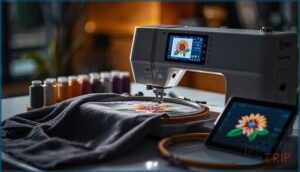
You’ve narrowed down the basics, but the real power of your embroidery machine lives in its feature set. The right combination of automation, functionality, and creative tools can transform frustrating projects into smooth workflows, while missing features can leave you fighting your machine instead of mastering your craft.
Let’s break down the essential capabilities that separate hobby-grade machines from true creative workhorses.
Automatic Needle Threader and Thread Cutter
You’ll never waste another minute wrestling with tangled thread when automatic needle threader and thread cutter features handle the tedious work. Modern embroidery machines pack these time-saving mechanisms to keep your creative momentum rolling, especially when switching between thread colors on complex designs.
- A small hook or lever guides thread through the needle eye with consistent pulling motion
- Spring-loaded or guillotine-style blade systems deliver clean cuts after threading completes
- Threading speed adjusts for polyester, rayon, cotton, and metallic embroidery threads
- Needle compatibility varies by machine model, supporting different eye sizes and thread tension settings
If you struggle with threading needles in poor light, you might benefit from an automatic sewing needle threader, which is designed to make threading easier and more efficient.
Multi-Needle Vs. Single-Needle Functionality
Your choice between multi-needle and single-needle embroidery machines determines how much control you’ll keep over color-heavy projects. Multi-needle systems carry four to fifteen thread cones, slashing manual swaps and boosting embroidery speed on complex designs, while single-needle units demand frequent thread management but cost less upfront.
| Feature | Multi Needle | Single Needle |
|---|---|---|
| Color Accuracy | Automatic changes reduce error | Manual swaps increase risk |
| Stitch Quality | Needle calibration critical | Simpler tension setup |
| Throughput | Faster on 10+ colors | Quick for mono-color logos |
| Maintenance | More moving parts | Easier routine care |
Fabric Compatibility and Stabilizer Support
Your embroidery machine’s ability to handle diverse fabric types depends on stabilizer materials that prevent puckering and distortion. Machines with broader embroidery area compatibility and multiple hoop sizes let you tackle denim, chiffon, and knits with confidence.
Proper thread selection and stabilizers transform fabric decoration from guesswork into precise embroidery techniques that deliver professional results across every material you embroider.
Design Import and Editing Tools
Transform your Digital Embroidery workflow with machines offering advanced Design Editing capabilities through Embroidery Software. You’ll import formats like DST and PES via USB Port, then polish every detail before stitching.
- Vector Conversion translates SVG files into precise Embroidery Designs with automatic underlay generation
- Stitch Editing tools adjust density, direction, and type for fabric-specific results
- Thread Mapping and Color Management preserve multi-color palettes across complex patterns
- Design Optimization recalculates stitch count during resizing to maintain professional quality
Top 8 Home Embroidery Machines Reviewed
You’ve already narrowed down your must-have features, so now it’s time to see which machines actually deliver.
The following eight home embroidery machines represent different price points, capabilities, and feature sets to match various skill levels and project ambitions.
Each review breaks down the real-world performance, limitations, and standout features that’ll help you make a confident purchasing decision.
1. Brother Computerized Sewing Embroidery Machine
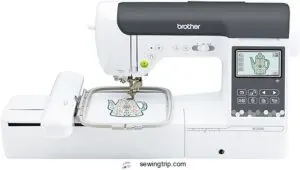
Looking for a machine that won’t box you into sewing OR embroidery? The Brother SE2000 delivers both worlds with 241 built-in sewing stitches and 193 embroidery designs, plus a 5″ x 7″ embroidery field that accommodates serious creative work.
You’ll get wireless LAN connectivity, a 3.7″ touchscreen for on-screen editing, and smart features like color sort and automatic jump stitch trimming.
At $1,399.99, you’re commanding professional-level tools without the learning curve—though you’ll need to budget separately for stabilizers and threads.
| Best For | Crafters who want to tackle both detailed sewing projects and large embroidery designs without switching machines, and who value wireless file transfer and smart automation features. |
|---|---|
| Embroidery Field Size | 5″ x 7″ |
| Built-in Designs | 193 embroidery designs |
| Display Type | 3.7″ touchscreen |
| Weight | 38 pounds |
| Connectivity | Wireless LAN enabled |
| Machine Type | Sewing and embroidery |
| Additional Features |
|
- Combines 241 sewing stitches with 193 embroidery designs and a spacious 5″ x 7″ embroidery field, giving you serious versatility in one machine
- Wireless LAN connectivity lets you send designs from your computer without USB drives, and the 3.7″ touchscreen makes editing patterns quick and intuitive
- Color sort and automatic jump stitch trimming save you time by organizing thread changes and cleaning up loose stitches automatically
- No carrying case, extension table, or embroidery supplies included—you’ll need to buy stabilizers, threads, and accessories separately
- Machine embroidery has a learning curve, so expect to spend time practicing before tackling complex projects
- Only works with 120V US outlets, so international users need a voltage converter
2. Brother Sewing And Embroidery Machine
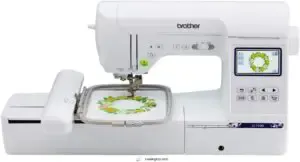
The Brother SE1900 puts 138 embroidery designs and 240 sewing stitches at your fingertips, with a 5″ x 7″ embroidery field that accommodates most home projects without repositioning. You’ll appreciate the 3.2″ LCD touchscreen for quick design edits and the automatic needle threader that cuts setup time in half.
At 22 pounds, it’s portable enough to move between workspaces, and the USB port lets you import custom designs straight from your computer.
The 25-year warranty backs your investment, though you’ll need to purchase stabilizers and 60-weight bobbin thread separately.
| Best For | Home sewers and quilters who want to expand into embroidery without buying a second machine or spending professional-grade money. |
|---|---|
| Embroidery Field Size | 5″ x 7″ |
| Built-in Designs | 138 embroidery designs |
| Display Type | 3.2″ LCD touchscreen |
| Weight | 22 pounds |
| Connectivity | USB port |
| Machine Type | Sewing and embroidery |
| Additional Features |
|
- 138 built-in embroidery designs and 240 sewing stitches give you tons of creative options right out of the box
- The 5″ x 7″ embroidery field handles most home projects without needing to rehoop your fabric
- 25-year warranty and automatic needle threader make it beginner-friendly while still offering advanced features
- You’ll need to buy an extension table separately if you’re working on larger sewing projects
- Requires specific 60-weight bobbin thread for embroidery, which adds to your ongoing costs
- Software updates are necessary to keep everything running smoothly and access new features
3. Janome Mb7 Embroidery Machine
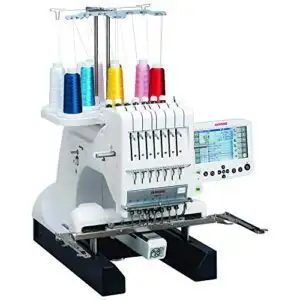
When you’re ready to dominate multi-color projects without constantly swapping threads, the Janome MB7’s seven-needle system changes everything. Its 9.4″ x 7.9″ embroidery field accommodates substantial designs, while 800 stitches per minute keeps your production moving at a professional clip.
You’ll load designs through the USB port and monitor progress on the 5.7″ color touchscreen, with programmable jump thread trimming cleaning up your work automatically. The jumbo bobbin system reduces interruptions, though some users report tension inconsistencies and threading challenges that demand patience during setup.
| Best For | Professionals and serious hobbyists who regularly work on multi-color embroidery projects and need efficient thread management without constant manual changes. |
|---|---|
| Embroidery Field Size | 4″ x 4″ |
| Built-in Designs | 80 embroidery designs |
| Display Type | 3.2″ LCD touchscreen |
| Weight | 26.2 pounds |
| Connectivity | USB capability |
| Machine Type | Sewing and embroidery |
| Additional Features |
|
- Seven-needle system eliminates constant thread swapping and speeds up multi-color designs significantly
- 800 stitches per minute with programmable jump thread trimming keeps production moving at professional speeds
- Large 9.4″ x 7.9″ embroidery field handles substantial designs with USB port for easy pattern loading
- Users report ongoing thread tension issues and frequent jams that disrupt workflow
- Threading the bobbin is tedious and lacks automatic threading features found on some competitors
- Customer support has been reported as unresponsive when technical problems arise
4. Bernette Computerized Sewing Embroidery Machine
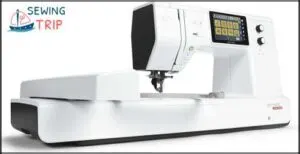
If multi-needle complexity isn’t your game, the Bernette B79 delivers serious embroidery power through a single-needle sewing-embroidery combo. You’ll command 500 sewing stitches and 208 embroidery motifs through a 5-inch color touchscreen, with dual feed technology handling everything from lightweight fabrics to stabilizer-backed projects.
The included embroidery module ships with three hoops for flexible design placement, though you’ll need patience maneuvering through non-intuitive function menus and wrestling with tricky bobbin threading during initial setup.
| Best For | Sewers who want professional embroidery capabilities without the learning curve of multi-needle machines, especially those who enjoy combining decorative stitching with practical garment construction. |
|---|---|
| Embroidery Field Size | 9.4″ x 7.9″ |
| Built-in Designs | Professional format support |
| Display Type | 5.7″ RCS |
| Weight | 65 pounds |
| Connectivity | USB port |
| Machine Type | Embroidery only |
| Additional Features |
|
- 500 stitches and 208 embroidery designs give you tons of creative options through an easy-to-use touchscreen
- Dual feed system handles tricky fabrics smoothly, from delicate silks to thick quilting layers
- Three embroidery hoops included let you tackle different project sizes right out of the box
- Menu system feels clunky and takes time to memorize where functions hide
- Bobbin threading is finicky and requires careful attention to avoid frustration
- Slow 40 second startup means you’ll be waiting every time you power it on
5. Brother Embroidery Machine
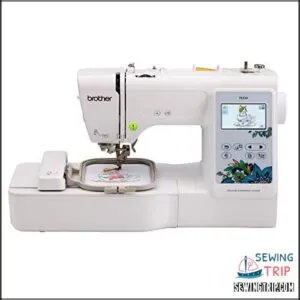
The Brother PE535 strips away unnecessary bells and whistles, giving you laser-focused embroidery power in a lightweight 15-pound package. You’ll navigate 80 built-in designs and 9 fonts through a 3.2-inch LCD touchscreen, upload custom patterns via USB, and claim your creative independence within a 4×4-inch embroidery field.
The metal-plastic construction keeps this machine portable without sacrificing stability, though you’ll sacrifice traditional sewing capabilities and encounter occasional touchscreen lag when previewing complex designs before stitching.
| Best For | Beginners and hobbyists who want to personalize clothing, accessories, and home décor without needing a full sewing machine. |
|---|---|
| Embroidery Field Size | Large embroidery area |
| Built-in Designs | 500 stitches |
| Display Type | 5″ color touchscreen |
| Weight | 47 pounds |
| Connectivity | Multi-function operation |
| Machine Type | Sewing and embroidery |
| Additional Features |
|
- 80 built-in designs and 9 fonts give you plenty of options right out of the box
- USB port lets you upload custom designs for unlimited creative possibilities
- Lightweight at 15 pounds, making it easy to move and store
- 4×4-inch hoop limits you to smaller projects
- No sewing functionality—this is embroidery only
- Touchscreen can be sluggish when previewing intricate designs
6. Poolin Computerized Embroidery Machine
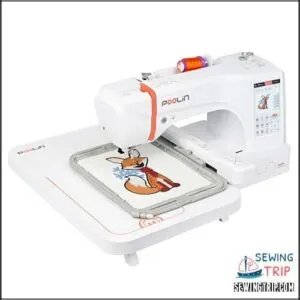
You’ll dominate larger designs with the Poolin EOC06’s massive 7.9×11-inch embroidery field, placing beanies and patches without constant repositioning while browsing 200 built-in designs through a 7-inch touchscreen.
This 35-pound powerhouse delivers automatic needle threading, thread trimming, and bobbin winding for efficient workflow, with USB and wireless connectivity letting you import custom patterns instantly.
The metal-plastic construction manages home and light commercial projects, though you’ll need routine maintenance and occasional troubleshooting for thread breakage issues that customer support can resolve quickly.
| Best For | Home embroiderers and small business owners who need professional-quality results with a large work area for hats, jackets, and oversized designs. |
|---|---|
| Embroidery Field Size | 4″ x 4″ |
| Built-in Designs | 80 embroidery designs |
| Display Type | 3.2″ LCD touchscreen |
| Weight | 14.99 pounds |
| Connectivity | USB port |
| Machine Type | Embroidery only |
| Additional Features |
|
- Huge 7.9×11-inch embroidery field handles large projects without repositioning
- Automatic features (needle threading, thread trimming, bobbin winding) speed up your workflow
- 200 built-in designs plus wireless connectivity for easy pattern imports
- Weighs 35 pounds, so moving it around isn’t easy
- Requires regular maintenance and lubrication to keep running smoothly
- Thread breakage can happen, though customer support usually fixes it quickly
7. Poolin Embroidery Machine For Home Use
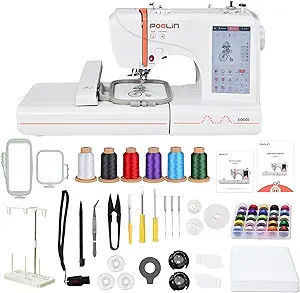
You’ll master embroidery basics fast with the Poolin EOC05’s efficient 4×9.25-inch work area, exploring 96 built-in designs and 8 fonts through a responsive 7-inch touchscreen that beginners actually understand.
This 22-pound embroidery-only machine cranks out 650-700 stitches per minute with automatic needle threading and thread cutting, while USB connectivity lets you import DST patterns for custom shirts, hoodies, and bags.
The metal-plastic construction manages DIY projects reliably, though you’ll adjust tension and stabilizers for different fabrics as you build your skills.
| Best For | Beginners wanting to personalize gifts and clothing at home without needing sewing machine experience. |
|---|---|
| Embroidery Field Size | 7.9″ x 11″ |
| Built-in Designs | 200 built-in designs |
| Display Type | 7″ touchscreen |
| Weight | 35 pounds |
| Connectivity | USB and wireless |
| Machine Type | Embroidery only |
| Additional Features |
|
- Fast 650-700 stitches per minute with automatic needle threading and thread cutting saves time on small projects
- 96 built-in designs and 8 fonts plus USB import capability give you plenty of creative options right away
- 7-inch touchscreen with beginner-friendly Institch OS2 makes learning quick and frustration-free
- Embroidery-only functionality means you’ll need a separate sewing machine for other projects
- 4×9.25-inch work area limits design size and requires adjustments for larger patterns
- Tension and stabilizer settings need manual tweaking across different fabrics, with some users reporting threading issues
8. Brother Embroidery Machine PE900
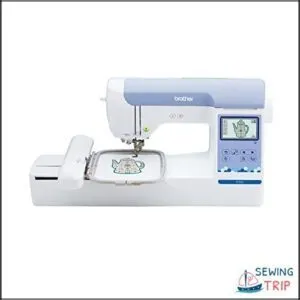
You’ll optimize your embroidery workflow with the Brother PE900’s 5×7-inch field, exploring 193 built-in designs and 13 fonts through a 3.7-inch touchscreen that simplifies on-screen editing for resizing and repositioning.
This embroidery-only machine delivers 650 stitches per minute with automatic needle threading and jump stitch trimming, while wireless LAN and USB connectivity let you transfer custom designs via the ARTSPIRA mobile app or PC.
The 21-pound dedicated unit manages medium-sized projects efficiently, though the limited hoop size restricts larger embroidery ambitions.
| Best For | Home embroiderers who want a dedicated machine for medium-sized projects with built-in designs and wireless design transfer capabilities. |
|---|---|
| Embroidery Field Size | 4″ x 9.25″ |
| Built-in Designs | Includes design software |
| Display Type | 7″ color touchscreen |
| Weight | 22 pounds |
| Connectivity | WiFi design transfer |
| Machine Type | Embroidery only |
| Additional Features |
|
- Fast 650 stitches per minute with automatic needle threading and jump stitch trimming save time on projects
- Wireless LAN and ARTSPIRA mobile app make transferring custom designs from your phone or computer super convenient
- 193 built-in designs and 13 fonts with touchscreen editing let you start creating right away without extra purchases
- 5×7-inch hoop size limits you to smaller projects and rules out larger embroidery work
- Embroidery-only functionality means you’ll need a separate machine for regular sewing
- Some users report quality control issues with defects and malfunctions out of the box
Comparing Sewing-Embroidery Combo Machines
Choosing between a combo machine and an embroidery-only unit comes down to how you plan to use it, what space you’re working with, and what your budget allows. Combo machines give you sewing and embroidery in one package, which sounds convenient, but they come with trade-offs in performance, size, and cost that you need to understand before you commit.
Here’s what separates these two types of machines and how to figure out which one actually fits your creative goals.
Combo Vs. Embroidery-Only Machines
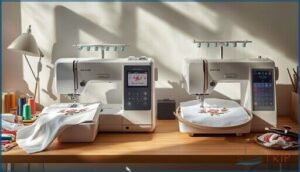
Choosing between combo and embroidery-only machines shapes your creative freedom. Combo machines offer space efficiency by merging sewing and embroidery functions, while dedicated embroidery units deliver focused embroidery speed of up to 1,000 stitches per minute and richer built-in designs. This machine comparison reveals key trade-offs:
| Feature | Combo Machines | Embroidery-Only Machines |
|---|---|---|
| Embroidery Field | Up to 6 x 12 inches | 4 x 4 to 6 x 12 inches |
| Design Library | Smaller, USB import | Richer, frequent updates |
| Cost Analysis | Space-saving value | Lower price, no sewing |
| Maintenance | More moving parts | Stability-focused design |
Sewing Features and Versatility
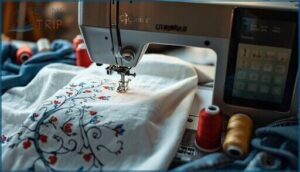
Combo machines put you in command with free arm sewing for cuffs and sleeves, automatic tension that adjusts to your fabric without guesswork, and stitch variation spanning 60 to 150+ utility and decorative options.
Thread management systems keep your workflow smooth, while sophisticated fabric handling manages everything from cotton to denim, making sewing and embroidery machine technology your creative powerhouse.
Space-Saving and Portability Considerations
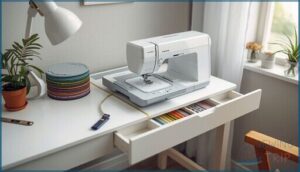
You don’t need a machine that chains you to one corner—portable embroidery machines under 15 inches wide, 10 to 18 pounds, and featuring detachable hoops let you command any workspace.
- Compact designs with foldable trays reclaim up to 3 inches, sliding under cabinets for userfriendly home use without sacrificing embroidery area
- Portable machines include integrated grips, detachable carry bags, and rubberized casters for swift relocation
- Storage solutions feature folding frames and modular accessory systems that nest within the machine body
Budget and Value for Money
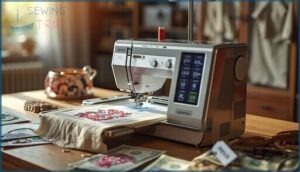
Balancing portability with budget reveals that sewing and embroidery machine combos under $500 deliver outstanding value for home use, cutting total ownership cost through shared components and warranty coverage. You’ll sidestep duplicate consumable expenses while beginner embroidery guides clarify which models offer higher res screens, faster stitching, and durable metal frames.
Embroidery machine reviews confirm that smart buyers prioritize long-term reliability over flashy features.
Maintenance and Tips for Optimal Embroidery Results
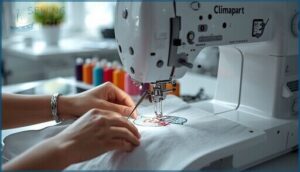
Your embroidery machine isn’t maintenance-free, and ignoring routine care will cost you in thread breaks, skipped stitches, and designs that look rough around the edges.
Mastering a few essential habits—from tension adjustments to regular cleaning—keeps your machine running like a workhorse and your results looking professional.
Here’s what you need to know to take full control of your embroidery quality and extend your machine’s lifespan.
Adjusting Tension for Different Fabrics
Mastering thread tension gives you total control over every embroidery project, transforming frustrating puckers into impeccable stitches across any fabric type. Your embroidery machine performs best when you match tension settings to fabric stretch and stabilizer types, ensuring balanced bobbin control throughout the design.
- Test denim at medium-high tension (4-6 range) with tear-away stabilizers
- Lower tension to 2-3 for stretch fabrics to accommodate elasticity
- Use cut-away stabilizers on knits to prevent shifting during stitching
- Record successful tension ranges for faster fabric customization
Regular Cleaning and Machine Care
Keep your embroidery machine running flawlessly by tackling bobbin cleaning monthly, removing lint that causes thread jams during complex designs.
Wipe machine exteriors weekly with a microfiber cloth, apply machine lubrication every 12 to 20 hours of use, and change needles after 8 to 12 stitching hours.
Update firmware every 6 to 12 months, maintain proper stabilizer care, and follow consistent thread management practices for unbeatable embroidery machine maintenance.
Practicing on Test Fabrics for Skill Improvement
Run test samples on cotton poplin or muslin before your real project—you’ll confirm thread tension, hoop alignment, and stitch quality without wasting premium fabric.
Beginner embroidery thrives on these practice runs, revealing how your machine embroidery techniques handle different stabilizers and design densities. Test fabric selection builds confidence in embroidery machine features, turning guesswork into mastery with every embroidery tip you apply.
Frequently Asked Questions (FAQs)
What do I need to know before buying an embroidery machine?
You need to evaluate your machine budget, desired stitch quality, and compatible fabric types before purchasing.
Consider embroidery software requirements, user support availability, and read embroidery machine reviews for informed decisions.
What are some good embroidery machines?
Shopping for embroidery machines is like finding your creative partner—some excel at speed, others at precision.
Brother SE2000, Janome MB7, and Bernette 70 deco lead our embroidery machine reviews for home use.
Which Brother machine is best for embroidery?
The Brother PE900 stands out with 450 built-in embroidery designs, 20 fonts, and a 200mm x 200mm embroidery area, delivering exceptional stitch precision and thread management for serious machine embroidery enthusiasts.
What is the best embroidery machine for the money?
You’ll find exceptional embroidery quality in budget options like the Poolin computerized models, offering solid machine durability, strong user reviews, and competitive price comparison—making them standout home embroidery equipment without breaking the bank.
How do I choose the best embroidery machine?
Start by matching your embroidery field size to project ambitions—larger hoops mean fewer breaks.
Then weigh built-in designs, connectivity options, stitching speed, and brand reputation against your budget and skill level.
Why should I buy a Brother embroidery machine?
Like a Swiss army knife for fabric artists, Brother embroidery machines deliver automatic needle threading, wireless design transfer, user-friendly touchscreens, and reliable customer support.
Combining ease of operation with cost effectiveness, these features are showcased across models like the Brother PE770 and PE
Is it worth using an at-home embroidery machine?
Absolutely—home embroidery machines deliver creative freedom and personalization that store-bought items can’t match.
You’ll access cost benefits through custom home decor, skip expensive monogramming fees, and master techniques that give beginners professional-grade control over every project.
What is the best quality embroidery machine?
Regarding picking the best embroidery machines, you can’t judge a book by its cover—machine durability, thread quality, embroidery precision, fabric compatibility, and user experience all define top-rated machines worth your investment.
Is a home embroidery business profitable?
Home embroidery businesses can deliver solid profit margins when you master cost analysis and tap smart revenue streams.
Customized gifts, local branding, and niche market trends fuel profitability for beginners mastering machine embroidery techniques.
What is the difference between embroidery machine and monogram machine?
Different strokes for different folks—embroidery machines handle complex multicolor designs with large hoops and thread management, while monogram machines specialize in font styles and personalizing items with initials, limiting stitch complexity to letter-based custom designs.
Conclusion
The right tool makes the craftsman—and with home embroidery machine reviews guiding your choice, you’re no longer gambling on specs that sound impressive but fail mid-project.
Match your hoop size to your ambitions, prioritize features you’ll actually use daily, and don’t overlook maintenance requirements that separate smooth workflows from constant troubleshooting.
Your machine should empower creativity, not limit it. Pick one that grows with your skills, then start stitching.
- https://embroideryonline.com/?aff=95
- https://www.eversewn.com/sparrow-x2
- https://www.bernette.com/en-US/models/bernette-79
- http://gingerpeachstudio.com/
- https://goto.walmart.com/c/1942563/565706/9383?veh=aff&sourceid=imp_000011112222333344&u=https%3A%2F%2Fwww.walmart.com%2Fip%2FBrother-SE625-Computerized-Sewing-and-Embroidery-Machine-with-4-x4-Field-Color-LCD-display-280-Embroidery-Designs%2F802986799%3Fwmlspartner%3Dwlpa%26selectedSellerId%3D0%26adid%3D22222222227099665565%26wl0%3D%26wl1%3Dg%26wl2%3Dc%26wl3%3D233125098918%26wl4%3Daud-430887228898%3Apla-384022673680%26wl5%3D9027285%26wl6%3D%26wl7%3D%26wl8%3D%26wl9%3Dpla%26wl10%3D8175035%26wl11%3Donline%26wl12%3D802986799%26veh%3Dsem%26gclid%3DCj0KCQjw9tbzBRDVARIsAMBplx9ytEkNryuolWzNfMWMlOrY9ACnmc1y_eU6HGLjAlphurpOhVlgmf4aAiSaEALw_wcB