This site is supported by our readers. We may earn a commission, at no cost to you, if you purchase through links.
Your first embroidery machine can feel like a dream and a gamble at the same time.
One moment you’re picturing custom hoodies, baby blankets, and gifts with perfect monograms.
The next you’re staring at hoop sizes, stitch counts, and model numbers that blur together.
The truth is, how to choose an embroidery machine for home use has less to do with brand hype and more to do with how you plan to stitch day‑to‑day.
When you match embroidery area, designs, speed, and budget to your real projects, the right machine stops feeling mysterious and starts feeling obvious.
Table Of Contents
- Key Takeaways
- Key Factors When Choosing a Home Embroidery Machine
- Single-Needle Vs Multi-Needle Machines
- Essential Features That Impact Usability
- Budget Breakdown: Entry, Mid, and High-End Machines
- Top Embroidery Machines for Home Use in 2026
- 1. PooLin Embroidery Machine
- 2. Poolin EOC05 Embroidery Machine 4×9.25 Inch Touchscreen WiFi
- 3. Brother SE700 Sewing Embroidery Machine White
- 4. Brother PE900 Embroidery Machine WLAN
- 5. Brother Skitch Single Needle Embroidery Machine
- 6. Brother SE2000 Sewing Embroidery Machine
- 7. Brother SE725 Sewing Embroidery Machine
- 8. Brother SE1900 Sewing Embroidery Machine
- Top Embroidery Machines for Home Use in026
- 1. PooLin Embroidery Machine
- 2. Poolin EOC05 Embroidery Machine 4×9.25 Inch Touchscreen WiFi
- 3. Brother SE700 Sewing Embroidery Machine White
- 4. Brother PE900 Embroidery Machine WLAN
- 5. Brother Skitch Single Needle Embroidery Machine
- 6. Brother SE2000 Sewing Embroidery Machine
- 7. Brother SE725 Sewing Embroidery Machine
- 8. Brother SE1900 Sewing Embroidery Machine
- Frequently Asked Questions (FAQs)
- Conclusion
Key Takeaways
- The right home embroidery machine is the one whose hoop size, embroidery area, built‑in designs, speed, and connectivity actually match the projects you want to stitch, your budget, and the space you have.
- For most home users a single-needle machine is quieter, smaller, and easier to maintain, while multi-needle models only make sense when you’re handling lots of color changes, larger fields, or steady high-volume orders.
- Everyday comfort depends heavily on usability features like automatic needle threading and cutting, jump‑stitch trimming and tie‑off, a clear touchscreen, and reliable USB or Wi‑Fi design transfer with the right file formats.
- Price tiers step up from basic 4" x 4" entry models to mid-range 5" x 7" combo machines and more advanced options like the PooLin EOC06, Poolin EOC05, and Brother SE700/PE900/Skitch/SE2000/SE725/SE1900, so you choose based on whether you prioritize simple gifts, versatile sewing‑plus‑embroidery, or more serious home production.
Key Factors When Choosing a Home Embroidery Machine
Before you look at specific models, it helps to be clear on what actually matters in day‑to‑day use.
For a practical breakdown of those must-have features, this in-depth guide to serger machines for small business owners walks through real-world priorities.
A home embroidery machine isn’t just about price or brand; the hoop size, designs, speed and screen all shape your experience.
Let’s quickly walk through the key factors so you know exactly what to pay attention to next.
Embroidery Area and Hoop Size
When you compare machines, start with Embroidery Area and Hoop Size, because they set Field Measurements.
A 4×4 hoop gives about 3.93 inches of stitchable space, while home models usually top out near 8×12.
Consider Hoop Shape, Adjustable Hoops, Magnetic Hoops, and Design Scaling as you narrow your Embroidery Machine Selection for Home Embroidery and any Embroidery Machine Buying Guide.
Understanding the hoop size conversions is important for selecting the right machine.
Built-in Designs and Fonts
hoop size Once you’ve nailed down hoop size, the next thing worth checking is what’s already loaded on the machine.
design library size varies a lot — entry models might offer 80 built-in designs, while newer machines often cross 200.
font variety matters too, especially for monogramming.
on-screen editing lets you rotate, resize, and combine custom designs without extra digital embroidery software, which makes embroidery machine selection so much simpler.
For more options, see the built‑in monogramming fonts.
Stitching Speed and Performance
After built‑in designs, you’ll want to check Stitching Speed.
For Home Use, most machines list 600–1,000 stitches per minute, but Stitch Quality improves around 600–700 for Digital Embroidery.
In any Embroidery Machine Buying Guide or Embroidery Machine Reviews, focus on:
- Motor Power and Heat Management
- Tension Control at speed
- A Speed Slider so you can slow projects
User Interface and Touchscreen Features
Speed only helps if you can control it easily, and that’s where the Touchscreen comes in.
Look for a User‑Friendly Interface with a comfortable Touchscreen Size, clear Icon Navigation, and simple menus for stitch speed and the Automatic Needle Threader.
On‑Screen Editing, Real‑Time Preview, built‑in help, and easy Language Switching beat the awkward USB Port and Wireless LAN Connectivity menus overall.
Connectivity Options: USB, Wi-Fi, App
Beyond the touchscreen, how your machine receives designs matters just as much.
USB Connectivity is the most reliable method — just make sure proper USB Formatting (FAT32, 2–32GB) and place the files in the root folder.
Wi‑Fi Setup and App Pairing, like the Artspira App, add wireless freedom.
Always prioritize Security Protocols and Firmware Updates to keep your Wireless LAN Connectivity and USB Port running smoothly.
Single-Needle Vs Multi-Needle Machines
One of the first decisions you’ll face when shopping for an embroidery machine is whether to go single-needle or multi-needle. It sounds technical, but it really comes down to how you work, what you make, and where you’re setting up.
Here’s what you need to know before choosing.
Advantages of Single-Needle Machines for Home Use
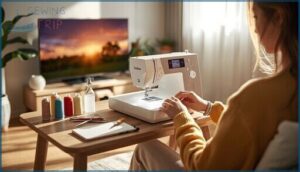
Think of a SingleNeedle Embroidery Machine as your Compact Footprint studio for home use, giving beginners Portable Design, Affordable Entry, and Custom Embroidery Designs.
| Benefit | What it means | Why it helps at home |
|---|---|---|
| Compact Footprint | Small 18×12 body | Leaves space on desk |
| Low Noise | Quieter than talk | Comfortable TV‑time stitching sessions |
| Easy Maintenance | Quick five‑minute checks | More sewing, less fuss |
When to Consider Multi-Needle Options
When your Custom Embroidery Designs outgrow simple projects, you should start eyeing a MultiNeedle Embroidery Machine for Home Use.
Multi‑needle setups shine for Color Complexity, High Volume Orders, Large Design Fields, Tubular Item Embroidery, and serious Production Scaling in Sewing and Embroidery.
| Signal | What you notice |
|---|---|
| Color jobs | Many thread changes |
| Deadlines | Repeating High Volume Orders |
| Caps | Tubular |
| Growth | Scaling |
Cost, Size, and Workspace Considerations
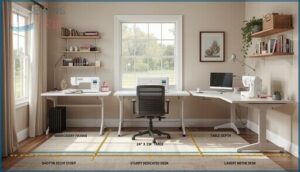
Budget Planning starts with honest math on space, not just price. For Home Use, match Machine Footprint and Hoop Size to your Workspace Layout, desired Embroidery Area, and Storage Solutions, using this Embroidery Machine Buying Guide as a quick lens when choosing an embroidery machine. Prioritize Ergonomic Design so you can stitch for hours without strain.
| Setup Type | Minimum Space | Notes |
|---|---|---|
| Entry single‑needle | 24"×36" table | Good for 4"x4" Embroidery Area projects. |
| Larger hoops | Extra 12" behind | Prevents fabric drag and cable strain. |
| Multi‑needle | Dedicated sturdy desk | Supports heavier weights over 15 lb. |
| Compact portable | Standard desk depth | Under 20 lb; easy to move between rooms. |
| Storage | Nearby shelves | Keeps hoops, thread, and tools organized. |
Essential Features That Impact Usability
When you’re actually sitting at the machine, the small ease-of-use features matter just as much as hoop size or stitch speed. They decide how quickly you can get started, how often you stop, and how much attention your machine needs while it runs.
To help you picture what everyday use will feel like with each model, here are the key usability features to pay attention to as you compare options.
Automatic Needle Threaders and Thread Cutters
In any Embroidery Machine Buying Guide, a home‑ready Embroidery Machine should make threading and trimming feel like support‑staff, not work.
- Automatic Needle Threader with a smooth Threader Mechanism for quick setup.
- Automatic Thread Cutting with Cutter Precision.
- Time Savings on color change.
- Accessibility Benefits for eyes and hands at Home Use.
- Regular Maintenance Tips: brush lint from the cutter area.
Jump-Stitch Trimming and Tie-Off Functions
Ever wished your Embroidery Machine could clean up after itself?
Jump Stitch Trimming with Automatic Thread Cutting and smart Trim Threshold Settings does exactly that, especially on high Design Complexity Impact projects.
Pair Automatic Tie‑Off Benefits, steady Thread Tension Interaction, and an Automatic Needle Threader, plus simple Cutter Maintenance Tips, and your Embroidery Design and Software finish looks effortlessly professional.
Design Transfer Methods and Compatibility
Once your stitches are tidied up, the real power is how designs reach the machine.
A USB Port with correct USB Formatting, usually FAT32, keeps Design Transfer smooth.
Match PES, JEF, or VP3 using proper File Format Matching in your Embroidery Software.
Strong Wi‑Fi Setup, Wireless LAN Connectivity, App Integration, and Firmware Updates keep Embroidery Design and Software in sync.
Budget Breakdown: Entry, Mid, and High-End Machines
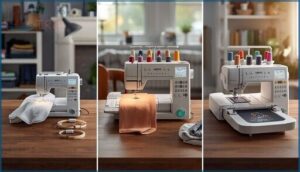
Price shapes almost every decision you’ll make when buying an embroidery machine for home use.
What you get for $300 looks very different from what you get for $1,500, and knowing those differences upfront saves you from buyer’s remorse. Here’s a clear breakdown of what to expect at each level so you can match your budget to your actual needs.
Features to Expect at Each Price Tier
While prices climb, what you gain at each tier is clearer when you look at the details.
Entry-level Embroidery Machine models have tight Hoop Size Limits around 4×4, smaller Design Library Size, basic Touchscreen Resolution, and fewer Built-in Designs.
Mid-range units add a UserFriendly Interface, better Stitch Quality, modest Wireless Features, and sometimes Automatic Thread Cutting plus Wireless LAN Connectivity.
Trade-Offs Between Price and Functionality
- Beyond those features, cheaper models cut Warranty Coverage; higher tiers extend repairs.
- Mid-range adds Wireless LAN Connectivity, making Software Updates simpler than USB transfers.
- Better Thread Compatibility plus Automatic Thread Cutting save time on color changes.
- Higher prices bring lower Noise Levels and Energy Consumption, better for apartments.
- Top-tier Embroidery Machine models give smoother UserFriendly Interface and richer Builtin Designs.
Choosing Based on Your Home Embroidery Goals
That’s why budget should follow your goals.
For simple Monogramming Projects and Gift Ideas, Beginners usually do well with a 4×4 Embroidery Area on a compact Embroidery Machine like the Brother PE535, especially if you’ve got Space Constraints.
If you want Quilt Accents or Apparel Customization with larger Custom Designs, mid-range models better support serious home embroidery.
Top Embroidery Machines for Home Use in 2026
Picking the right embroidery machine comes down to finding one that fits your space, your skill level, and what you actually want to make.
The best embroidery machine is the one that fits your space, skills, and creative goals
The good news is that 2026 has some genuinely strong options for home use across a range of budgets.
Here are eight machines worth your attention.
1. PooLin Embroidery Machine
If you want a home machine that feels pro without the scary price tag, the PooLin Embroidery Machine (EOC06) is worth a hard look.
You get a roomy 7.9" x 11" embroidery area, 200 built‑in designs, and a 7" color touchscreen that lets you drag, rotate, and edit like on your phone.
USB and wireless connectivity, InStitch software, starter thread, bobbins, and stabilizer make it very beginner‑friendly, though it still rewards careful setup and regular maintenance for long‑term, reliable stitching.
| Best For | Beginners and hobbyists who want a versatile, feature‑rich home embroidery machine that feels professional but stays affordable and approachable. |
|---|---|
| Brand | Poolin |
| Material | Metal, Plastic |
| Dimensions | 23 x 27 x 12.5 in |
| Weight | 35 lb |
| Machine type | Embroidery-only |
| Embroidery area | 11″ x 7.9″ |
| Additional Features |
|
- 7.9" x 11" embroidery area with 200 built‑in designs and a 7" touchscreen makes creating and editing designs simple and fun.
- USB and wireless connectivity plus InStitch Doodle Digitizing Software give you lots of flexibility to import and customize your own patterns.
- Comes with hoops, thread, bobbins, and stabilizer, so you can start stitching right away without buying a bunch of extras.
- There’s a learning curve, so you’ll need some practice and patience to get comfortable and get the best results.
- Some users report issues like faulty wiring or electronics, and support isn’t always quick to fully resolve them.
- Can be sensitive to nearby electronics and requires regular cleaning and maintenance to keep it running smoothly over time.
2. Poolin EOC05 Embroidery Machine 4×9.25 Inch Touchscreen WiFi
Precision meets simplicity with the Poolin EOC05, a dedicated embroidery‑only machine that suits home crafters who want control without overload.
You get a 4 x 9.25 inch embroidery area plus a 4 x 4 inch hoop, great for borders, monograms, and small garments.
The 7‑inch color touchscreen, Institch OS2, WiFi, and USB let you import, edit, and manage custom designs easily.
One‑on‑one training, included software, starter hoops, thread, and bobbins help you start stitching confidently, even as a complete beginner.
| Best For | Home crafters and small side‑hustle creators who want an easy‑to‑learn, embroidery‑only machine for personalized designs on shirts, hoodies, bags, and gifts. |
|---|---|
| Brand | Poolin |
| Material | Metal, Plastic |
| Dimensions | 8.27 x 22.44 x 12.2 in |
| Weight | 22 lb |
| Machine type | Embroidery-only |
| Embroidery area | 4″ x 9.25″ |
| Additional Features |
|
- Large 4" x 9.25" embroidery area plus extra 4" x 4" hoop for versatile projects and placements.
- 7-inch color touchscreen with Institch OS2, WiFi, and free software makes importing and editing designs straightforward.
- Includes 1-on-1 training and starter accessories, so beginners can get up and running with minimal frustration.
- Embroidery-only machine, so you still need a separate sewing machine for construction or repairs.
- Extra accessories like specialty needles, stabilizers, and additional hoops may require added cost.
- Some users report performance quirks and mixed customer support experiences, and firmware updates are needed to keep it running smoothly.
3. Brother SE700 Sewing Embroidery Machine White
Workhorse versatility sums up the Brother SE700 if you want one machine that sews and embroiders.
You get a 4" x 4" embroidery field, 135 built‑in designs, 10 fonts, plus 103 sewing stitches and auto buttonholes for everyday projects.
The 3.7‑inch color touchscreen, wireless LAN, USB, and Artspira app support keep design transfer simple.
With an automatic needle threader, drop‑in bobbin, and up to 710 stitches per minute, you can move from hemming to custom monograms smoothly at home daily.
| Best For | beginners and hobbyists who want one compact machine for everyday sewing, simple quilting, and custom 4" x 4" embroidery designs, with easy file transfer from their phone. |
|---|---|
| Brand | Brother |
| Material | Metal, Plastic |
| Dimensions | 16.5 x 7.76 x 12.09 in |
| Weight | 15.6 lb |
| Machine type | Sewing & embroidery |
| Embroidery area | 4″ x 4″ |
| Additional Features |
|
- 2‑in‑1 machine with 135 embroidery designs, 10 fonts, and 103 sewing stitches covers most home projects without needing extra machines.
- 3.7" color touchscreen, wireless LAN, USB, and Artspira app make it simple to preview, edit, and send designs.
- Automatic needle threader, drop‑in bobbin, and up to 710 stitches per minute help projects go faster with less fuss.
- Small 4" x 4" embroidery field and limited throat space can feel cramped for large quilts or big designs.
- Needs a wireless network (and often extra needles, hoops, and threads), so the real setup cost is higher than just the machine.
- Learning all the features, assembly, and settings can take some trial and error, especially for total beginners.
4. Brother PE900 Embroidery Machine WLAN
Think of the Brother PE900 as your dedicated embroidery studio when you don’t need regular sewing. You get a 5" x 7" embroidery field, 193 built‑in designs, and 13 fonts, so personalizing towels, bags, and small business orders feels straightforward.
The 3.7" color touchscreen and WLAN with Artspira app let you send designs wirelessly and tweak them on screen. With automatic needle threading, jump‑stitch trimming, and 650 stitches per minute, it’s built for smooth, focused embroidery sessions at home daily.
| Best For | Home embroiderers, crafters, and small business owners who want an easy-to-use, dedicated embroidery machine with wireless design transfer and solid personalization options. |
|---|---|
| Brand | Brother |
| Material | Plastic |
| Dimensions | 17.48 x 9.49 x 11.81 in |
| Weight | 30.4 lb |
| Machine type | Embroidery-only |
| Embroidery area | 5″ x 7″ |
| Additional Features |
|
- 5" x 7" embroidery field is a versatile size for most home and small business projects like towels, totes, and shirts.
- 193 built-in designs, 13 fonts, and the Artspira app give you plenty of creative options and easy customization without extra software.
- User-friendly features like the 3.7" color touchscreen, automatic needle threader, and wireless LAN make setup and daily use simpler for beginners and experienced users.
- Embroidery-only machine, so you’ll still need a separate traditional sewing machine for regular stitching or garment construction.
- Limited to a 5" x 7" embroidery area, which can be restrictive for larger designs without splitting or re-hooping.
- Some users report dated built-in designs, quality control issues, and the need for firmware updates and app setup before unlocking all features.
5. Brother Skitch Single Needle Embroidery Machine
Curious what a phone‑controlled embroidery setup feels like?
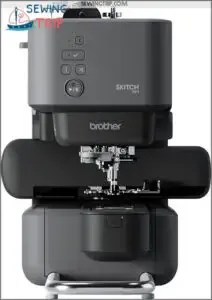
The Brother Skitch gives you a compact, single‑needle machine with a 4" x 4" magnetic hoop and free arm, ideal for sleeves, hats, and kids’ clothes.
It runs up to 400 stitches per minute, so it’s better suited to detailed small designs than high‑volume production.
Bluetooth plus the Artspira app handles all design selection and transfer, which feels modern and convenient but does tie the machine to a compatible device and connection.
| Best For | beginners and hobbyists who want an easy, phone-controlled way to personalize clothing, accessories, and small home decor projects in a compact space. |
|---|---|
| Brand | Brother |
| Material | Metal |
| Dimensions | 17.19 x 9.02 x 12.52 in |
| Weight | 22 lb |
| Machine type | Embroidery-only |
| Embroidery area | 4″ x 4″ |
| Additional Features |
|
- Compact 4" x 4" embroidery area with a magnetic hoop and free arm, great for sleeves, kids’ clothes, and small projects.
- Bluetooth connectivity and the Artspira app make it simple to create, edit, and send designs wirelessly from your phone.
- Beginner-friendly single-needle setup that’s easy to learn and fits nicely in small craft rooms or apartments.
- Limited to a 4" x 4" embroidery area and 400 spm, so it’s not ideal for large designs or high-volume work.
- Requires the Artspira app and a compatible device to function, and some users report connectivity frustrations.
- Extra costs for app subscriptions and accessories, plus limited support and troubleshooting resources.
6. Brother SE2000 Sewing Embroidery Machine
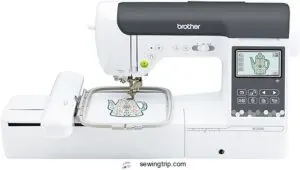
If you want one machine that can stay on your table for almost everything, the Brother SE2000 is worth a hard look.
You get a 5" x 7" embroidery field, 193 built‑in designs, 13 fonts, plus 241 sewing stitches and 10 buttonholes, so you can move from monogrammed towels to denim bags without switching machines.
The 3.7" color touchscreen and wireless LAN with the Artspira app make design transfer simple, while 850 stitches per minute keeps projects moving for you.
| Best For | Hobbyists, beginners, and home sewists who want one versatile machine for both sewing and embroidery projects like monograms, gifts, and home decor. |
|---|---|
| Brand | Brother |
| Material | Metal, Plastic |
| Dimensions | 17.56 x 9.49 x 11.81 in |
| Weight | 38 lb |
| Machine type | Sewing & embroidery |
| Embroidery area | 5″ x 7″ |
| Additional Features |
|
- The 5" x 7" embroidery field gives you real room to work, and 193 built-in designs plus 241 stitches means you’re rarely starting from scratch.
- Wireless LAN and the Artspira app make sending designs from your phone or PC to the machine genuinely easy.
- The 3.7" touchscreen keeps editing and design management simple, even if you’re new to embroidery machines.
- At $1,499.99, it’s a solid investment — and you’ll need to download the app and run a firmware update just to unlock everything.
- No carrying case included, so moving it around isn’t the most convenient.
- It’s not built for commercial or high-volume work, so if your projects scale up, you’ll likely outgrow it.
7. Brother SE725 Sewing Embroidery Machine
While the SE2000 suits bigger hoops, the Brother SE725 is a smart pick if you’re happy with a 4" x 4" embroidery field and want to keep costs down.
You still get 135 built‑in embroidery designs, 10 fonts, and 103 sewing stitches, plus a 3.7" color LCD for on‑screen editing.
Wireless LAN, Design Database Transfer, and Artspira give you app‑based pattern creation.
Just know that many units are refurbished with only a 90‑day warranty, and reliability feedback is mixed, so weigh that before buying.
| Best For | Budget-conscious sewists who are happy with a 4" x 4" embroidery area and want wireless, app-friendly embroidery without paying for a bigger, more advanced machine. |
|---|---|
| Brand | Brother |
| Material | Plastic |
| Dimensions | 21 x 16.6 x 15.5 in |
| Weight | 1 lb |
| Machine type | Sewing & embroidery |
| Embroidery area | 4″ x 4″ |
| Additional Features |
|
- Wireless design transfer with Design Database Transfer and Artspira makes it easy to send designs from your device and experiment with custom patterns.
- 135 built-in embroidery designs, 103 sewing stitches, plus advanced needle threading and an automatic thread cutter give you lots of creative options with less hassle.
- Versatile enough for custom apparel, quick repairs, and home décor, and approachable for both beginners and more experienced users.
- Many units are refurbished with only a 90-day warranty, and some users report malfunctions or breakage after a short time.
- No USB port, so you’re locked into wireless transfer instead of using a simple flash drive.
- Customer support can be hard to reach, which is frustrating if you run into issues with a refurbished machine.
8. Brother SE1900 Sewing Embroidery Machine
If you’re ready to step beyond a 4" x 4" hoop, the Brother SE1900 gives you room to grow. You get a 5" x 7" embroidery field, 138 designs, 11 fonts, and 240 sewing stitches, all managed from a 3.2" color touchscreen. USB import lets you bring in PES designs you’ve bought online.
In practice, it’s a strong mid‑range choice for serious home stitchers who want reliable performance without jumping to commercial pricing. It manages quilts, garments, and gifts beautifully.
| Best For | Confident hobbyists and home sewists who want to level up into larger embroidery projects, quilting, and custom designs without paying commercial-machine prices. |
|---|---|
| Brand | Brother |
| Material | Metal |
| Dimensions | 13.43 x 23.19 x 11.54 in |
| Weight | 22 lb |
| Machine type | Sewing & embroidery |
| Embroidery area | 5″ x 7″ |
| Additional Features |
|
- 5" x 7" embroidery field, 138 built-in designs, 11 fonts, and 240 stitches give you tons of creative flexibility.
- Easy-to-use 3.2" color touchscreen plus advanced needle threader and drop-in bobbin make setup and operation smoother.
- USB import and My Custom Stitch let you bring in or design your own patterns for highly personalized projects.
- No extension table included, so larger sewing or quilting projects may feel cramped unless you buy one separately.
- Works best with an added spindle holder for big thread cones to avoid tangling, which is an extra purchase.
- Embroidery software and additional design files can get pricey, and the 120V US-only voltage limits use outside the US under warranty.
Top Embroidery Machines for Home Use in026
Now that you know what to look for in a machine, it helps to see how features show up in real models you can actually buy.
Below, you’ll find a lineup of popular home embroidery machines that cover different budgets, skill levels, and project types.
Take a look through this list and notice which ones match the way you want to sew and embroider at home.
1. PooLin Embroidery Machine
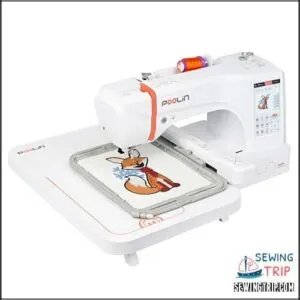
If you want a home machine that feels pro without the scary price tag, the PooLin Embroidery Machine (EOC06) is worth a hard look.
You get a roomy 7.9" x 11" embroidery area, 200 built‑in designs, and a 7" color touchscreen that lets you drag, rotate, and edit like on your phone.
USB and wireless connectivity, InStitch software, starter thread, bobbins, and stabilizer make it very beginner‑friendly, though it still rewards careful setup and regular maintenance for long‑term, reliable stitching.
Best For: Beginners and hobbyists who want a versatile, feature‑rich home embroidery machine that feels professional but stays affordable and approachable.
Pros:
- 7.9" x 11" embroidery area with 200 built‑in designs and a 7" touchscreen makes creating and editing designs simple and fun.
- USB and wireless connectivity plus InStitch Doodle Digitizing Software give you lots of flexibility to import and customize your own patterns.
- Comes with hoops, thread, bobbins, and stabilizer, so you can start stitching right away without buying a bunch of extras.
Cons:
- There’s a learning curve, so you’ll need some practice and patience to get comfortable and get the best results.
- Some users report issues like faulty wiring or electronics, and support isn’t always quick to fully resolve them.
- Can be sensitive to nearby electronics and requires regular cleaning and maintenance to keep it running smoothly over time.
2. Poolin EOC05 Embroidery Machine 4×9.25 Inch Touchscreen WiFi
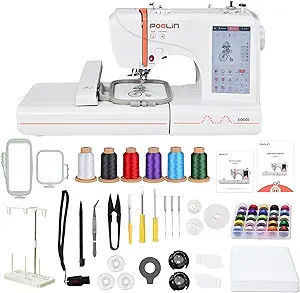
Precision meets simplicity with the Poolin EOC05, a dedicated embroidery‑only machine that suits home crafters who want control without overload.
You get a 4 x 9.25 inch embroidery area plus a 4 x 4 inch hoop, great for borders, monograms, and small garments.
The 7‑inch color touchscreen, Institch OS2, WiFi, and USB let you import, edit, and manage custom designs easily.
One‑on‑one training, included software, starter hoops, thread, and bobbins help you start stitching confidently, even as a complete beginner.
Best For: Home crafters and small side‑hustle creators who want an easy‑to‑learn, embroidery‑only machine for personalized designs on shirts, hoodies, bags, and gifts.
Pros:
- Large 4" x 9.25" embroidery area plus extra 4" x 4" hoop for versatile projects and placements.
- 7-inch color touchscreen with Institch OS2, WiFi, and free software makes importing and editing designs straightforward.
- Includes 1-on-1 training and starter accessories, so beginners can get up and running with minimal frustration.
Cons:
- Embroidery-only machine, so you still need a separate sewing machine for construction or repairs.
- Extra accessories like specialty needles, stabilizers, and additional hoops may require added cost.
- Some users report performance quirks and mixed customer support experiences, and firmware updates are needed to keep it running smoothly.
3. Brother SE700 Sewing Embroidery Machine White
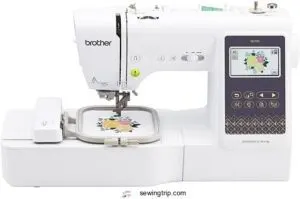
Workhorse versatility sums up the Brother SE700 if you want one machine that sews and embroiders.
You get a 4" x 4" embroidery field, 135 built‑in designs, 10 fonts, plus 103 sewing stitches and auto buttonholes for everyday projects.
The 3.7‑inch color touchscreen, wireless LAN, USB, and Artspira app support keep design transfer simple.
With an automatic needle threader, drop‑in bobbin, and up to 710 stitches per minute, you can move from hemming to custom monograms smoothly at home daily.
Best For: beginners and hobbyists who want one compact machine for everyday sewing, simple quilting, and custom 4" x 4" embroidery designs, with easy file transfer from their phone.
Pros:
- 2‑in‑1 machine with 135 embroidery designs, 10 fonts, and 103 sewing stitches covers most home projects without needing extra machines.
- 3.7" color touchscreen, wireless LAN, USB, and Artspira app make it simple to preview, edit, and send designs.
- Automatic needle threader, drop‑in bobbin, and up to 710 stitches per minute help projects go faster with less fuss.
Cons:
- Small 4" x 4" embroidery field and limited throat space can feel cramped for large quilts or big designs.
- Needs a wireless network (and often extra needles, hoops, and threads), so the real setup cost is higher than just the machine.
- Learning all the features, assembly, and settings can take some trial and error, especially for total beginners.
4. Brother PE900 Embroidery Machine WLAN
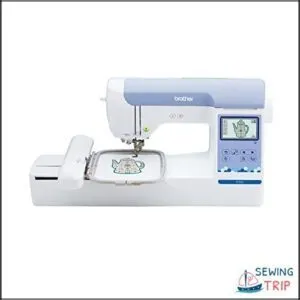
Think of the Brother PE900 as your dedicated embroidery studio when you don’t need regular sewing. You get a 5" x 7" embroidery field, 193 built‑in designs, and 13 fonts, so personalizing towels, bags, and small business orders feels straightforward.
The 3.7" color touchscreen and WLAN with Artspira app let you send designs wirelessly and tweak them on screen. With automatic needle threading, jump‑stitch trimming, and 650 stitches per minute, it’s built for smooth, focused embroidery sessions at home daily.
Best For: Home embroiderers, crafters, and small business owners who want an easy-to-use, dedicated embroidery machine with wireless design transfer and solid personalization options.
Pros:
- 5" x 7" embroidery field is a versatile size for most home and small business projects like towels, totes, and shirts.
- 193 built-in designs, 13 fonts, and the Artspira app give you plenty of creative options and easy customization without extra software.
- User-friendly features like the 3.7" color touchscreen, automatic needle threader, and wireless LAN make setup and daily use simpler for beginners and experienced users.
Cons:
- Embroidery-only machine, so you’ll still need a separate traditional sewing machine for regular stitching or garment construction.
- Limited to a 5" x 7" embroidery area, which can be restrictive for larger designs without splitting or re-hooping.
- Some users report dated built-in designs, quality control issues, and the need for firmware updates and app setup before unlocking all features.
5. Brother Skitch Single Needle Embroidery Machine
Curious what a phone‑controlled embroidery setup feels like?
The Brother Skitch gives you a compact, single‑needle machine with a 4" x 4" magnetic hoop and free arm, ideal for sleeves, hats, and kids’ clothes.
It runs up to 400 stitches per minute, so it’s better suited to detailed small designs than high‑volume production.
Bluetooth plus the Artspira app handles all design selection and transfer, which feels modern and convenient but does tie the machine to a compatible device and connection.
Best For: beginners and hobbyists who want an easy, phone-controlled way to personalize clothing, accessories, and small home decor projects in a compact space.
Pros:
- Compact 4" x 4" embroidery area with a magnetic hoop and free arm, great for sleeves, kids’ clothes, and small projects.
- Bluetooth connectivity and the Artspira app make it simple to create, edit, and send designs wirelessly from your phone.
- Beginner-friendly single-needle setup that’s easy to learn and fits nicely in small craft rooms or apartments.
Cons:
- Limited to a 4" x 4" embroidery area and 400 spm, so it’s not ideal for large designs or high-volume work.
- Requires the Artspira app and a compatible device to function, and some users report connectivity frustrations.
- Extra costs for app subscriptions and accessories, plus limited support and troubleshooting resources.
6. Brother SE2000 Sewing Embroidery Machine
If you want one machine that can stay on your table for almost everything, the Brother SE2000 is worth a hard look.
You get a 5" x 7" embroidery field, 193 built‑in designs, 13 fonts, plus 241 sewing stitches and 10 buttonholes, so you can move from monogrammed towels to denim bags without switching machines.
The 3.7" color touchscreen and wireless LAN with the Artspira app make design transfer simple, while 850 stitches per minute keeps projects moving for you.
Best For: Hobbyists, beginners, and home sewists who want one versatile machine for both sewing and embroidery projects like monograms, gifts, and home decor.
Pros:
- The 5" x 7" embroidery field gives you real room to work, and 193 built-in designs plus 241 stitches means you’re rarely starting from scratch.
- Wireless LAN and the Artspira app make sending designs from your phone or PC to the machine genuinely easy.
- The 3.7" touchscreen keeps editing and design management simple, even if you’re new to embroidery machines.
Cons:
- At $1,499.99, it’s a solid investment — and you’ll need to download the app and run a firmware update just to unlock everything.
- No carrying case included, so moving it around isn’t the most convenient.
- It’s not built for commercial or high-volume work, so if your projects scale up, you’ll likely outgrow it.
7. Brother SE725 Sewing Embroidery Machine
While the SE2000 suits bigger hoops, the Brother SE725 is a smart pick if you’re happy with a 4" x 4" embroidery field and want to keep costs down.
You still get 135 built‑in embroidery designs, 10 fonts, and 103 sewing stitches, plus a 3.7" color LCD for on‑screen editing.
Wireless LAN, Design Database Transfer, and Artspira give you app‑based pattern creation.
Just know that many units are refurbished with only a 90‑day warranty, and reliability feedback is mixed, so weigh that before buying.
Best For: Budget-conscious sewists who are happy with a 4" x 4" embroidery area and want wireless, app-friendly embroidery without paying for a bigger, more advanced machine.
Pros:
- Wireless design transfer with Design Database Transfer and Artspira makes it easy to send designs from your device and experiment with custom patterns.
- 135 built-in embroidery designs, 103 sewing stitches, plus advanced needle threading and an automatic thread cutter give you lots of creative options with less hassle.
- Versatile enough for custom apparel, quick repairs, and home décor, and approachable for both beginners and more experienced users.
Cons:
- Many units are refurbished with only a 90-day warranty, and some users report malfunctions or breakage after a short time.
- No USB port, so you’re locked into wireless transfer instead of using a simple flash drive.
- Customer support can be hard to reach, which is frustrating if you run into issues with a refurbished machine.
8. Brother SE1900 Sewing Embroidery Machine
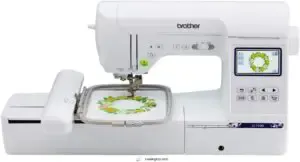
If you’re ready to step beyond a 4" x 4" hoop, the Brother SE1900 gives you room to grow. You get a 5" x 7" embroidery field, 138 designs, 11 fonts, and 240 sewing stitches, all managed from a 3.2" color touchscreen. USB import lets you bring in PES designs you’ve bought online.
In practice, it’s a strong mid‑range choice for serious home stitchers who want reliable performance without jumping to commercial pricing. It manages quilts, garments, and gifts beautifully.
Best For: Confident hobbyists and home sewists who want to level up into larger embroidery projects, quilting, and custom designs without paying commercial-machine prices.
Pros:
- 5" x 7" embroidery field, 138 built-in designs, 11 fonts, and 240 stitches give you tons of creative flexibility.
- Easy-to-use 3.2" color touchscreen plus advanced needle threader and drop-in bobbin make setup and operation smoother.
- USB import and My Custom Stitch let you bring in or design your own patterns for highly personalized projects.
Cons:
- No extension table included, so larger sewing or quilting projects may feel cramped unless you buy one separately.
- Works best with an added spindle holder for big thread cones to avoid tangling, which is an extra purchase.
- Embroidery software and additional design files can get pricey, and the 120V US-only voltage limits use outside the US under warranty.
Frequently Asked Questions (FAQs)
How to choose an embroidery machine for home use?
Start with what matters most: hoop size, stitch speed, built-in designs, ease of use, and connectivity. Match those features to your actual projects, and your budget will guide the rest.
What makes a good embroidery machine?
A good embroidery machine gives you enough hoop area, around 4×4 to 5×7 inches, solid built‑in designs and fonts, 650–800 stitches‑per‑minute speed, a clear color touchscreen, plus USB or Wi‑Fi for easy design imports flexibly.
Do you need an embroidery machine?
When push comes to shove, you need an embroidery machine if you’re stitching weekly, selling gifts, or tackling dense logos.
For a few names a year, a local shop or online service stays more practical.
Which brother embroidery machine should I buy?
If you mostly personalize kids’ clothes or small logos, choose the Brother SE700.
For roomier 5×7 designs and faster embroidery, the PE900 suits dedicated embroidery, while the SE1900 excels if you also want sewing features.
How do I know what embroidery machine to buy?
Feeling overwhelmed is normal; focus on hoop size first (4×4 for small gifts, 5×7 for adaptable projects), then your budget, and pick a single-needle model with reliable stitch quality over flashy extra designs and gimmicks.
How do I maintain my embroidery machine at home?
Clean lint from the bobbin area and under the needle plate with a brush, never canned air, and oil only at points your manual lists.
Change needles regularly and get a service once a year.
What accessories do beginners need to get started?
It’s no coincidence that your must-have starter accessories are simple: three stabilizers (tear‑away, cut‑away, wash‑away), 40‑weight threads with prewound bobbins, basic embroidery and fabric scissors, a few hoop sizes, marking tools, and spray adhesive, too.
Can embroidery machines handle thick or specialty fabrics?
Yes, many home and commercial embroidery machines can stitch denim, canvas, fleece, even leather.
As long as you stay within about 3–4 mm thickness, use heavier needles, polyester thread, proper stabilizer, and adjust presser-foot height/pressure.
Are extended warranties worth it for home machines?
Extended warranties can make sense if you run your machine hard, repairs are pricey, and the plan is under 20% of the purchase price.
light, occasional use, you usually overpay compared with repair costs.
Where can I find support and embroidery communities online?
You’ll find the most helpful embroidery support in Facebook groups, Reddit communities like r/embroidery and r/MachineEmbroidery, multi‑craft Discord servers, and year‑long workshop groups.
Members share designs, troubleshoot machine issues, and trade supply discounts together.
Conclusion
Like setting up your first cozy stitching corner, choosing your machine gets easier once you know what really matters.
You’ve seen how hoop size, designs, speed work together, and you’ve met solid options that fit real homes, not factories.
Now that you understand how to choose an embroidery machine for home use, trust your short list, sleep on it if you need to, then pick the one that makes you excited to stitch.
- https://bowenmaterial.com/a-comprehensive-guide-for-new-users-of-embroidery-machines-in-2025/
- https://hatchembroidery.com/resources/blog/choosing-the-best-embroidery-machine-for-your-home-business
- https://omtech.com/blogs/tips/how-to-choose-the-best-embroidery-machine-for-beginners
- https://www.echidnasewing.com.au/article/embroidery/machine-embroidery-hoop-sizes-what-you-need-to-kno/
- https://www.anysew.com/blog/the-ultimate-guide-to-choosing-the-perfect-embroidery-machine