This site is supported by our readers. We may earn a commission, at no cost to you, if you purchase through links.
Your seven-year-old watches a YouTube tutorial, sketches her own hoodie design on notebook paper, then asks if she can make it real. That spark—turning imagination into something tangible—is exactly why embroidery machines designed for children have become essential tools in creative households.
Unlike adult models with industrial-grade complexity, machines built for young makers strip away the intimidation factor while keeping the magic intact. Automatic needle threaders eliminate the squinting and frustration, user-friendly touchscreens replace cryptic button arrays, and built-in designs give kids instant wins before they tackle custom projects.
The right machine doesn’t just prevent accidents through smart engineering—it builds confidence stitch by stitch, transforming abstract ideas into wearable art your child can actually show off at school.
Table Of Contents
- Key Takeaways
- Top 6 Embroidery Machines for Kids
- Choosing The Right Embroidery Machine for Your Child
- Essential Safety Features for Kids’ Embroidery Machines
- Educational Benefits of Embroidery Machines for Children
- Maintenance and Care Tips for Children’s Embroidery Machines
- Frequently Asked Questions (FAQs)
- Conclusion
Key Takeaways
- Kid-friendly embroidery machines combine automatic needle threaders, adjustable speeds, and touchscreen interfaces to build confidence through immediate wins, transforming abstract ideas into wearable projects children can proudly display at school.
- The right machine balances embroidery field size (4×4 to 5×7 inches for beginners), built-in design libraries (25-135 patterns), and connectivity options (USB, WiFi, Bluetooth) that match your child’s skill level while leaving room for growth.
- Safety features like automatic threaders, needle guards, stable construction, and intuitive touchscreens reduce accidents and frustration, but adult supervision during initial sessions remains essential for mastering thread-path checks and emergency stops.
- Regular maintenance—cleaning lint after every 4-8 hours of use, replacing needles every 8-12 runtime hours, and matching thread weight to fabric choice—prevents performance issues and extends machine lifespan while keeping projects running smoothly.
Top 6 Embroidery Machines for Kids
Finding the right embroidery machine for your child means balancing safety, simplicity, and creative potential. You’ll want a model that won’t frustrate a young learner but still delivers quality results they can be proud of.
Here are six machines that meet those standards, each offering different features to match your child’s skill level and interests.
1. Uten Computerized Sewing Machine
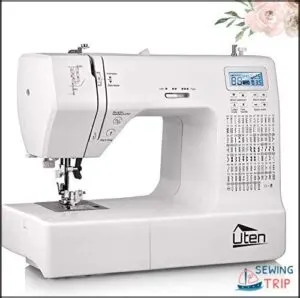
The Uten Computerized Sewing Machine packs 200 built-in stitches into a compact, beginner-friendly design that won’t overwhelm your young creator. You’ll appreciate the automatic needle threader—a must-have safety feature for kids’ embroidery—and the adjustable sewing speed that lets children work at their own pace.
The large LCD screen simplifies stitch selection, while the user manual guides you through thread tension adjustments and needle quality checks.
At $249.99, this metal-frame machine balances durability with accessibility, making embroidery for children an achievable, confidence-building adventure in child development and learning.
| Best For | Parents seeking a starter embroidery machine for children who want to explore creative sewing projects with supervised, safety-focused features and adjustable speed controls. |
|---|---|
| Brand | Uten |
| Display Type | Large LCD screen |
| Embroidery Area | Not specified |
| Built-in Designs | 200 stitches |
| Weight | 11.9 lbs |
| Connectivity | None |
| Additional Features |
|
- 200 built-in stitches and automatic needle threader make it easy for kids to start projects quickly without frustration
- Adjustable sewing speed and large LCD screen let children work at their comfort level while learning proper technique
- Metal frame construction provides stability during use, reducing tipping risks and supporting long-term durability
- Mixed customer feedback reports some units stop working after short periods, raising reliability concerns
- Replacement parts like plastic bobbin covers have limited availability, making repairs difficult
- Needle threader can be tricky to operate despite being marketed as a key beginner feature
2. Brother Embroidery Machine
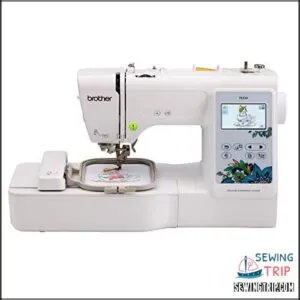
The Brother PE535 stands out in machine comparison reviews for its 80 builtin designs and kid-friendly 3.2″ LCD touchscreen—perfect for kids’ embroidery projects that build confidence. You’ll love the automatic needle threader that keeps little fingers safe, while the 4″ x 4″ field accommodates everything from backpack patches to pillowcase decorations.
User reviews consistently praise Brother models for reliability, and the USB port opens up endless design library options beyond the factory embroidery software. At under $400, it’s a sweet spot for growing skills.
| Best For | Beginners and kids ages 6–12 who want to learn embroidery through built-in designs and a simple touchscreen interface with safety features like automatic needle threading. |
|---|---|
| Brand | Brother |
| Display Type | 3.2″ LCD touchscreen |
| Embroidery Area | 4″ x 4″ |
| Built-in Designs | 80 designs |
| Weight | 14.99 lbs |
| Connectivity | USB port |
| Additional Features |
|
- 80 built-in designs and 9 font styles give you plenty of creative options right out of the box
- Large 3.2″ LCD touchscreen makes it easy for kids to preview and select designs without confusion
- Automatic needle threader and USB port for custom designs help beginners grow their skills safely
- 4″ x 4″ embroidery field limits you to smaller projects like patches and not full garments
- Embroidery-only function means you’ll need a separate sewing machine for basic stitching
- Some users report needle breakage issues and you’ll need to budget for extra thread, needles, and stabilizer
3. Brother Wireless Embroidery Machine
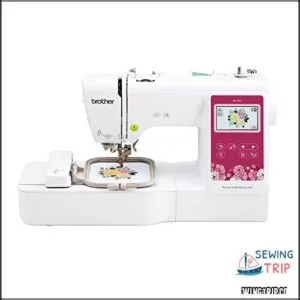
When wireless connectivity matters, the Brother PE545 upgrades your embroidery machine comparison with WiFi and Bluetooth options that let you send designs straight from your phone.
Your kids get 135 built-in patterns plus Artspira app integration for custom creations, all managed through a bright 3.7″ touchscreen interface that makes design editing straightforward.
The automatic needle threader keeps setup frustration-free, while machine durability backed by Brother’s reputation ensures years of beginner projects.
Just note: it’s embroidery-only, so traditional sewing tasks require separate equipment.
| Best For | Parents looking for a beginner-friendly embroidery machine with wireless design transfer and a strong library of built-in patterns for kids’ creative projects. |
|---|---|
| Brand | Brother |
| Display Type | 3.7″ LCD touchscreen |
| Embroidery Area | 4″ x 4″ |
| Built-in Designs | 135 designs |
| Weight | 24 lbs |
| Connectivity | Wireless LAN, USB |
| Additional Features |
|
- Wireless connectivity and Artspira app integration make transferring custom designs from your phone incredibly easy
- 135 built-in patterns and automatic needle threader remove common frustration points for beginners
- Bright 3.7″ touchscreen lets kids preview and edit designs before stitching
- Embroidery-only functionality means you’ll need a separate machine for regular sewing tasks
- 4″ x 4″ embroidery field limits project size compared to larger machines
- Some users report durability concerns and occasional issues with design transfer reliability
4. PooLin Embroidery Machine
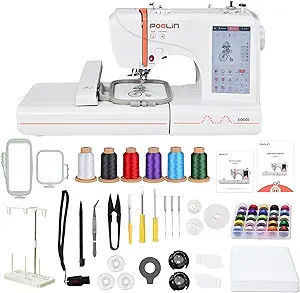
Looking for dual hoop sizes in your embroidery machine comparison, the PooLin offers 4×4″ and 4×9.25″ fields—giving your beginner projects room to grow. Its 7-inch touchscreen and WiFi transfer make kids embroidery surprisingly accessible, while 130+ built-in designs and educational toys and tools approach keep young crafters engaged.
At 22 pounds, machine portability stays manageable for relocating between workspaces. Kid safety benefits from included stabilizers and thorough starter kits, though you’ll want to supervise thread handling. PooLin features like tailored training support your child’s journey from simple lettering to custom pattern work.
| Best For | Parents introducing kids and beginners to embroidery with dual hoop sizes that grow with their skills, plus WiFi design transfer and 130+ built-in patterns to keep young crafters engaged. |
|---|---|
| Brand | Poolin |
| Display Type | 7″ touchscreen |
| Embroidery Area | 4″ x 4″ and 4″ x 9.25″ |
| Built-in Designs | 130+ designs |
| Weight | 22 lbs |
| Connectivity | WiFi, USB |
| Additional Features |
|
- Dual hoop flexibility (4×4″ and 4×9.25″) lets beginners start small and expand to larger projects without outgrowing the machine
- 7-inch touchscreen with WiFi and USB transfer makes design loading surprisingly easy for kids learning digital workflow
- Complete starter kit with threads, bobbins, stabilizers, and 1-on-1 training removes guesswork for first-time users
- WiFi connectivity issues and thread bunching reported by some users may frustrate beginners during learning phase
- 22-pound weight feels portable until kids need to move it frequently between rooms or storage
- Limited to embroidery only—no sewing functions—so you’ll need a separate machine if projects expand beyond decorative stitching
5. Brother Single Needle Embroidery Machine
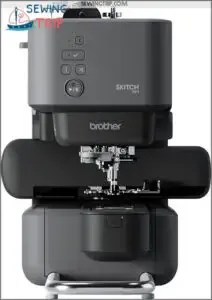
Pairing efficient needle management with Bluetooth connectivity, the Brother PE545 brings single-needle embroidery into your young maker’s hands through the Artspira app. You’ll appreciate its 4×4″ field for kids’ embroidery essentials—patches, towel borders, simple appliqués—while the magnetic hoop and free-arm design simplify fabric positioning.
At 400 stitches per minute, it’s slower than industrial embroidery machines but safer for learners mastering thread selection and user interface basics. Machine comparison shows this compact model prioritizes simplicity over speed, making embroidery software approachable for supervised beginners exploring sewing and embroidery machines.
| Best For | Parents looking for a beginner-friendly embroidery machine that kids can operate through a simple mobile app, perfect for small personalization projects like patches and monograms. |
|---|---|
| Brand | Brother |
| Display Type | Mobile app control |
| Embroidery Area | 4″ x 4″ |
| Built-in Designs | Import only |
| Weight | Not specified |
| Connectivity | Bluetooth |
| Additional Features |
|
- Magnetic hoop and free-arm design make it easier for young hands to load fabric without struggling with traditional screw-tight hoops
- Bluetooth app control eliminates confusing buttons and screens, letting kids pick designs right from a phone or tablet
- Slower 400 SPM speed is actually safer for learning, giving beginners time to watch the process and catch mistakes before they multiply
- You’re completely dependent on the Artspira app to run anything—no USB backup means app crashes or compatibility issues can stop projects cold
- The 4×4″ embroidery area limits what kids can make, ruling out larger designs like full shirt fronts or tote bag panels
- App glitches and limited customer support have frustrated users who hit technical snags with no easy fix
6. Brother Sewing And Embroidery Machine
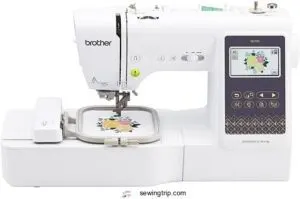
Combining 103 sewing stitches with 135 embroidery designs, the Brother SE700 combo machine lets your child switch between sewing techniques and creative projects without juggling separate equipment. User reviews praise its 3.7″ touchscreen for operating embroidery software, while the 4×4″ field manages most kids’ embroidery machine tasks—monogramming backpacks, personalizing pillowcases.
Machine comparison confirms it’s pricier than the Brother PE545, yet the wireless LAN and Artspira app make design transfer smooth for young makers ready to explore both disciplines.
| Best For | Kids ready to explore both sewing and embroidery who want one machine that grows with their skills—from simple stitches to custom designs. |
|---|---|
| Brand | Brother |
| Display Type | 3.7″ touchscreen |
| Embroidery Area | 4″ x 4″ |
| Built-in Designs | 135 designs |
| Weight | 15.6 lbs |
| Connectivity | Wireless LAN |
| Additional Features |
|
- Dual functionality means your child can jump between basic sewing projects and creative embroidery without needing two machines
- Wireless file transfer and Artspira app make it easy for kids to load their own designs from a tablet or computer
- 3.7″ touchscreen simplifies navigation so young users can preview and edit patterns without constant adult help
- 4×4″ embroidery area limits project size—larger designs like full-sized quilt blocks won’t fit
- Higher price point compared to embroidery-only models like the PE545 may not make sense if your child only wants to embroider
- Learning curve for embroidery features can be steep for total beginners, especially without guided tutorials built into the machine
Choosing The Right Embroidery Machine for Your Child
You wouldn’t hand your child a race car before they’ve learned to steer, and the same thinking applies here. The right embroidery machine grows with your child’s skills, balancing simple controls with features that keep projects exciting as they gain confidence.
Let’s break down the five key factors that’ll help you pick a machine your child will actually use—and love using.
Embroidery Field Size
Think of embroidery field size as your child’s creative canvas—it defines the maximum design area the machine can stitch in one go. Most kid-friendly embroidery machines offer 4×4 to 5×7 inch fields, perfect for patches and name tags.
Smaller fields simplify hoop compatibility and fabric selection for beginners, while larger ones reduce repositioning for combo machine projects, balancing stitch density with manageable learning curves.
When creating embroidery designs, consider the importance of clear science information to guarantee accuracy and precision.
Built-in Designs & Fonts
Most modern embroidery machines pack 25 to 120 built-in embroidery designs—animals, shapes, and letters perfect for quick projects—while the Artspira App and digital embroidery software expand creative options beyond factory limits.
Your child gains instant access to:
- Design catalog variety with quick LCD previews organized by category
- Font styles (2–6 options) including block, script, and cursive for name personalization
- Stitch quality optimized for lightweight fabrics, avoiding excessive density that overwhelms beginners
Brother PE545 exemplifies this balance with 135 preloaded designs. When evaluating embroidery machines, consider the importance of research methodology in ensuring a well-informed decision.
Ease of Use & Interface
You’ll want a touchscreen that responds quickly, displays color previews at a glance, and guides your child through threading paths without guesswork.
User-friendly controls—big start/stop buttons, visual error messages, and automatic thread cutting—slash setup frustration and keep young makers focused on crafting.
Interface design matters: machines with one-tap shortcuts and step-by-step on-screen tutorials score highest in embroidery machine reviews for user experience and error reduction.
Connectivity Options
USB ports let your child drag designs straight from a flash drive, while Wi-Fi connectivity unlocks wireless transfers and firmware updates that keep sewing and embroidery machines current. Bluetooth pairing simplifies mobile-device syncing, and optional SD card slots provide offline pattern storage when internet access isn’t available.
These connectivity options transform embroidery machines into flexible learning tools that grow alongside your young maker’s skills.
Machine Type: Embroidery-Only Vs. Combo
Once you’ve sorted out connectivity, you’ll face a bigger fork in the road: embroidery-only machines versus sewing and embroidery combos. Your embroidery machine selection hinges on three factors: portability, machine complexity trade-offs, and embroidery flexibility needs.
- Footprint & weight – Embroidery-only machines stay lighter, combo units demand more counter space
- User interface – Brother embroidery-only models simplify controls for younger makers
- Cost comparison – Dedicated machines trim upfront investment while combos add sewing versatility
Essential Safety Features for Kids’ Embroidery Machines
Safety isn’t just a checklist—it’s the foundation that lets your child explore embroidery with confidence instead of fear. The right machine combines protective design elements with user-friendly controls, reducing accidents while keeping the creative process flowing smoothly.
Here are the essential safety features you should prioritize when selecting an embroidery machine for your young maker.
Automatic Needle Threaders
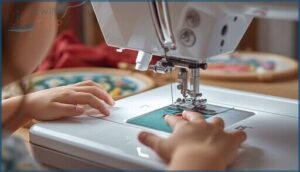
Automatic needle threaders eliminate one of the trickiest—and riskiest—parts of embroidery setup. Instead of guiding thread through a tiny eye near a sharp point, you’ll activate a lever that does the work instantly, reducing finger exposure and frustration.
Brother machines often include this feature, improving stitch quality by ensuring correct thread tension from the start and cutting errors before your child even begins crafting.
Secure Needle Placement and Stable Construction
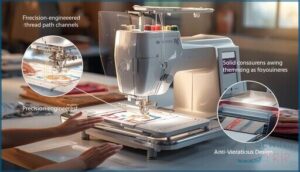
Once threading’s sorted, you’ll want a machine built to stay put. Needle guard safety shields and stable base design anchor units like the Brother PE545 during every stitch cycle, preventing tip-overs that could startle young makers.
Vibration reduction keeps the embroidery area steady, while secure thread path channels guide filament away from moving parts—construction materials matter here, especially when little hands explore Crafting and Hobby projects with automatic thread cutting engaged.
Intuitive Touchscreen Displays
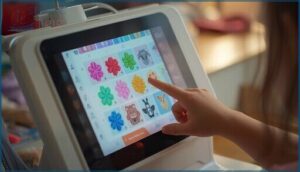
A clear display helps your child navigate design menus without guessing. Touchscreen navigation on machines like the Brother PE545 simplifies pattern selection through large, well-labeled icons, while display clarity ensures embroidery field size previews appear sharp.
Screen responsiveness matters—laggy interface design frustrates young makers, but straightforward user experience keeps them engaged. That connectivity between touch and action builds confidence, making embroidery machines genuinely kid-friendly.
Parental Supervision Guidelines

Even with thorough safety precautions, adult guidance transforms embroidery machines from educational toys into true skill-builders. You’ll want to master these supervision techniques for effective accident prevention:
- Position yourself within arm’s reach during initial sessions to monitor needle placement and fabric handling.
- Demonstrate thread-path checks before each project to prevent jams that startle young crafters.
- Practice emergency stop procedures together, reinforcing child monitoring without hovering.
- Schedule short, focused sessions that match attention spans while building fine motor skills and child development milestones.
Educational Benefits of Embroidery Machines for Children
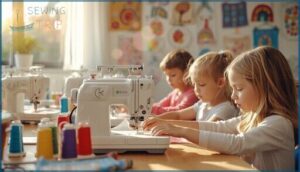
Beyond keeping little hands safe, embroidery machines develop skills that stick with kids for life. You’ll watch them grow in patience, problem-solving, and artistic confidence—benefits that reach far beyond the craft room.
Here’s how the right machine turns playtime into real learning moments your child can build on.
Skill Development and Creativity
When your child threads a needle and watches their first design take shape, they’re building more than fabric art—they’re mastering fine motor skills that strengthen hand-eye coordination in just 4–6 weeks. This creative hobby transforms into a powerful tool for child development, where textile design and creation meet cognitive development through every stitch.
Embroidery transforms playtime into measurable skill-building, strengthening hand-eye coordination and cognitive development through every stitch your child completes
| Developmental Area | Skill Built | Observable Benefit |
|---|---|---|
| Fine Motor Skills | Bimanual coordination, grip stability | Smoother needle control after 8–12 sessions |
| Spatial Awareness | Visual-spatial planning, pattern mapping | Improved layout accuracy over multiple projects |
| Creative Expression | Color sequencing, design adaptation | Greater artistic confidence and problem-solving flexibility |
| Cognitive Development | Sequential planning, procedural memory | Faster task completion, fewer errors with practice |
Embroidery machines give you crafting tools that turn repetitive stitching into measurable gains in concentration and perseverance, fueling both creative expression and real-world problem-solving abilities.
Kid-Friendly Project Patterns for Ages 6-12
You’ll achieve real educational outcomes when you match projects to your child’s age. Simple shapes with bold outlines build fine motor skills for 6–8 year olds, while intermediate embroidery designs (stars, animals, alphabet motifs) introduce color theory and pattern literacy for older kids.
Themed textile design and creation sets keep machine embroidery sessions short and repeatable, turning crafting and DIY into measured skill growth.
Step-by-Step Practice Designs
Your best path forward starts with six to eight practice motifs ranked by complexity—run stitches first, then satin borders, finally fill patterns. Each design template should list stitch sequences, recommended embroidery field size, fabric choices, and thread colors.
You’ll want downloadable swatches with color-coding and safety checkpoints for digital embroidery and sewing, turning machine embroidery into structured, repeatable mastery.
Maintenance and Care Tips for Children’s Embroidery Machines

Keeping your child’s embroidery machine in top shape doesn’t require a degree in engineering—just a few consistent habits that prevent problems before they start. Regular upkeep protects your investment, ensures safe operation, and keeps projects running smoothly without frustrating interruptions.
Here’s what you need to know about the three essential maintenance tasks that’ll extend your machine’s life and keep creativity flowing.
Regular Lint Cleaning
Think of lint buildup as the silent saboteur of embroidery performance—it sneaks into the bobbin area, disrupts thread tension, and causes frustrating skipped stitches.
You’ll want to clean your machine’s bobbin area and feed dogs after every 4–8 hours of use, using a soft lint brush or small vacuum attachment.
This simple habit keeps embroidery-only machines and combo models running smoothly, regardless of connectivity options like USB port transfers or embroidery field size.
Needle Replacement Schedule
A dull needle can wreck your embroidery designs faster than you’d expect—replace it every 8 to 12 hours of runtime to maintain stitch quality. Needle wear factors like fabric weight and thread type accelerate deterioration, so you’ll need flexible maintenance schedules for both embroidery-only machines and sewing and embroidery combos.
- Switch needles when you notice skipped stitches or thread fraying
- Use fresh needles at the start of each major project
- Match needle type selection to your fabric weight and machine embroidery techniques
- Keep a log tracking hours and replacement intervals for consistent results
- Power off completely before changing needles to guarantee safe handling
Thread Selection and Compatibility
After you’ve swapped in a fresh needle, it’s time to match thread weight to fabric choice—40-weight polyester works best for most kids’ embroidery machines. Needle size must align with thread thickness, while tension control prevents looping. Test color management on scrap fabric before running embroidery designs, ensuring your textile design choices won’t bleed or fade during washing.
| Thread Type | Best For | Compatibility Notes |
|---|---|---|
| 40-weight polyester | Standard embroidery designs | Works with most embroidery only machines and combos |
| Cotton threads | Natural fabric projects | Requires careful tension control adjustments |
| Rayon threads | Vibrant textile design work | May cause issues on beginner-level machines |
Frequently Asked Questions (FAQs)
What age is safe to start embroidery?
Imagine handing a young child the keys to creativity—too early, and frustration blooms; perfectly timed, and skills flourish.
Most pediatric advice suggests ages 8–12 for embroidery machines, with hand-sewing introductions around ages 6–8.
Can embroidery machines embroider on thick fabrics?
Yes, embroidery machines can handle thick fabrics with proper stabilizers and needle adjustments. Use tear-away backing, heavier needles (like denim types), and reduce design density to prevent puckering on heavy material projects.
How long does a typical project take?
Most kids’ embroidery projects take 30 to 60 minutes, depending on stitch complexity and design planning. Simpler embroidery designs finish faster, while time management and efficiency tips help simplify computerized embroidery for young crafters exploring textile art.
Do embroidery machines work without a computer?
Many standalone embroidery machines feature built-in designs and onboard memory, enabling computer-free embroidery with USB ports for offline stitching.
Computerized models usually need connectivity options like WiFi, though basic patterns run autonomously.
Whats the average cost of embroidery thread?
Thread prices vary widely based on quality and type. Cotton floss runs $50–$50 per skein, polyester $60–$00, while specialty metallics reach $3–$
Wholesale options greatly lower costs for bulk fabric decoration and crafting projects.
Conclusion
Before electricity powered factories, crafters built entire wardrobes by hand—one careful stitch at a time. Today’s embroidery machines for kids honor that same patient craftsmanship while removing the tedium.
You’re not just buying equipment; you’re handing your child the tools to transform blank fabric into personal statements. Start with machines offering automatic threaders and built-in designs, then watch as confidence grows with every completed project.
Their creations will outlast childhood itself.