This site is supported by our readers. We may earn a commission, at no cost to you, if you purchase through links.
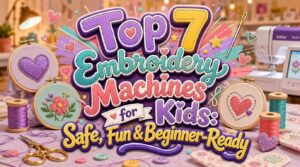
My daughter once turned a plain backpack into her most prized possession — all because a machine helped her stitch her name on it in purple thread. That small win lit something up in her.
Embroidery machines for kids have come a long way from clunky, intimidating gear that only grandma could operate. Today’s models come loaded with colorful touchscreens, built-in designs, and safety guards that give parents peace of mind without cramping a kid’s creative style.
Whether your child wants to monogram a pencil case or jazz up a tote bag, the right machine makes all the difference between a fun new hobby and a frustrating afternoon.
Seven standout options make that choice a whole lot easier.
Table Of Contents
- Key Takeaways
- Top 7 Embroidery Machines for Kids
- 1. Axe Yamazaki Kids Yarn Sewing Machine
- 2. Uten Computerized 200 Stitch Sewing Machine
- 3. Brother PE535 Embroidery Machine Touchscreen
- 4. Brother PE545 Wireless Embroidery Machine
- 5. PooLin EOC05 Large Touchscreen Embroidery Machine
- 6. Brother Skitch Single Needle Embroidery Machine
- 7. Brother SE700 Sewing Embroidery Machine
- Choosing a Kid-Friendly Embroidery Machine
- Safety Features Parents Should Check
- Easy Features for Young Beginners
- Best Kids’ Embroidery Projects
- Frequently Asked Questions (FAQs)
- Conclusion
Key Takeaways
- Machines like the Brother PE535 and PooLin EOC05 stand out for kids because they combine touchscreen simplicity, built-in designs, and safety features that let children create independently without constant adult help.
- Choosing between an embroidery-only machine and a combo sewing/embroidery model matters a lot — combo machines give kids more room to grow without needing a second purchase down the road.
- Safety isn’t just about needle guards; look for variable speed control, bright LED lighting, and a stable frame so kids can stitch confidently without surprises mid‑project.
- The best starter projects — name patches, monograms, tote bags, and pencil cases — are short enough to finish in one sitting, which keeps beginners motivated and proud of what they made.
Top 7 Embroidery Machines for Kids
Finding the right embroidery machine for your kid doesn’t have to be overwhelming. These seven picks cover a range of ages, skill levels, and budgets — so there’s genuinely something here for everyone. Let’s take a closer look at each one.
Whether you’re shopping for a beginner or a budding crafter, this curated guide to embroidery machines for gift makers also highlights the three supplies you’ll want on hand from day one.
1. Axe Yamazaki Kids Yarn Sewing Machine
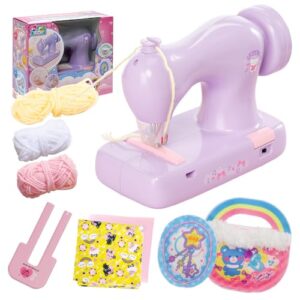
The Axe Yamazaki Kids Yarn Sewing Machine is a great starting point for little crafters. It’s battery-operated, lightweight, and uses a yarn-only system — so no tricky thread tangles to deal with.
The built-in safety needle guard keeps small fingers protected while kids work independently.
It even comes with mini-bag and mascot kits, so they can dive straight into a project.
It’s perfect for ages 6 and up who are ready to make something real.
| Best For | Kids ages 6 and up who are ready to start crafting on their own, without needing a grown-up hovering over every stitch. |
|---|---|
| Embroidery Capability | Yarn-based embroidery |
| Power Source | 4 AA batteries |
| Target Skill Level | Ages 6+ beginners |
| Design Input Method | Included kits only |
| Machine Weight | 1.63 lb |
| Sewing Function | No sewing |
| Additional Features |
|
- The yarn-only system means zero thread tangles — way less frustrating for beginners
- The safety needle guard lets kids work independently without you worrying about poked fingers
- Comes with starter kits right out of the box, so there’s something to make from day one
- Batteries aren’t included, and there’s no rechargeable option — you’ll be making a AA run sooner or later
- Only works with yarn and its own accessories, so don’t expect to use it for regular sewing projects
- Replacement needles aren’t sold separately, which is a bit of a headache if one goes missing
2. Uten Computerized 200 Stitch Sewing Machine
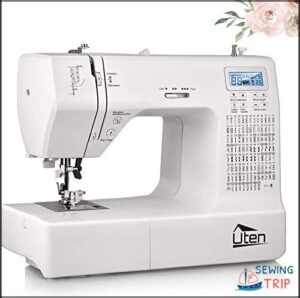
Ready to level up from yarn crafts? The Uten Computerized 200 Stitch Machine brings real sewing power to curious kids. It packs 200 built-in stitches — utility, decorative, and alphabet — so there’s always something new to try.
Threading is a breeze with the automatic needle threader, and the LCD screen makes picking stitches feel like browsing a menu. Plus, the drop-in bobbin system means less frustration and more creating.
| Best For | Kids and beginners who want to move beyond basic crafts and start exploring real sewing projects like apparel, quilting, and home décor. |
|---|---|
| Embroidery Capability | Free-motion embroidery |
| Power Source | Standard AC power |
| Target Skill Level | Beginner to intermediate |
| Design Input Method | Manual stitch selection |
| Machine Weight | 11.9 lb |
| Sewing Function | Full sewing machine |
| Additional Features |
|
- 200 built-in stitches — utility, decorative, and alphabet — so there’s always something new to try
- Automatic needle threader and drop-in bobbin system make setup quick and frustration-free
- Large LCD screen and adjustable speed keep things simple for new sewers
- The plastic bobbin cover can be tricky to replace, and aftermarket parts often don’t fit right
- Some users have run into needle breakage and early mechanical issues after limited use
- The manual isn’t great at explaining the feed-dog lever, so expect a little extra trial and error
3. Brother PE535 Embroidery Machine Touchscreen
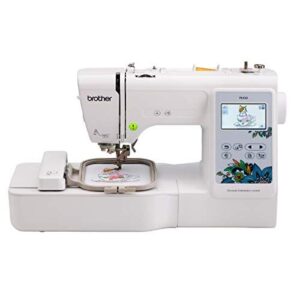
The Brother PE535 is where embroidery starts to feel real. It comes loaded with 80 built-in designs — florals, frames, and fun motifs — plus 9 fonts for adding names and monograms. The 3.2-inch color touchscreen lets kids preview and position designs before a single stitch is made.
USB import means they can grow beyond the built-in library whenever they’re ready. Built-in tutorials walk beginners through every step, making the whole experience surprisingly stress-free.
| Best For | Beginners and younger crafters who want a real embroidery machine with an easy learning curve and room to grow. |
|---|---|
| Embroidery Capability | 80 built-in designs |
| Power Source | 120V AC US only |
| Target Skill Level | Beginner friendly |
| Design Input Method | USB import |
| Machine Weight | 14.99 lb |
| Sewing Function | Embroidery only |
| Additional Features |
|
- 80 built-in designs plus USB import means you’re never stuck with just what came in the box.
- The 3.2-inch touchscreen makes it easy to preview and position designs before you commit to a single stitch.
- Built-in tutorials and a simple threading system make the whole setup way less intimidating for first-timers.
- The 4×4 hoop is pretty limiting — anything bigger means re-hooping or splitting the design.
- The touchscreen can be finicky and sometimes needs a few extra taps to register.
- It’s embroidery only, so don’t expect it to double as a regular sewing machine.
4. Brother PE545 Wireless Embroidery Machine
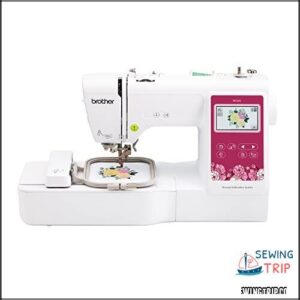
If the PE535 got you excited, the PE545 takes things a step further — wireless design transfer changes everything. No hunting for USB cables. Just send patterns straight from your phone or tablet.
It packs 135 built-in designs and 10 fonts, so there’s plenty to work with right out of the box. The 3.7-inch color touchscreen makes previewing and positioning designs simple. Even first-timers get an automatic needle threader to help them start without the struggle.
| Best For | Hobbyists and small-business owners who want easy wireless design transfer and a beginner-friendly touchscreen experience for custom embroidery projects. |
|---|---|
| Embroidery Capability | 135 built-in designs |
| Power Source | 120V AC US only |
| Target Skill Level | Beginner friendly |
| Design Input Method | USB or wireless LAN |
| Machine Weight | 14.07 lb |
| Sewing Function | Embroidery only |
| Additional Features |
|
- Wireless transfer via the Artspira app means no cables — just send designs straight from your phone
- 135 built-in designs and 10 fonts give you a solid head start without buying extra patterns
- The 3.7-inch touchscreen with drag-and-drop editing makes positioning designs quick and intuitive
- Embroidery only — you can’t use it for regular sewing, so it’s a single-purpose machine
- The 4"×4" hoop limits project size, which can be frustrating for larger designs
- Some users have reported needle breaks and motor jams, so it may not hold up well under heavy, frequent use
5. PooLin EOC05 Large Touchscreen Embroidery Machine
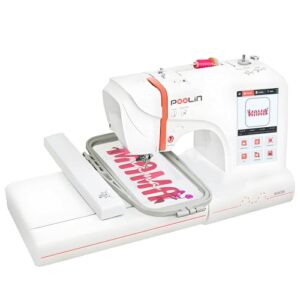
The PooLin EOC05 is a real standout for beginners. That 7-inch color touchscreen feels like using a tablet — tap, preview, stitch. Simple as that. The 4 × 9.25-inch hoop gives kids plenty of room for shirts, bags, and bigger creative ideas without constant re-hooping.
Safety-minded parents will appreciate that the EOC05 checks those boxes too — see how it stacks up in this guide to the best sewing machines for 10-year-olds.
Built-in Wi-Fi and USB mean designs transfer wirelessly from a phone or computer. No cables, no fuss. It’s genuinely beginner-friendly, with starter accessories included so kids can jump straight in.
| Best For | Beginners and hobbyists — especially those starting a small home-based embroidery business — who want a straightforward, no-fuss machine without any prior sewing experience. |
|---|---|
| Embroidery Capability | Large 4×9.25in hoop |
| Power Source | AC power Wi-Fi |
| Target Skill Level | Beginner to hobbyist |
| Design Input Method | Wi-Fi or USB |
| Machine Weight | 22 lb |
| Sewing Function | Embroidery only |
| Additional Features |
|
- The 7-inch touchscreen makes everything visual and intuitive — you tap, preview, and stitch without digging through confusing menus.
- Built-in Wi-Fi and free InStitch software mean you can send designs straight from your Mac or iPad, no cables needed.
- The large 4 × 9.25-inch hoop handles bigger projects like shirts and bags in one go, cutting down on setup time.
- It’s embroidery only — if you ever need to sew or quilt, you’ll have to buy a separate machine.
- If your thread runs out mid-job, you have to restart that whole segment from scratch, which can be frustrating.
- Some built-in designs can lose stitch locks when you swap colors, so you may need to fix things manually or find third-party software for more advanced work.
6. Brother Skitch Single Needle Embroidery Machine
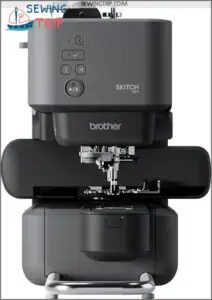
Sketch meets stitch with the Brother Skitch PP1. This little machine pairs directly with the Artspira app on your phone or tablet via Bluetooth — draw a design, tap send, and it’s stitching within seconds. No USB hunting, no computer needed.
It’s compact, quiet, and beginner-friendly with an automatic needle threader built right in. The 4 × 4-inch magnetic hoop snaps into place easily, making setup a breeze for young crafters ready to personalize patches, bags, and apparel.
| Best For | Beginners and hobbyists who want a simple, app-driven way to add custom embroidery to clothing, patches, and accessories without a steep learning curve. |
|---|---|
| Embroidery Capability | 100 built-in designs |
| Power Source | 120V AC US only |
| Target Skill Level | Beginner friendly |
| Design Input Method | Bluetooth app |
| Machine Weight | 22 lb |
| Sewing Function | Embroidery only |
| Additional Features |
|
- Bluetooth app workflow means you can design on your phone and start stitching in seconds — no computer or USB required.
- Magnetic hoop and automatic needle threader make setup quick and frustration-free, even for first-timers.
- Compact and lightweight enough to take to markets, workshops, or craft fairs without a hassle.
- The 4 × 4-inch hoop is pretty limiting — bigger projects are off the table unless you buy extra accessories.
- No screen on the machine itself means you’re fully dependent on the app, and users have reported some connectivity and stability hiccups.
- Advanced features like digitizing and portrait embroidery are locked behind a paid Artspira subscription, which adds ongoing cost.
7. Brother SE700 Sewing Embroidery Machine
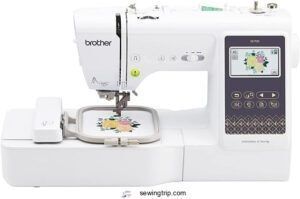
Want a machine that does it all? The Brother SE700 manages both sewing and embroidery, so kids can grow without outgrowing it.
It comes loaded with 135 built-in designs, 10 fonts, and a 3.7-inch color touchscreen for easy previewing before stitching.
The automatic needle threader and wireless design transfer via Wi-Fi make setup genuinely painless.
Add the bright LED work area and variable speed control, and you’ve got a machine that’s as safe as it’s capable.
| Best For | Beginners who want one machine for both sewing and embroidery, especially those looking to personalize apparel, accessories, or home décor without buying two separate machines. |
|---|---|
| Embroidery Capability | 135 built-in designs |
| Power Source | 120V AC US only |
| Target Skill Level | Beginner friendly |
| Design Input Method | USB or wireless LAN |
| Machine Weight | 15.6 lb |
| Sewing Function | Sewing and embroidery |
| Additional Features |
|
- Comes loaded with 135 embroidery designs, 103 stitches, and 10 fonts right out of the box — plenty to work with from day one.
- Wireless Wi-Fi transfer and the Artspira app make it easy to pull new designs straight from your phone or computer.
- Auto needle threader and auto thread cutter save time and cut down on frustrating setup errors.
- The 4×4 in. embroidery hoop is pretty small — anything larger than a pocket-sized design means you’ll hit a wall fast.
- Some users have run into needle breakage and tension issues, which can be annoying mid-project.
- Setup instructions are reportedly vague, so expect to spend some time hunting down tutorial videos before you feel fully up and running.
Choosing a Kid-Friendly Embroidery Machine
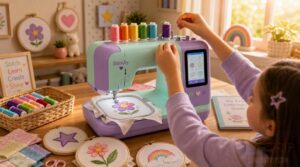
Not every embroidery machine is built with kids in mind — and that makes the search a little tricky. A few key things can make or break whether your child actually enjoys using it. Here’s what to look for before you buy.
Embroidery-only Vs Combo Machine
Here’s the thing — not all embroidery machines work the same way. Embroidery-only machines focus purely on decorative designs, often with faster embroidery speed and larger hoops.
Combo machines handle both sewing and embroidery in one unit, saving space and money upfront. For child embroidery beginners, a combo is usually the smarter pick — one machine, fewer purchases, and plenty of room to explore.
Separate machines enable simultaneous sewing and embroidery, cutting overall project time.
Best Age and Skill Level
Age really does shape everything in child embroidery. A preschool beginner (ages 3–5) needs hands-on adult guidance and simple shapes — just getting comfortable holding fabric counts as a win.
- Ages 6–8 thrive with large, easy controls and short projects
- Ages 9–11 can swap thread colors and pick basic patterns
- Tweens (12–14) handle intermediate designs confidently
- Teens (15–18) run independent projects start to finish
Simple Controls for Beginners
Good controls can make or break a beginner’s first session. Look for large, labeled buttons with wide spacing — small hands need that breathing room. Color-coded action buttons cut setup confusion fast.
One-tap navigation keeps menus from feeling like a maze, and on-screen guided prompts walk kids through each step in plain language.
An automatic needle threader is a total major benefit, too.
Hoop Size for Kids
Hoop size matters more than most people think. Entry-level machines commonly include a 4 × 4-inch hoop — perfect for patches, monograms, and small beginner designs that won’t overwhelm young crafters. It’s manageable for small hands and builds confidence fast.
Once skills click, stepping up to a 5 × 7-inch field opens the door to bigger, bolder projects.
Room to Grow
Picking a machine your child can grow with is just as important as picking one they can start with. Room to grow matters. The Brother SE2000’s 5 × 7-inch field and the Baby Lock Flare’s larger workspace leave plenty of room as skills develop — so you won’t be shopping for an upgrade six months in.
Safety Features Parents Should Check
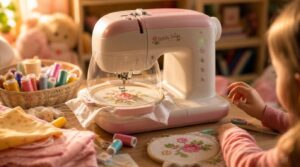
Before you hand your kid the machine, it’s worth knowing what actually keeps little fingers safe. Not all machines are built the same, and a few key features can make a real difference. Here’s what to look for.
Finger Guards and Presser Feet
One of the first things to look for is a protective presser foot. These chunky, wide-profile feet physically block small fingers from getting close to the needle — a simple but smart shield design.
Many snap on easily, with no tools, so guard installation steps are quick.
For children’s sewing projects, always confirm foot compatibility with your specific machine model first.
Variable Speed Control
Speed matters more than you’d think. Variable speed control lets kids start slow — around 400 stitches per minute — and build confidence before pushing faster.
The Brother SE700 is great for this. Its soft start feature gently ramps up, so there’s no sudden lurch that startles little hands or puckers fabric mid‑stitch.
Bright LED Work Area
Good lighting isn’t just a nice-to-have — it’s a safety feature.
The Brother SE700’s bright LED work area keeps little eyes comfortable and focused. Here’s why it matters:
- 5000K–6500K color temperature mimics natural daylight, so thread colors match exactly
- Flicker-free operation cuts eye fatigue during long creative sessions
- Uniform light distribution eliminates needle-area shadows
- 80% more energy-efficient than old-school bulbs
- Cool-running LEDs stay safe around delicate fabrics and threads
Stable Machine Construction
A wobbly machine is a recipe for accidents. That’s why stable machine construction matters more than most parents realize.
Brother embroidery machines are built on a welded steel frame — thick, solid, and resistant to bending under needle pressure. Corner gussets reduce flex, while adjustable leveling pads keep the machine steady even on uneven surfaces.
| Feature | What It Does | Why Kids Benefit |
|---|---|---|
| Welded Steel Frame | Resists bending and twisting | Prevents unexpected movement mid-stitch |
| Tuned Mass Damper | Absorbs high-frequency vibrations | Smoother stitching, less startling noise |
| Alignment Dowel System | Keeps needle perfectly positioned | Consistent, accurate results every time |
The powder coated chassis resists scratches from frequent handling — perfect for children’s sewing projects. Even the tuned mass damper near the needle area quietly absorbs vibrations, so the machine feels calm and controlled, not jittery.
The alignment dowel system ensures the needle stays square to the fabric, which means cleaner results. Whether you’re using an extension table for bigger pieces or tackling beginner designs, the machine holds its ground.
That kind of stability? It’s not just about precision — it’s peace of mind.
A machine that holds its ground gives parents peace of mind and kids the confidence to create
Adult Supervision Needs
Even the safest machine needs a grown-up nearby.
For children’s sewing projects, having two supervising adults on site is the recommended approach — one leads the session, one stays ready as backup. A buddy system keeps kids accountable between check-ins.
Before starting any introductory embroidery, verify emergency contacts are handy and document who supervised, when, and how everything went.
Easy Features for Young Beginners
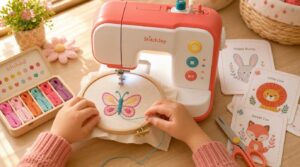
The right machine doesn’t just look cool — it actually makes learning easier. Kids stay engaged longer when the tech works with them, not against them. Here are the beginner-friendly features worth looking for.
Built-in Designs and Fonts
One of the best things about kid-friendly embroidery machines? Built-in design libraries mean zero setup before the fun starts. Most machines pack 80 to 135 ready-to-stitch patterns — florals, animals, geometric shapes — organized by theme so kids can actually find what they want. Some even include Disney character designs.
Font options aren’t an afterthought either. Script, block, and monogram styles let kids personalize patches and name tags with real flair.
Touchscreen Design Preview
The touchscreen design preview is where the fun really takes off. Large, tappable icon buttons are sized perfectly for small fingers — no frustrating misses.
Tap a design thumbnail and the preview updates instantly. Kids can pinch to zoom or drag to explore details before a single stitch drops.
A dedicated template menu keeps fonts and saved designs easy to find.
Automatic Needle Threader
Threading a needle by hand is genuinely fiddly — even for adults. That’s why automatic needle threading is such a clear advantage for kids.
One quick press of the lever and it’s done. The built-in threader components guide the thread through the eye without frustration. Plus, the mechanism is durable enough to handle hundreds of cycles, so it stays reliable long-term.
USB or Wireless Transfer
Getting new designs onto the machine is easier than ever. Most kid‑friendly embroidery machines offer USB or wireless transfer — and both work well.
USB is reliable and interference‑free, perfect when your Wi‑Fi is spotty. Wireless options like Bluetooth pairing let kids send designs straight from a tablet.
Just check that your design files are in a compatible format like PES or DST.
Beginner-friendly Tutorials
Once kids know how to transfer designs, the next win is actually learning to stitch them. That’s where beginner-friendly tutorials shine.
The best machines display step-by-step tutorials right on the screen — no manual-hunting needed.
Each lesson uses simple language, numbered steps, and real-time feedback so young stitchers build confidence fast without feeling lost.
Best Kids’ Embroidery Projects
Once your kid gets the hang of their new machine, the real fun begins — picking what to make first. Some projects are perfect for beginners, quick to finish, and genuinely useful around the house. Here are a few great starting points to spark some creativity.
Personalized Name Patches
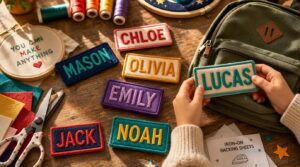
Name patches are one of the most satisfying kids’ embroidery projects you can start with.
Twill or felt backings hold stitches cleanly and keep the patch shaped after washing.
Stick to bold, sans-serif fonts — thin script often blurs.
Choose iron-on or sew-on backing based on how often the item gets washed.
Air-dry to keep edges sharp.
Simple Monogram Designs
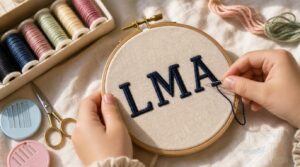
Once your kid has name patches down, monograms are a natural next step — and honestly, they feel a little fancy. 淋
A simple three-letter monogram works great for beginners.
Stick with a horizontal layout and bold block lettering for clarity.
Monochrome thread keeps it clean and cuts color changes.
Try interlocking letters when confidence grows.
Decorated Tote Bags
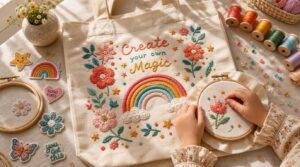
Tote bags might be the perfect canvas for DIY embroidery projects — roomy, flat, and forgiving for beginners.
Your child can layer patch appliques for texture, add iron-on transfers for bold graphics, or stitch a name right across the front. Beaded embellishments along the straps add instant sparkle.
Neutral bag colors are trending, making colorful thread designs really pop.
Embroidered Pencil Cases
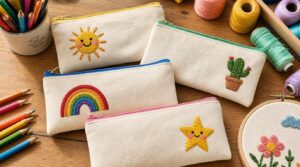
Pencil cases are one of the most rewarding children sewing projects to start with — small, useful, and totally personalizable.
- Choose cotton canvas fabric for a stable base that won’t pucker
- Pick high-contrast thread colors so designs pop on light fabric
- Place your design in one corner for a balanced, polished look
- Add a YKK zipper for smooth, durable daily use
- Resize the pattern to fit more pencils or keep it compact
Fabric Scrap Appliques
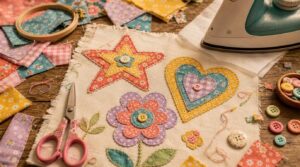
Few children sewing projects are as satisfying — or as forgiving — as fabric scrap appliques. You’re basically turning leftover bits into art.
| Step | What to Do |
|---|---|
| Prep your scraps | Cut shapes using child-safe scissors |
| Bond with fusible interfacing | Iron pieces onto your base fabric |
| Layered collage effect | Stack scraps for depth and color |
| Edge finishing | Zigzag-stitch all raw edges neatly |
Raid your scrap bin for a cheerful color palette, then let kids arrange flowers, stars, or hearts freely before stitching down.
Frequently Asked Questions (FAQs)
What age is safe to start embroidery?
Most kids are ready to start around ages four to six with blunt needles and close adult supervision. Fine motor skills and hand-eye coordination really click into place by age seven or eight.
Can embroidery machines embroider on thick fabrics?
Yes, they can! Use heavier needles (size 90/14), strong polyester thread, and layered stabilizers. Slow the speed, prep your fabric, and you’ll get clean, durable stitches even on denim or canvas.
How long does a typical project take?
Most simple projects wrap up in under 45 minutes. Add color changes or a larger hoop, and you’re looking at 60 to 90 minutes. Short, focused sessions work best.
Do embroidery machines work without a computer?
Surprisingly, yes — no computer needed. Most machines run on standalone operation, using internal memory to stitch built-in embroidery designs instantly. You can also load extras via USB loading or wireless transfer.
Whats the average cost of embroidery thread?
Thread is pretty affordable. Basic polyester spools run $1–$4 each, while rayon sits around $2–$ Buy in bulk and you can drop below $1 per spool easily.
Can kids design their own embroidery patterns digitally?
Kids can absolutely sketch their own patterns digitally. Beginner design apps convert simple drawings into stitch paths automatically. They can preview, edit, and transfer designs wirelessly — turning a tablet doodle into real embroidered art.
How long does a typical beginner project take?
Most beginner projects wrap up in under an hour. Setup takes 15–30 minutes, stitching another 20–40, and finishing maybe 10 more. Short, satisfying, and totally doable for a first-time sewer.
What thread types work best for childrens projects?
Cotton floss is soft, washable, and great for learning. Polyester thread holds color through tons of washes. Blends offer the best of both. Skip stretch threads for now — they’re tricky.
How do you clean and maintain a kids machine?
Unplug first. Always. Clean out lint after every use with a small brush, oil the moving parts lightly, swap needles regularly, and do a quick monthly safety check to keep everything running smoothly.
Are embroidery machines compatible with stretch or knit fabrics?
Most embroidery machines handle stretch and knit fabrics just fine — with a little prep. Use a ballpoint needle, a tear-away stabilizer, and slow your stitch speed down. That combo keeps everything smooth and pucker-free.
Conclusion
The first stitch is just the beginning. Before long, your child won’t just be decorating pencil cases — they’ll be solving problems, developing patience, and building real creative confidence.
The right embroidery machines for kids don’t just make projects easier; they make embroidery machines for kids feel exciting.
So pick the machine that fits your child’s age, style, and curiosity.
Then step back and watch something small — a needle, a thread, a spark — turn into something they’re genuinely proud of.
- https://rockymountainsewing.com/top-rated-sewing-machines-2025
- https://meissnersewing.com/blogs/inspiration/best-embroidery-machines-2026
- https://www.nytimes.com/wirecutter/reviews/best-sewing-machine
- https://www.goodhousekeeping.com/home-products/g70419357/the-best-embroidery-machines
- https://www.brother-usa.com/home/sewing-embroidery/embroidery-machines