This site is supported by our readers. We may earn a commission, at no cost to you, if you purchase through links.
Finding the right embroidery machine for monogramming can transform a casual hobby into a profitable venture. But the wrong choice leaves you wrestling with thread tension issues, limited hoop sizes, and fonts that look amateurish on finished products.
Modern embroidery machines designed specifically for monogramming combine built-in letter styles with automatic thread cutting and wireless design transfer, eliminating the technical headaches that plague general-purpose models.
Whether you’re personalizing towels for friends or launching a full-scale monogramming business, the machine you choose determines your production speed, design versatility, and ultimately your ability to deliver professional results that customers will actually pay premium prices for.
Table Of Contents
- Key Takeaways
- Top 8 Embroidery Machines for Monogramming
- 1. Poolin Computerized Embroidery Machine
- 2. Brother Sewing And Embroidery Machine
- 3. PooLin Embroidery Machine
- 4. Brother Embroidery Machine Bundle Deal
- 5. Brother Wireless Embroidery Machine System
- 6. Commercial Embroidery Machine System
- 7. Brother Wireless Embroidery Machine
- 8. Singer Quantum Stylist Sewing Machine
- Essential Features for Monogramming Embroidery Machines
- Single-Needle Vs Multi-Needle Machines for Monogramming
- Starting a Monogramming Business With Embroidery Machines
- Maintaining Your Monogramming Embroidery Machine
- Frequently Asked Questions (FAQs)
- Conclusion
Key Takeaways
- Single-needle embroidery machines ($200-$1,200) suit beginners and hobbyists with built-in fonts and 4×4″ hoops, while multi-needle systems ($2,000-$40,000+) deliver commercial-grade speed at 1,000+ stitches per minute with automated thread changes that cut production time in half.
- Essential monogramming features include wireless design transfer (Wi-Fi/Bluetooth), touchscreen editing interfaces, automatic needle threading and thread cutting, plus hoop sizes ranging from 4×4″ for pocket monograms to 8×14″ for jacket backs.
- Starting a profitable monogramming business requires identifying target markets (custom gift buyers, home décor enthusiasts, schools, online marketplace customers), implementing tiered pricing strategies ($5-$50 per monogram based on complexity and volume), and building a 20-40 design portfolio showcasing diverse font styles.
- Consistent maintenance practices—including lint removal after each project, monthly bobbin case cleaning, fabric-specific thread tension adjustments, and professional servicing per manufacturer schedules—prevent thread breakage and puckering while protecting warranty coverage.
Top 8 Embroidery Machines for Monogramming
You’ve got plenty of options regarding embroidery machines that excel at monogramming, from budget-friendly single-needle models to commercial-grade systems that can handle high-volume work. The right machine for you depends on your skill level, the types of projects you’re planning, and whether you’re embroidering for personal use or starting a business.
Here are eight machines that consistently deliver clean, professional monograms across different price points and feature sets.
1. Poolin Computerized Embroidery Machine
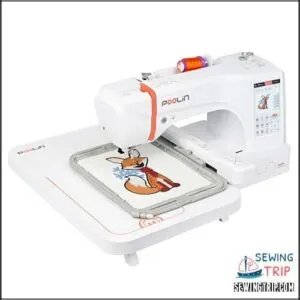
You’ll find the POOLIN EOC06 brings serious capability to your monogramming setup with its expansive 7.9″x11″ hoop area and 7″ touchscreen display that makes design editing feel user-friendly.
The included embroidery software gives you creative freedom to digitize custom monograms, while USB and wireless connectivity simplify your workflow between computer and machine.
User reviews highlight the InStitch i3 system’s beginner-friendly interface, though some mention thread breakage challenges that proper maintenance and technical support can usually resolve for this computerized embroidery machine.
| Best For | Beginners and hobbyists looking for a user-friendly embroidery machine with a large work area for monogramming clothing, home decor, and personalized gifts. |
|---|---|
| Embroidery Area | 7.9″ x 11″ |
| Built-in Designs | 200 |
| Display Type | 7″ touchscreen |
| Connectivity | USB and wireless |
| Weight | 35 lbs |
| Fonts Included | 8 |
| Additional Features |
|
- Large 7.9″x11″ hoop area handles bigger projects without repositioning fabric
- 7″ touchscreen and InStitch i3 system make design editing straightforward for newcomers
- USB and wireless connectivity plus included digitizing software give you flexibility for custom monograms
- Thread breakage issues reported by some users during operation
- Build quality gets mixed reviews, suggesting inconsistency in manufacturing
- Premium price point at 35 pounds and $2,000 range may stretch hobby budgets
2. Brother Sewing And Embroidery Machine
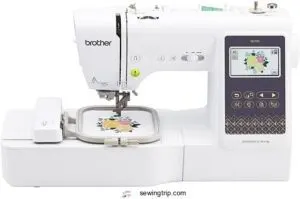
Brother embroidery machines deliver outstanding versatility for monogramming projects, and the Brother SE700 stands out as a revolutionary tool with its combination sewing and embroidery capabilities, 4″x4″ field, and 135 built-in designs that give you creative freedom right out of the box.
The 3.7″ touchscreen simplifies design software navigation and thread management, while wireless connectivity lets you transfer custom patterns seamlessly from your PC or the Artspira mobile app.
At 15.6 pounds with automatic needle threading, this machine comparison favorite bridges beginner accessibility with expert embroidery tips and sewing techniques you’ll rely on for professional monogramming results.
| Best For | Sewers and crafters who want an affordable combo machine that handles both everyday sewing projects and smaller monogramming work without needing separate equipment. |
|---|---|
| Embroidery Area | 4″ x 4″ |
| Built-in Designs | 135 |
| Display Type | 3.7″ touchscreen |
| Connectivity | Wireless LAN |
| Weight | 15.6 lbs |
| Fonts Included | 10 |
| Additional Features |
|
- Wireless connectivity and Artspira app compatibility make transferring custom designs incredibly easy
- 135 built-in embroidery designs plus 10 fonts give you plenty of monogramming options right away
- Automatic needle threader and thread cutter save time and frustration on repetitive projects
- The 4″x4″ embroidery area limits you to smaller monograms and won’t work for large-scale designs
- Limited throat space makes quilting or working with bulky fabrics difficult
- Beginners may face a learning curve with embroidery features despite the touchscreen interface
3. PooLin Embroidery Machine
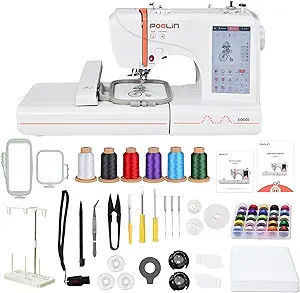
The PooLin EOC06 is a monogram machine that pairs a 7-inch touchscreen with WiFi and USB design transfer, making embroidery software integration seamless for your custom lettering projects. User reviews praise the dual-size hoop flexibility—4″x4″ and 4″x9.25″—alongside 130+ built-in designs and 8 fonts that position this embroidery machine among top embroidery machines for monogramming.
At 22 pounds with customized training included, PooLin Models deliver machine upgrades like automatic threading and stabilizer kits that transform beginners into confident creators.
| Best For | Beginners who want to learn embroidery and monogramming with hands-on training and a user-friendly touchscreen interface. |
|---|---|
| Embroidery Area | 4″ x 9.25″ |
| Built-in Designs | 130+ |
| Display Type | 7″ touchscreen |
| Connectivity | WiFi and USB |
| Weight | 22 lbs |
| Fonts Included | 8 |
| Additional Features |
|
- Comes with dual-size hoops (4″x4″ and 4″x9.25″) plus a complete starter kit including thread, bobbins, and stabilizers so you can start projects right away.
- WiFi and USB design transfer let you upload custom patterns easily, and the 7-inch touchscreen makes navigating the 130 built-in designs simple.
- Includes personalized 1-on-1 training to help you get comfortable with the machine and troubleshoot any issues.
- Some users have reported WiFi connectivity problems and thread bunching, which can slow down your workflow.
- At 22 pounds, it’s portable but not super lightweight if you need to move it around frequently.
- Customer support response times can be inconsistent, so getting help when you need it isn’t always guaranteed.
4. Brother Embroidery Machine Bundle Deal

When you’re ready to level up your monogramming setup, bundle options deliver serious value—the NQ1700E package combines Brother’s 6″x10″ field with BES BLUE software containing 800+ designs and 199 digitized fonts, transforming your creative capacity overnight.
This bundle savings approach includes the SAMF180 magnetic hoop and tutorial guides, eliminating the piecemeal purchasing headache while warranty coverage from authorized retailers protects your investment.
Brother embroidery machines for monogramming thrive in these accessory kits, where discount strategies meet professional-grade tools that business owners and hobbyists alike can’t afford to overlook.
| Best For | Crafters and small business owners who want to expand their embroidery capabilities with a complete setup that includes professional software, large design space, and all the accessories needed to start monogramming projects right away. |
|---|---|
| Embroidery Area | 6″ x 10″ |
| Built-in Designs | 800+ |
| Display Type | 4.85″ LCD touchscreen |
| Connectivity | Wireless |
| Weight | 37.3 lbs |
| Fonts Included | 199 |
| Additional Features |
|
- Comes with 800 built-in designs and 199 fonts plus BES BLUE software, so you’re not spending extra money hunting down patterns or paying for separate design programs
- The 6″x10″ embroidery field handles bigger projects like jacket backs and quilt blocks without constantly repositioning your fabric
- Bundle pricing saves you from buying hoops, stabilizers, and other accessories separately, plus you get warranty coverage through authorized dealers
- At 37.3 pounds, moving this machine around isn’t easy—you’ll want a dedicated workspace or help relocating it
- There’s a learning curve if you’re new to embroidery software or transferring files via flash drive, especially if you’re not comfortable with computers
- The quality of your finished designs depends heavily on how well patterns are digitized, so you might need to invest time learning the software or sourcing good files
5. Brother Wireless Embroidery Machine System
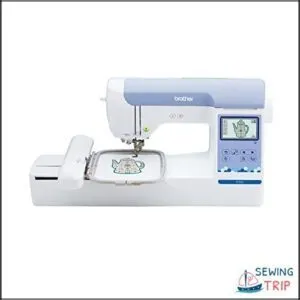
Wireless connectivity transforms your monogramming workflow—the Brother SE700 delivers Wi-Fi and Bluetooth design transfer, eliminating USB stick hassles. The 3.7″ touchscreen facilitates real-time font management and stitch optimization before you commit a single thread.
You’ll appreciate the automatic machine calibration that ensures precise letter spacing across 193 built-in designs and 13 fonts, while firmware updates expand your creative arsenal without leaving your workspace.
Brother embroidery machines for monogramming excel when wireless design transfer meets user-friendly editing tools that adapt to your creative pace.
| Best For | Home embroiderers who want wireless design transfer and built-in editing tools for quick, professional monogramming without constant USB transfers. |
|---|---|
| Embroidery Area | 5″ x 7″ |
| Built-in Designs | 193 |
| Display Type | 3.7″ touchscreen |
| Connectivity | Wireless LAN |
| Weight | 21 lbs |
| Fonts Included | 13 |
| Additional Features |
|
- Wi-Fi and Bluetooth connectivity lets you send designs straight from your phone or tablet, cutting out the USB middleman entirely.
- 193 built-in designs and 13 fonts give you plenty of starting points, plus the touchscreen makes tweaking spacing and alignment dead simple.
- Automatic thread trimming and color sorting keep your workflow smooth, especially when you’re cranking out multiple monograms back-to-back.
- The 5″ x 7″ hoop caps your project size, so larger monograms or full garment designs are off the table.
- It’s embroidery-only—no regular sewing functions—which means you’ll need a separate machine if you do other fabric work.
- Built-in designs can feel a bit dated, so you’ll likely lean on the Artspira app or your own files to keep things fresh.
6. Commercial Embroidery Machine System
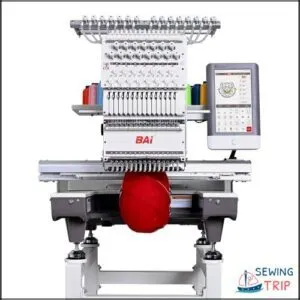
High-volume production demands something different—the BAi 15-needle system turns monogramming into an assembly line with 1200 stitches per minute across a 20×14″ embroidery area. You’re looking at industrial embroidery that manages continuous runs on leather, denim, and promotional gear without sacrificing stitch precision.
Machine selection for commercial use hinges on production efficiency metrics: multi-needle configurations eliminate thread changes, DST file compatibility streamlines design workflows, and automated jump functions maintain consistent output. Commercial embroidery machines for monogramming transform your operation when throughput eclipses hobbyist limitations.
| Best For | Businesses running high-volume monogramming operations on hats, apparel, and promotional items who need industrial-grade speed and multi-color capability. |
|---|---|
| Embroidery Area | 4″ x 4″ |
| Built-in Designs | 80 |
| Display Type | 3.2″ LCD touchscreen |
| Connectivity | USB |
| Weight | 26.2 lbs |
| Fonts Included | 6 |
| Additional Features |
|
- 15-needle setup eliminates constant thread changes during multi-color designs, keeping production moving at up to 1200 stitches per minute
- 20×14″ embroidery area handles everything from small monograms to large jacket backs without repositioning
- WiFi and USB design transfer plus cloud platform support streamline workflow from design station to machine
- 250-pound industrial footprint requires dedicated floor space and proper setup
- Steep learning curve for operation and maintenance means you’ll need training time before hitting full speed
- Customer support operates across time zones, which can delay troubleshooting during your production hours
7. Brother Wireless Embroidery Machine
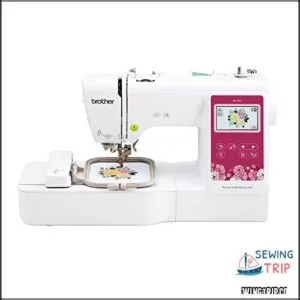
Design transfer transforms your creative workflow when the Brother SE700 connects via Wireless LAN to send embroidery files from your tablet or phone directly to the machine. You’re working with a 4″ x 4″ embroidery field, 135 built-in patterns, and 10 font styles that deliver monogram precision across custom apparel and home décor projects.
Thread management stays efficient through automatic cutting, though machine durability concerns surface in some user reports. Brother embroidery machines for monogramming balance wireless connectivity with practical limitations—perfect for custom projects when you understand the constraints.
| Best For | Hobbyists and small business owners who want wireless design transfer for personalized embroidery and monogramming on clothing, accessories, and home décor items. |
|---|---|
| Embroidery Area | 20″ x 14″ |
| Built-in Designs | N/A |
| Display Type | 10″ touchscreen |
| Connectivity | WiFi and USB |
| Weight | 250 lbs |
| Fonts Included | N/A |
| Additional Features |
|
- Wireless LAN and Artspira app compatibility let you send designs from your phone or tablet without dealing with USB cables or memory sticks
- Large 3.7″ LCD touchscreen makes it easy to preview and edit your 135 built-in patterns and 10 font styles before you start stitching
- Automatic needle threading and thread cutting save time on repetitive monogramming tasks so you can work faster
- This is embroidery-only, so you’ll need a separate machine if you want to do regular sewing
- The 4″ x 4″ embroidery field limits you to smaller designs and monograms
- Some users report durability issues and problems transferring designs from computers despite the wireless feature
8. Singer Quantum Stylist Sewing Machine
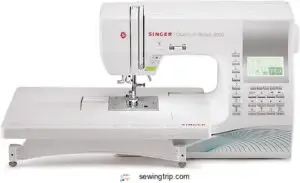
The Singer Quantum Stylist simplifies your personalization projects with 150 built-in stitches and preset monogram styles, including script and block letter fonts.
Embroidery speed remains controlled through adjustable stitch length and width settings, enhancing monogram accuracy across garments and linens. Automatic needle threading and a drop-in bobbin design improve thread management, boosting sewing efficiency.
This computerized sewing machine offers medium embroidery capabilities for monogramming tasks. However, it’s worth noting that embroidery machines with dedicated hoops generally provide higher lettering precision.
| Best For | Sewers who want built-in monogram fonts and personalization options without investing in a dedicated embroidery machine. |
|---|---|
| Embroidery Area | 5″ x 7″ |
| Built-in Designs | 193 |
| Display Type | LCD touchscreen |
| Connectivity | Wireless LAN |
| Weight | 38.4 lbs |
| Fonts Included | 13 |
| Additional Features |
|
- 150 built-in stitches with preset monogram styles in script and block fonts make adding custom lettering straightforward
- Automatic needle threader and drop-in bobbin system simplify setup and thread management during projects
- Adjustable stitch controls let you fine-tune monogram spacing and size for different fabrics
- Doesn’t match the precision of dedicated embroidery machines with specialized hoops for complex lettering
- Learning curve for beginners navigating monogram setup and placement features
- Regular maintenance needed to prevent thread snags and keep embroidery stitches consistent
Essential Features for Monogramming Embroidery Machines
Not all embroidery machines are created equal regarding monogramming, and the features you choose can make or break your creative workflow. Whether you’re personalizing baby blankets or launching a custom apparel business, certain capabilities separate the machines that deliver professional results from those that leave you frustrated.
Let’s explore the essential features that’ll transform your monogramming projects from decent to outstanding.
Built-in Monogram Fonts and Letter Styles
Your machine’s built-in monogramming fonts are the backbone of every customized project, offering script, block, and decorative letter spacing options that transform simple initials into stunning embroidery scripts. Font size options vary by hoop capacity, so check your manual for the full library—firmware updates often add fresh monogram styles and design customization features that expand your creative toolkit without purchasing additional software.
Effective writing and clear communication are key to creating a well-structured research paper guide.
Hoop Sizes and Project Compatibility
Your embroidery machine’s hoop selection directly determines which projects you can tackle, from delicate pocket monograms on 4×4-inch hoops to sprawling jacket designs requiring 8×14-inch specialty frames. Larger monogram placement demands stable stabilizer options and precise fabric choice to prevent puckering during stitching.
- Multi-needle machines generally support a fixed set of hoop sizes per unit
- Single-needle machines rely on interchangeable hoops that vary by model
- Verify included hoops match your target garment dimensions before purchase
- Consider future project scaling with optional hoops or combination frames
When evaluating embroidery machines, you should think about the research methodology to make an informed decision.
Touchscreen Interface and Design Editing
Once you’ve matched your hoop to the project, a responsive touchscreen navigation system lets you fine-tune every detail before the first stitch drops. You’ll adjust letter spacing, rotate monogram layouts, and preview color editing choices right on the display—no separate embroidery software needed for routine font management.
Modern computerized control puts design editing and stitch preview at your fingertips, streamlining workflows from concept to finished piece.
Automatic Thread Cutting and Needle Threading
After your design is set, automatic needle threaders and cutting technology step in to accelerate production. High-end embroidery machines thread the needle with a single keypad command, then trim jump stitches between color changes without stopping—reports show you’ll save minutes per monogramming run.
That stitch optimization means less hand fatigue and tighter thread management, letting your computerized sewing machine deliver consistent monograms hour after hour.
Wireless Connectivity and Design Transfer Options
Wi‑Fi and Bluetooth let you beam monogram files straight from your tablet to the embroidery machine’s built-in memory—no USB hunting required.
Cloud storage platforms sync design libraries across devices, so your lettering software updates travel with you.
Network security protocols keep proprietary monogram templates protected while wireless transfer accelerates turnaround for rush orders.
Single-Needle Vs Multi-Needle Machines for Monogramming
Choosing between a single-needle and multi-needle embroidery machine can feel like you’re standing at a crossroads, especially when you’re weighing speed, budget, and the scope of your monogramming ambitions.
Single-needle machines offer an accessible entry point for hobbyists and small-scale projects, while multi-needle systems deliver the efficiency and automation that business owners need to keep up with demanding production schedules.
Let’s break down the key differences, from beginner-friendly options to commercial powerhouses, so you can find the machine that aligns with your goals and workflow.
Best Single-Needle Options for Beginners
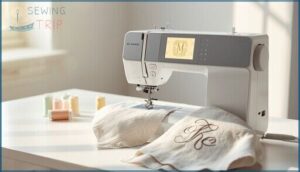
You’re just starting out, and machine selection doesn’t have to overwhelm you. Single-needle embroidery machines for monogramming deliver simplicity without sacrificing quality, with models like the Brother SE600 and Janome MyArt Quiet 20 offering beginner tips through built-in tutorials and straightforward embroidery software.
These monogram machines simplify thread management while you master the fundamentals.
| Machine | Key Beginner Feature |
|---|---|
| Brother SE600 | 80 monogram designs, 4 letter fonts |
| Janome MyArt Quiet 20 | Compact with 60 designs, 6 fonts |
| Brother PE800 | 5×7″ field, 138 designs |
| Bernette b70 Deco | Easy threading, color touchscreen |
Multi-Needle Advantages for Business Use
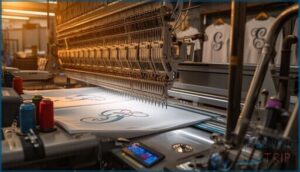
Scaling your monogramming business demands machines that keep pace with order volume, and multi-needle systems deliver production efficiency through simultaneous color changes and reduced thread-swapping downtime. You’ll access cost savings and automation benefits as independent needles handle complex designs without manual intervention, giving you the scalability options to expand service offerings while maintaining consistent stitch quality across every garment—essential for commercial embroidery operations targeting business growth.
| Multi-Needle Advantage | Business Impact |
|---|---|
| Automated thread changes | 40% faster turnaround on multi-color monograms |
| Higher production capacity | Process 3-5× more items per shift |
| Lower per-unit labor cost | Improved profit margins on bulk orders |
Speed and Efficiency Comparisons
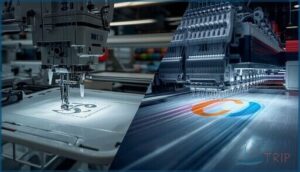
Generally, you’ll notice single-needle embroidery machines for monogramming deliver 400 to 1,000 stitches per minute, while multi-needle models exceed 1,000 SPM with excellent thread management and automated color changes that slash production time. Operational speed determines your daily output capacity, making efficiency metrics essential when evaluating models like the Brother SE700 in any embroidery machine buying guide.
| Machine Type | Stitch Rate | Production Time per Monogram |
|---|---|---|
| Single-needle | 400-1,000 SPM | 8-12 minutes |
| Multi-needle | 1,000+ SPM | 4-6 minutes |
Price Considerations and ROI
Often, you’ll find entry single-needle embroidery machines for monogramming priced between $200 and $600, while multi-needle units start around $2,000 and climb to $40,000+ for professional systems. This makes cost analysis and budget planning critical for return investments.
Your profit margins depend on production volume. Single-needle models suit low-volume monogramming business opportunities, whereas multi-needle machines deliver faster ROI through small business entrepreneurship at scale.
| Investment Tier | Machine Cost | Monthly Revenue Potential |
|---|---|---|
| Entry Single-Needle | $200-$600 | $500-$1,200 |
| Mid-Range Single | $600-$1,200 | $1,200-$2,500 |
| Basic Multi-Needle | $2,000-$6,000 | $3,000-$8,000 |
| Commercial Multi | $20,000+ | $10,000-$25,000+ |
Starting a Monogramming Business With Embroidery Machines
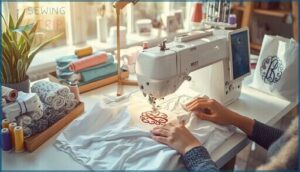
Starting a monogramming business with the right embroidery machine can transform your creative skills into a profitable venture, whether you’re working from home or launching a full-scale operation.
You’ll need to identify your ideal customers, set competitive pricing, and invest in the essential tools that’ll keep your workflow efficient and your designs impressive.
Let’s explore the key strategies that’ll help you build a successful monogramming business from the ground up.
Target Markets and Customer Opportunities
Your monogramming business opportunities span five customer segments that reflect current market trends and monogram demand in the custom embroidery services landscape. The embroidery niche offers solid home-based business ideas with proven revenue streams:
- Custom gift buyers – weddings, anniversaries, newborns, and holidays drive year-round orders through online marketplaces where millions search for monogrammed items annually
- Home décor enthusiasts – pillows, towels, linens, and heirloom-style textiles align with 2026 design forecasts positioning embroidery at center stage
- Online marketplace customers – Etsy alone hosts thousands of active monogram listings, with top sellers moving simple monogrammed pieces in high volumes through fast turnarounds
- Schools and organizations – spirit wear, team apparel, and bulk uniform orders provide repeat institutional revenue with quantity discounts and branding focus
These marketing strategies for monogramming address both individual consumers seeking one-of-a-kind pieces and small business entrepreneurship targeting B2B clients, creating diverse income channels within the monogramming business opportunities ecosystem.
Pricing Strategies for Monogramming Services
Your revenue models directly shape customer perception and profitability when starting a monogramming business. Cost analysis drives sustainable home-based business ideas, while price negotiation accommodates both retail buyers and bulk orders. Market research reveals competitor rates guide your custom embroidery services positioning:
| Pricing Model | Best For | Example Rate |
|---|---|---|
| Cost-Plus | Simple monogramming services tracking material costs | Base cost + 40% markup |
| Tiered Volume | Bulk orders from schools and teams | $8 single / $5 per item (20+) |
| Time-Based | Complex custom embroidery designs | $25-$45 per setup hour |
| Value-Based | Premium branding and luxury materials | $15-$50+ per monogram |
| Market-Aligned | Competitive local marketing strategies for monogramming | Match area averages ±15% |
Test multiple approaches across customer segments to identify which revenue models optimize both conversion rates and margins in your specific market.
Essential Equipment and Software Needs
Your embroidery machine demands a complete ecosystem to produce impeccable monogramming results: design software that converts fonts to.dst or.pes formats, thread management systems with database-approved brands for consistent sheen, hoop accessories matched to your fabric thickness, machine calibration tools ensuring needle alignment across runs, and font libraries offering adjustable monogram styles—each component working in concert to transform your monogram machine from hardware into a revenue-generating asset.
Building a Portfolio of Monogram Designs
Your equipment’s ready, so now you’ll compile 20 to 40 distinct monogram layouts that showcase your command of design themes—classic serif, flowing cursive, bold block, and decorative flourishes.
Include at least five font styles per letter with variations like italic and outline, then document each custom design with high-resolution mockups on caps, towels, and polo shirts.
This catalog demonstrates your range across color schemes and stitch effects, turning your embroidery machines for monogramming into a visual résumé that converts inquiries into orders.
Marketing Your Monogramming Services
Once your portfolio captures attention, you’ll channel that visual proof into targeted marketing strategies that convert browsers into buyers. Start by identifying your core customer segments through market research—sports teams need bulk orders, while gift-seekers want tailored gifts with fast turnaround—then craft your brand identity and sales strategy around their specific needs.
- Showcase before/after transformations on social media platforms where your target markets gather, using video demos to boost customer engagement and demonstrate monogramming precision
- Structure pricing tiers for your home based business that reward bulk orders and rush services, increasing average transaction value while building repeat client relationships
- Deploy online ordering flows with transparent lead times and live chat support, removing friction between inquiry and purchase in your entrepreneurship journey
Maintaining Your Monogramming Embroidery Machine
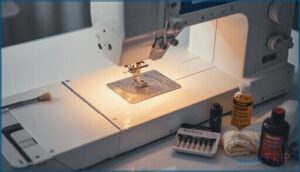
Your monogramming machine is an investment that’ll pay dividends for years, but only if you keep it running smoothly through consistent maintenance and care. Regular cleaning, proper tension adjustments, and understanding your warranty coverage aren’t just recommended practices—they’re essential habits that separate perfect monograms from frustrating thread breaks and skipped stitches.
Your monogramming machine delivers professional results for years only through consistent maintenance, proper tension adjustments, and essential care habits
Let’s walk through the key maintenance practices that’ll keep your machine delivering crisp, professional results project after project.
Cleaning and Lint Removal Best Practices
Your machine’s performance hinges on vigilant lint prevention and fiber cleanup—so grab a soft brush and tackle the needle plate, bobbin case, and tension discs after every heavy embroidery session. Compressed air works wonders at low pressure, but keep it away from internal mechanisms. Monthly cleaning routines paired with professional servicing at recommended intervals will keep your sewing machine delivering impeccable monogramming results.
| Cleaning Task | Frequency |
|---|---|
| Needle plate & presser foot lint removal | After each project |
| Bobbin case & hook area brush-out | Monthly |
| Tension disc & thread path inspection | Weekly |
| Lint filter wash (if present) | After heavy sessions |
| Professional internal servicing | Per manufacturer schedule |
Thread Tension Adjustments for Clean Monograms
Balanced tension settings separate sharp monogram precision from fuzzy disasters. So, after clearing lint buildup, dial your upper thread tension slightly tighter for cotton or rayon thread types, then test on a scrap of your target fabric selection.
Polyester threads demand different adjustments than metallics, and dense fabrics like canvas need looser settings to prevent puckering. Master these machine embroidery techniques, and your stitch quality will speak volumes about your embroidery machine’s capabilities.
Warranty and Service Network Considerations
Beyond the Brother SE700’s embroidery machine features, you need solid network coverage and repair options that won’t leave your business in limbo. Service contracts with regional Authorized Service Providers slash maintenance costs through parts replacement and labor coverage, while embroidery machine reviews consistently highlight support quality as a deal-breaker.
Consider these warranty essentials when comparing embroidery machines for monogramming:
- Registration within 30 days activates 1–3 year coverage periods
- Genuine parts and approved accessories protect warranty eligibility
- On-site versus depot service options minimize downtime for commercial users
Frequently Asked Questions (FAQs)
How do I digitize custom monogram designs?
Transforming artwork into thread starts with vector conversion using monogram software. You’ll map letterforms with stitch editing tools, calibrate design parameters for your fabric, then validate the embroidery machine file through test runs on scrap material.
What thread types work best for monogramming?
You’ll want polyester thread for vibrant, durable monograms with excellent wash fastness, while rayon delivers a luxurious silky sheen that elevates custom embroidery—both pair beautifully with most fabrics and embroidery machines.
Can I monogram leather or difficult fabrics?
Leather and challenging materials demand sharp titanium-coated needles, heavy cut-away stabilizers, and polyester thread—your embroidery machine manages them beautifully when you test stitch density on scraps first, ensuring impeccable custom embroidery every time.
How do I prevent puckering on thin materials?
Puckering happens when fabric shifts during stitching, so you’ll want to use water-soluble stabilizer underneath, reduce thread tension, and choose fine needles.
These adjustments keep thin materials smooth and prevent distortion during monogramming.
What file formats do embroidery machines accept?
Most embroidery machines for monogramming accept DST files, PES compatibility, EXP formats, and JEF conversion options, while XXX support varies by brand—ensuring your digital embroidery transfers seamlessly with embroidery software and designs.
Conclusion
Your first monogram might wobble slightly, but by your hundredth, you’ll be threading intricate three-letter designs faster than most people can address an envelope.
The embroidery machines for monogramming we’ve covered here—from budget-friendly single-needle models to commercial powerhouses—give you the technical foundation to turn fabric into custom heirlooms.
Choose based on your production goals, master the tension adjustments, and watch your machine pay for itself through satisfied customers who keep coming back.
- https://threadsmagazine.com/
- https://en.wikipedia.org/wiki/Embroidery_machine
- https://science.howstuffworks.com/embroidery-machine.htm
- https://goto.walmart.com/c/1942563/565706/9383?veh=aff&sourceid=imp_000011112222333344&u=https%3A%2F%2Fwww.walmart.com%2Fip%2FBrother-SQ9285-Computerized-Sewing-Quilting-Machine-with-150-Stitches-and-Wide-Table%2F372497516
- https://shrsl.com/4q35o