This site is supported by our readers. We may earn a commission, at no cost to you, if you purchase through links.

Your grandmother’s monogrammed handkerchief took a skilled artisan hours to complete. Today, you can stitch that same elegant personalization in minutes—and add full-color family crests, pet portraits, or custom logos while you’re at it. The right embroidery machine transforms plain fabric into cherished keepsakes, branded merchandise, or profitable products with surprising ease.
But here’s what most buyers don’t realize: the “best” machine isn’t always the priciest one with the most bells and whistles. What matters is matching features to your actual projects—whether you’re monogramming baby blankets in your spare bedroom or running a full-scale custom apparel business. The sweet spot between capability and value looks different for everyone.
Table Of Contents
Key Takeaways
- The best embroidery machine for personalization isn’t the most expensive one—it’s the model that matches your actual project types, whether you’re monogramming baby blankets at home or running a custom apparel business with high-volume orders.
- Key features that matter most include built-in design libraries (50-200+ patterns), monogramming capabilities with multiple fonts, flexible hoop sizes (4×4″ to 7×9″+), and reliable file transfer methods like USB or wireless connectivity for loading custom designs.
- Home machines like the Brother SE700 deliver solid value under $600 for hobbyists, while commercial-grade multi-needle units handle 1,000-3,000 stitches per minute and justify higher upfront costs through faster production speeds and durability for business use.
- Success with personalized embroidery depends on proper fabric preparation (prewashing, correct stabilizer selection, minimal hoop tension), regular maintenance (cleaning after every project, needle replacement every 8-12 hours), and matching thread types to your fabric—polyester for durability, rayon for decorative shine.
Key Features for Personalization Embroidery
You can’t just walk into a store and grab any embroidery machine if you want great personalization results. The right features make the difference between frustrating limitations and creative freedom.
The right embroidery machine features unlock creative freedom—the wrong ones trap you in frustrating limitations
Let’s look at what really matters when you’re picking a machine that’ll handle monograms, custom designs, and everything in between.
Built-in Designs and Customization Options
Built-in Designs give you instant creative freedom without starting from scratch. Most computerized embroidery machines pack anywhere from 50 to over 200 patterns in their library—from florals to geometric shapes—ready to stitch the moment you power up.
- Pattern Library: Browse hundreds of built-in designs ranging from classic to contemporary styles
- Customization: Resize, rotate, mirror, or combine multiple patterns for truly custom designs
- Thread Colors: Swap out color palettes on-screen to match your fabric perfectly
- Design Editing: Adjust stitch density and orientation before the needle ever touches cloth
To guarantee the accuracy of embroidery designs, consider using methodological rigor in your design selection process.
Monogramming Capabilities
Monogramming turns a simple towel or tote into a one-of-a-kind gift. Your embroidery machine should offer at least one alphabet set—many include 1 to 3 font styles, from elegant script to bold block letters.
Monogram accuracy depends on thread management and stabilizer selection, so higher-end models detect fabric type automatically.
Custom embroidery designs let you scale letter height, adjust spacing, and preview alignment on-screen before you stitch.
Design Transfer and File Compatibility
Once you’ve perfected your monogram, you’ll need to load it onto your embroidery machine. Most models accept DST, PES, EXP, and JEF file formats through a USB port or wireless connectivity. Some machines even support design conversion if your custom designs aren’t in the right format.
Check firmware updates regularly—they often enable new file compatibility and improve thread management for smoother color matching across projects.
Editing Functions and Touchscreen Controls
After you’ve transferred your design files, you’ll work with touchscreen navigation to fine-tune every detail. Modern touchscreen displays let you preview stitch simulation before the automatic needle threader even starts.
You can adjust font customization, rotate custom designs, and manage thread management settings—all through user-friendly on-screen controls.
Design editing transforms your embroidery machine into a powerful creative tool that responds instantly to your vision.
Hoop Sizes and Embroidery Area
Your embroidery area determines what you can actually create. Common hoop sizes run from 4×4 inches to 6×10 inches, defining the embroidery field for your custom embroidery designs. Larger hoops enable broader machine embroidery possibilities but demand more workspace.
Proper hoop tension and fabric stability prevent puckering, keeping stitch accuracy sharp across every embroidery machine project you tackle.
Types of Embroidery Machines for Personalization
You’ll find embroidery machines in different categories, each designed for specific needs and workloads. Understanding which type fits your personalization goals will help you narrow down your options fast.
Let’s break down the main machine types you’ll encounter when shopping for personalization projects.
Home Embroidery Machines

You’ll find Home Sewing Machines built for personal projects deliver superb value without the industrial price tag. The Brother SE700 and similar models give you solid Embroidery Area ranges, user-friendly User Interface controls, and reliable Thread Management—all essential for Custom Designs that pop. When considering Machine Selection, focus on these three priorities:
- Fabric Compatibility for diverse materials
- Straightforward Maintenance Tips you can actually follow
- Built-in designs that jumpstart your creativity
Sewing and Embroidery Combo Machines
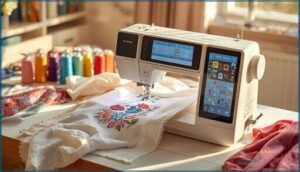
When your budget demands double duty, Combination Machines deliver both Sewing Machine basics and dedicated Embroidery Machine features in one chassis. You’ll get a flexible Embroidery Area plus User Interface controls that switch modes fast.
Thread Management stays simple, Stitch Quality holds up across fabrics, and Fabric Compatibility spans cotton to canvas—so you can tackle Sewing and Embroidery projects without swapping gear or sacrificing Machine Operation speed.
Commercial-Grade Embroidery Machines
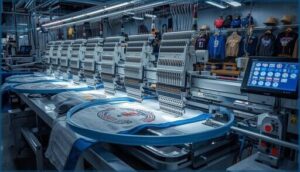
When you’re ready to scale beyond home projects, Commercial-Grade Embroidery Machines transform your Custom Embroidery vision into a profitable Embroidery Service. These industrial powerhouses deliver Machine Durability that survives three-shift production cycles while Cutting-Edge Embroidery Machine Technology manages complex designs at breakneck speed.
High-Speed Embroidery capabilities power Industrial Applications you can’t touch with consumer gear:
- Automated Systems trim threads and swap needles without operator babysitting
- Multi-needle setups stitch 1,000–3,000 stitches per minute for rush orders
- 8×12-inch hoops accommodate oversized logo work and jacket backs
- USB connectivity lets you queue batches for hands-off overnight runs
- Commercial Maintenance plans keep machines humming through peak seasons
Smart Embroidery Business Solutions start here—invest in equipment that pays for itself through volume and uptime.
Portable Embroidery Machines
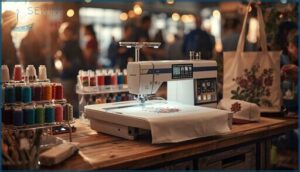
When you’re stitching at craft fairs or client homes, Machine Portability becomes your secret weapon. Portable Embroidery Machines like the Brother SE700 pack 4×4-inch to 6×10-inch Embroidery Area into 5–15-pound frames you can carry anywhere.
Compact Designs deliver Wireless Connectivity and user-friendly User Interface controls while managing Thread Management and Embroidery Speed that rival desktop units—perfect for on-site personalization gigs.
Top Embroidery Machines for Personalization
You’ve narrowed down what type of machine fits your needs, so now it’s time to look at specific models that deliver real results.
The machines below stand out for their personalization features, reliability, and value across different price points.
Whether you’re just starting out or running a growing business, these picks offer the performance you need to bring custom designs to life.
1. Brother Sewing And Embroidery Machine
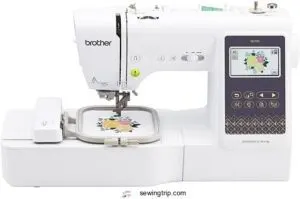
The Brother SE700 stands out as a superb choice if you’re diving into custom designs and personalization. This sewing and embroidery combo delivers 135 built-in designs and 10 fonts, giving you plenty of creative options right out of the box.
You’ll love the wireless LAN feature for transferring files from your computer or the Artspira app. The 4″ x 4″ embroidery field manages monograms and small projects beautifully, while the 3.7″ touchscreen makes editing designs straightforward.
User reviews consistently praise its reliability for home-based embroidery tips and sewing projects.
| Best For | Beginners and hobbyists who want to explore both sewing and embroidery with wireless design transfer and built-in customization options. |
|---|---|
| Embroidery Area | 4″ x 4″ |
| Touchscreen Size | 3.7 inches |
| Built-in Designs | 135 |
| Connectivity | Wireless LAN |
| Built-in Fonts | 10 |
| Weight | 15.6 pounds |
| Additional Features |
|
- Wireless LAN and Artspira app compatibility make transferring custom designs incredibly easy
- 135 built-in embroidery designs and 10 fonts give you plenty of creative options right away
- Automatic needle threader and touchscreen controls simplify the learning curve for new users
- 4″ x 4″ embroidery area limits you to smaller projects and monograms
- Throat space may feel cramped when working with large quilts or thick fabrics
- Requires additional purchases for threads, needles, and advanced design software
2. PooLin Embroidery Machine
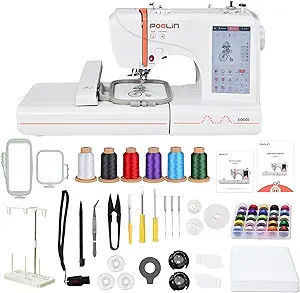
For those seeking dual-size flexibility, the PooLin EOC05 brings outstanding value to your embroidery machine comparison. This computerized embroidery machine offers both 4×4″ and 4×9.25″ fields, letting you tackle everything from monograms to larger custom designs.
User reviews highlight the 7-inch touchscreen and WiFi transfer as game-changers for workflow. You’ll appreciate the automatic needle threader and 130+ built-in designs.
The complete starter kit includes stabilizers and thread, perfect for applying embroidery tips right away. PooLin accessories expand your creative possibilities without breaking the bank.
| Best For | Beginners and home crafters who want an affordable embroidery machine with dual hoop sizes and built-in designs to personalize gifts, clothing, and home décor. |
|---|---|
| Embroidery Area | 4″ x 4″ and 4″ x 9.25″ |
| Touchscreen Size | 7 inches |
| Built-in Designs | 130+ |
| Connectivity | WiFi and USB |
| Built-in Fonts | 8 |
| Weight | 22 pounds |
| Additional Features |
|
- Dual hoop sizes (4×4″ and 4×9.25″) give you flexibility to work on small monograms or larger custom projects without buying extra equipment.
- 7-inch touchscreen with WiFi and USB transfer makes it easy to load your own designs and preview them before stitching.
- Complete starter kit with thread, bobbins, and stabilizers means you can start embroidering right out of the box without hunting down extras.
- WiFi connectivity can be unreliable based on user reports, so you might end up using the USB option more often.
- Thread bunching issues have been mentioned by some users, which means you’ll need to get the hang of proper stabilizer use and tension settings.
- Customer support response times vary, so troubleshooting problems might take longer than you’d like.
3. Poolin Computerized Embroidery Machine
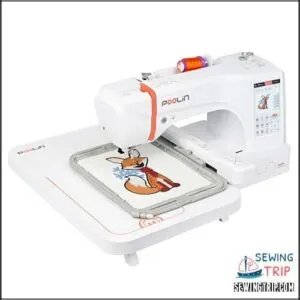
Step up to the POOLIN EOC05’s impressive 7.9″x11″ embroidery field and you’ll access new horizons for custom designs. This embroidery machine reviews consistently praise its InStitch i3 computer system for user-friendly machine operation.
The automatic needle threader saves precious time during thread management, while the 7″ touchscreen user interface simplifies design scaling without external software.
You’ll master stitch quality quickly with 200 built-in patterns and eight fonts. The metal-and-plastic construction manages everything from delicate monograms to ambitious home décor projects with reliable precision.
| Best For | Beginners and small business owners who want a reliable embroidery machine with a large work area and easy-to-use touchscreen interface for creating custom designs on clothing, home décor, and accessories. |
|---|---|
| Embroidery Area | 7.9″ x 11″ |
| Touchscreen Size | 7 inches |
| Built-in Designs | 200 |
| Connectivity | USB and wireless |
| Built-in Fonts | 8 |
| Weight | 35 pounds |
| Additional Features |
|
- Large 7.9″x11″ hoop area lets you tackle bigger projects without repositioning fabric, and 200 built-in designs plus 8 fonts give you plenty to work with right out of the box.
- 7″ touchscreen and beginner-friendly InStitch i3 system make it easy to navigate, edit designs, and manage projects without needing external software for basic tasks.
- USB and wireless connectivity plus included digitizing software let you transfer and create custom designs with flexibility.
- Some users report thread breakage issues that may require troubleshooting or regular maintenance to keep the machine running smoothly.
- Build quality receives mixed reviews, with concerns about durability despite the metal-and-plastic construction.
- Customer support may not always resolve issues quickly, and the higher price point might be a barrier for some hobbyists.
4. Brother Wireless Embroidery Machine System
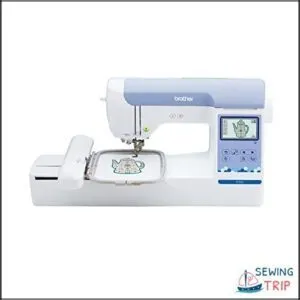
If you’re looking for an embroidery machine that takes the headache out of file transfers, the Brother PE900 delivers impressive wireless connectivity through its ARTSPIRA mobile app.
You’ll master custom designs faster with its 5″x7″ embroidery field and 193 built-in patterns that embroidery machine reviews consistently praise.
The 3.7″ touchscreen simplifies design scaling right on the machine, while automatic thread trimming manages thread efficiently.
Brother’s reputation for reliability shines through in this dedicated embroidery system that manages personalization projects with confidence.
| Best For | Home embroiderers who want wireless design transfer and a dedicated machine for personalized projects without the bulk of a combo sewing unit. |
|---|---|
| Embroidery Area | 5″ x 7″ |
| Touchscreen Size | 3.7 inches |
| Built-in Designs | 193 |
| Connectivity | Wireless LAN |
| Built-in Fonts | 13 |
| Weight | 21 pounds |
| Additional Features |
|
- Wireless connectivity through the ARTSPIRA app makes transferring custom designs effortless without dealing with USB drives
- 5″x7″ embroidery field gives you enough space for most home projects while the automatic thread trimming saves time on multi-color designs
- 193 built-in designs and 13 fonts give you plenty of starter options, plus the 3.7″ touchscreen makes on-machine editing straightforward
- It’s embroidery-only, so you’ll need a separate sewing machine for regular stitching projects
- The 5″x7″ hoop caps out smaller than some competitors, which limits your options for larger designs
- Built-in designs feel a bit dated, so you’ll likely end up importing most of your patterns anyway
5. Brother Embroidery Sewing Machine
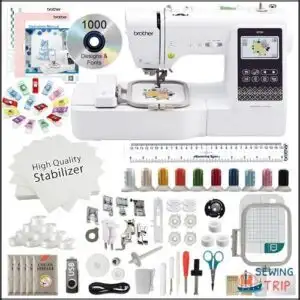
For those who want both sewing and embroidery in one powerhouse, the Brother SE700 stands out in user reviews as a true dual-threat. This combination machine delivers the sewing features and embroidery techniques you need without requiring separate equipment investments.
You’ll command 135 built-in designs and a 4″x4″ embroidery field that manages custom designs with wireless file transfer through the ARTSPIRA mobile app. The 3.7″ touchscreen puts editing power at your fingertips, while automatic needle threading saves precious time.
| Best For | Crafters who want to combine everyday sewing projects with personalized embroidery work without buying two separate machines. |
|---|---|
| Embroidery Area | 4″ x 4″ |
| Touchscreen Size | 3.7 inches |
| Built-in Designs | 135 |
| Connectivity | Wireless LAN |
| Built-in Fonts | 10 |
| Weight | 29.3 pounds |
| Additional Features |
|
- Wireless design transfer through the ARTSPIRA app and WiFi lets you send custom patterns straight from your phone or computer to the machine
- Large touchscreen interface makes it easy to preview, edit, and adjust designs before you start stitching
- Automatic needle threader and thread cutter handle the tedious stuff so you can focus on the creative work
- WiFi only works on older 2.4GHz networks, which some newer routers don’t support well
- ARTSPIRA app features are limited unless you pay for a subscription
- Some users report inconsistent stitch quality and occasional thread tension issues that take practice to fix
6. Brother Computerized Sewing Embroidery Machine
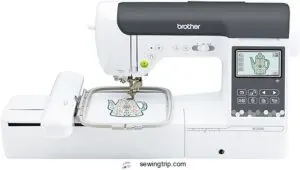
The Brother SE2000 elevates your personalization game with a spacious 5″x7″ embroidery field—nearly double what you’ll find on the SE700. You’ll utilize 193 built-in embroidery designs and 241 sewing stitches through a responsive 3.7″ touchscreen display that makes custom designs seamless. The automatic needle threader eliminates frustration, while wireless LAN connectivity streams files directly from your PC.
User reviews consistently praise its reliability for sewing projects and monogramming work, backed by Brother’s solid product warranty and reputation in machine comparison tests.
| Best For | Crafters who want a reliable machine for both everyday sewing and creative embroidery projects, especially those ready to tackle larger designs without spending pro-level money. |
|---|---|
| Embroidery Area | 5″ x 7″ |
| Touchscreen Size | 3.7 inches |
| Built-in Designs | 193 |
| Connectivity | Wireless LAN |
| Built-in Fonts | 13 |
| Weight | 38 pounds |
| Additional Features |
|
- The 5″x7″ embroidery field gives you room to work on bigger designs without constantly repositioning, and wireless file transfer means no fumbling with USB drives.
- With 193 embroidery designs and 241 sewing stitches built in, you’ve got plenty to play with right out of the box—no immediate need to hunt down extra patterns.
- The 3.7″ touchscreen and automatic needle threader take care of the annoying bits, so you spend more time creating and less time troubleshooting.
- You’ll need to budget extra for embroidery threads, stabilizers, and a carrying case since none of that comes included.
- The Artspira app’s best features hide behind a paywall, so the “free” mobile access feels a bit limited once you start exploring.
- If you’re outside the US, you’ll need a voltage adapter for international use, which adds another step to setup.
Choosing The Right Machine for Your Needs
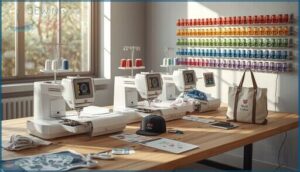
Finding the right embroidery machine isn’t about picking the fanciest model—it’s about matching features to your actual workflow. You need to think through what you’ll embroider, how often you’ll use it, and what support you’ll need down the road.
Here’s how to zero in on a machine that’ll actually work for your personalization business or hobby.
Assessing Project Scope and Volume
Before investing in an Embroidery Machine, you need to nail down your Project Planning by tracking monthly embroidery hours and understanding your workflow. Scope Definition starts with honest Volume Assessment:
- Average order size determines your Capacity Management strategy
- Required Embroidery Area dictates which Custom Designs you can tackle
- Lead times from approval to finished product guide Machine Embroidery Techniques
- Features like Automatic Needle Threader impact production speed
- Demand Forecasting reveals if you need single or multi-needle capability
Budget and Value Considerations
Generally, you’ll find Cost Analysis essential for Budget Planning when evaluating Embroidery Machines for Custom Garment Embroidery Solutions.
Price Comparison reveals that entry-level Sewing and Embroidery units like the Brother SE700 start under $600.
Value Assessment shows mid-range Embroidery Machine models deliver better Investment Returns through larger areas, faster speeds, and reduced operating costs that justify higher upfront spending for serious personalization work.
Brand Reputation and Support
Choosing a machine from established names like Brother, Janome, or Singer gives you access to strong Support Networks and proven Reliability Metrics.
Customer Reviews averaging 4.2/5 or higher signal quality Branding Solutions. Look for Warranty Options spanning 1–3 years and Service Intervals recommended every 1,000–2,000 hours.
That’s how you protect your Embroidery Machine investment long-term.
Essential Accessories for Personalization
Your Embroidery Machine needs the right supporting cast to shine. Stock up on quality Embroidery Thread with strong colorfastness, match Bobbin Selection to your machine brand, and grab Stabilizer Types suited to different fabric weights.
Don’t skimp on diverse Hoop Sizes—they’ll expand your design possibilities. Add proper Fabric Preparation tools and Embroidery Hoops in multiple dimensions to tackle any personalization project confidently.
Tips for Successful Personalized Embroidery
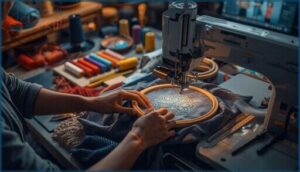
Owning the right machine is just the starting point. Your embroidery results depend on how you prepare your materials, place your designs, and keep your equipment running smoothly.
Let’s walk through the practical tips that’ll help you create professional-quality custom embroidery every time.
Preparing Fabrics for Embroidery
Your personalization projects live or die by fabric preparation—it’s that simple. Before your embroidery machine even powers on, you need to get your materials ready for perfect stitching. Here’s your essential prep checklist:
- Prewash fabrics to remove starches and prevent future shrinkage that ruins your finished work.
- Choose the right stabilizer based on fabric weight—cutaway for knits, tear-away for lighter materials.
- Hoop with minimal tension to avoid stretching while keeping fabric secure and flat.
- Test on scrap samples to confirm your thread tension and needle settings before embroidering the real piece.
Optimizing Design Placement
Once your fabric is prepped, you’ve got to nail design alignment—or your monogram ends up crooked. Use placement templates in your embroidery software to visualize where your digitized embroidery lands within the embroidery area.
Check fabric stabilization holds firm, then run hoop calibration with a test stitch. Pay attention to stitch density; heavier designs shift more easily, throwing off placement accuracy on your embroidery machine’s custom design creation.
Regular Maintenance and Troubleshooting
After you’ve nailed design placement, staying ahead of maintenance keeps your embroidery machine running smoothly. Regular machine cleaning prevents lint buildup and thread tension problems that throw off stitch quality.
Here’s your maintenance routine:
- Clean the bobbin area after every project to avoid thread breaks
- Check needle replacement every 8–12 hours of stitching
- Follow oil maintenance schedules using recommended lubricants
- Address error codes immediately by consulting your manual
Automatic needle threader components need gentle handling—dust them monthly to keep embroidery technology working efficiently.
Enhancing Quality With Proper Threads and Needles
Your machine’s running smoothly—now let’s talk about the supplies that make or break stitch quality. Thread selection matters more than you’d think: polyester and rayon threads offer excellent colorfastness and minimal lint production. Needle maintenance means matching size to fabric weight and changing them regularly to prevent fraying.
Use ballpoint needles for knits and sharp points for woven materials—fabric compatibility directly impacts your embroidery machine’s performance and prevents perforation.
| Thread Type | Best For | Key Benefit |
|---|---|---|
| Polyester | Heavy fabrics, outdoor items | Exceptional durability and UV resistance |
| Rayon | Decorative embroidery patterns | Striking sheen and color vibrancy |
| Metallic | Special occasion designs | Eye-catching shimmer effect |
| Cotton | Natural fiber fabrics | Soft finish with matte appearance |
| Blends | Machine embroidery, versatility | Balanced strength and appearance |
Frequently Asked Questions (FAQs)
How long does a typical personalization project take?
You’d think slapping a name on a shirt takes five minutes—reality check: most personalization projects demand 2 to 6 hours of embroidery machine time, shaped by design complexity, fabric effects, and your setup processes.
Whats the learning curve for complete embroidery beginners?
You’ll pick up basic stitches in 1–2 hours, but real stitch mastery and thread management emerge around 5–10 hours of focused practice.
Start with beginner projects on scrap fabric—it’s the fastest way to build skill retention.
Conclusion
The embroidery industry grew 23% last year as personalization demand exploded across home businesses and commercial shops.
Your choice of embroidery machines for personalization directly determines whether you’ll spend evenings wrestling with software crashes or effortlessly producing quality work that builds your reputation.
Match the machine’s capabilities to your actual project list, invest in reliable brands with responsive support, and you’ll transform plain items into meaningful keepsakes people treasure for decades.