
This site is supported by our readers. We may earn a commission, at no cost to you, if you purchase through links.

A wobbly cut can ruin an hour of layout work in half a second, which is why so many scrapbookers eventually ditch their scissors for something sturdier.
The right rotary cutters for scrapbooking rely on a self-sharpening steel blade, a calibrated base, and a carriage that glides at a steady 4-5 inches per second, so your lines stay straight even through layered cardstock.
Cheap models drift, jam, or dull fast, costing you clean edges right when precision matters most.
From the Carl RT-200N’s metal base to the Dahle 508’s featherweight design, you’re about to see which trimmer actually earns a spot on your craft table.
Table Of Contents
Key Takeaways
- Blade size and base material determine performance, with 45mm blades and metal bases (8-12 lbs) delivering the tight tolerances and long-term alignment needed for precision cardstock cuts.
- Sheet capacity varies widely by tool type, so rotary trimmers handle 7-15 sheets for precision work while guillotines manage up to 30 sheets for bulk projects.
- Regular maintenance—cleaning the cutting slit, sharpening every 15-20 hours, and using proper storage cases—keeps blades performing safely and extends their lifespan.
- Matching blade type to project (straight for precision, deckle/scallop for decorative edges, scoring for fold lines) and pairing it with a genuine self-healing mat ensures consistently clean, professional-looking results.
Top Rotary Cutters for Scrapbooking
Not every rotary cutter belongs in your scrapbooking kit, since blade size, cutting capacity, and base material all change how it works with your projects.
If you’re working on scalloped edges or tight curves, this guide to cutting curves with a rotary cutter breaks down which blade sizes actually make turning easier.
You’ll want a trimmer that matches your paper thickness and precision needs, whether that’s a heavy-duty metal base or a lightweight option for quick edges.
Here are six models worth your attention, each built for a different kind of cutting job.
1. Carl Professional Rotary Paper Trimmer
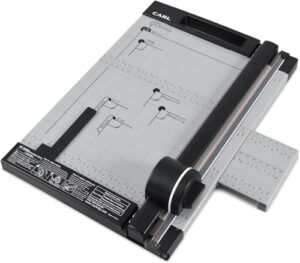
Fifteen sheets of 20lb paper at once — that’s what the RT-200N brings to your worktable, thanks to its calibrated metal base with inch and centimeter markings.
The no-touch stainless steel blade cartridge retracts automatically, so you’re not fumbling with exposed edges mid-project.
A luminous acrylic paper holder sharpens your line of sight for cleaner cuts, while built-in storage keeps spare blades organized. With a carrying handle and rubber feet, it’s stable enough for precision work yet portable for craft nights.
| Best For | crafters, photographers, and small office users who need precise, repeatable cuts on paper, photos, labels, and card stock. |
|---|---|
| Blade Type | Rotary stainless steel |
| Base Material | Steel and plastic |
| Cutting Capacity | 15 sheets 20lb |
| Cutting Width | 12 inches |
| Portability | Carrying handle |
| Safety Feature | No-touch cartridge |
| Additional Features |
|
- Calibrated metal base with inch and centimeter markings makes accurate, repeatable cuts easy
- No-touch stainless steel blade cartridge keeps fingers safe from exposed edges
- Built-in storage, carrying handle, and non-slip feet make it stable and easy to transport
- Cutting capacity tops out at 15 sheets of 20lb paper, so bigger jobs need multiple passes
- Maximum cutting width of 12 inches limits use with larger paper sizes
- Perforating blade (G-02) isn’t included and must be purchased separately
2. Dahle 508 Personal Rotary Trimmer
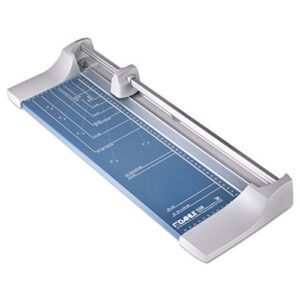
If you want something lighter on the desk than the RT-200N, the Dahle 508 is built for that.
It’s got a self-sharpening ground steel blade that hones itself in both directions, so you skip constant blade swaps. Rated for 5 sheets of 80gsm paper (up to 7 in practice), it weighs just 2.9 pounds.
The automatic clamp keeps paper from shifting, while the triangular aluminum guide bar delivers stable, accurate cuts every time.
| Best For | The Dahle 508 is best for anyone who needs precise, occasional cuts on photos, cardstock, or paper without dedicating much desk space to the tool. |
|---|---|
| Blade Type | Self-sharpening steel |
| Base Material | Metal |
| Cutting Capacity | 7 sheets |
| Cutting Width | 18 inches |
| Portability | Portable design |
| Safety Feature | Protective housing |
| Additional Features |
|
- Self-sharpening blade cuts in both directions, so you rarely need to worry about maintenance
- Automatic clamp holds paper firmly in place for clean, accurate cuts
- Lightweight, portable design makes it easy to store or move between workspaces
- Sheet capacity tops out at 7, so it’s not built for bulk cutting jobs
- Meant for personal use, not high-volume or industrial workloads
- Smaller size means less stability compared to bigger, heavier trimmers
3. Fiskars Precision SureCut Paper Trimmer
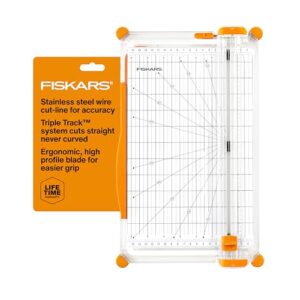
That automatic clamp on the Dahle is nice, but if you’re chasing dead-straight lines every time, the Fiskars SureCut earns its keep with a stainless steel wire that shows your cut line before the blade ever touches paper.
Its TripleTrack System interlocks blade and rail, killing wobble even on cardstock. The swing-out arm extends measuring to 15.6 inches, with 1/16" gridlines built right in.
Cuts through 10 sheets on the 12" model, backed by a lifetime warranty.
| Best For | This trimmer is best for crafters and hobbyists who want precise, straight cuts for cards and large paper projects. |
|---|---|
| Blade Type | Wire guided |
| Base Material | Stainless steel |
| Cutting Capacity | Not specified |
| Cutting Width | 6 inch deck |
| Portability | Lightweight portable |
| Safety Feature | Smudge guard |
| Additional Features |
|
- SureCut wire shows the exact cut line before you cut, helping ensure accuracy
- TripleTrack System locks blade and rail together to prevent wobbly or curved cuts
- Built-in 1/16 inch gridlines make measuring simple without extra tools
- Lightweight build may need extra care for stability on uneven surfaces
- Cutting width is capped by the 6.0 inch base deck and arm extension
- Not ideal for larger-scale projects that need a wider cutting area
4. Westcott CarboTitanium Wide Body Trimmer
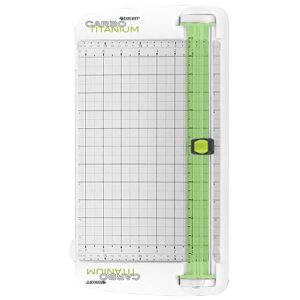
If cutting cardstock or photos leaves your blade dull fast, the Westcott CarboTitanium solves that with a blade 8 times harder than steel, engineered for repeated heavy use.
With a blade that stays sharp through heavy use, this pair of scissors is perfect for cutting fleece fabric cleanly for a cozy DIY blanket.
Its spring-assisted arm reduces hand fatigue during long sessions, while the wide body cuts through up to 10 sheets of 20lb paper.
A 12-inch swing-out ruler and enclosed blade design round out this trimmer, backed by a 15-year limited warranty for lasting durability.
| Best For | Anyone who regularly trims photos, paper, or card stock and wants a durable, easy-to-use cutter for home or office projects. |
|---|---|
| Blade Type | CarboTitanium |
| Base Material | Metal |
| Cutting Capacity | 10 sheets 20lb |
| Cutting Width | 12 inches |
| Portability | 1.21 lbs lightweight |
| Safety Feature | Spring-assisted mechanism |
| Additional Features |
|
- CarboTitanium blade stays sharp far longer than standard steel blades
- Spring-assisted arm makes long cutting sessions comfortable and smooth
- Backed by a 15-year limited warranty for long-term peace of mind
- Limited to 10 sheets of 20lb paper per cut
- Not built for heavy-duty or industrial-level use
- Larger wide-body design may take up more desk space than compact trimmers
5. Firbon 12 Inch Guillotine Paper Cutter
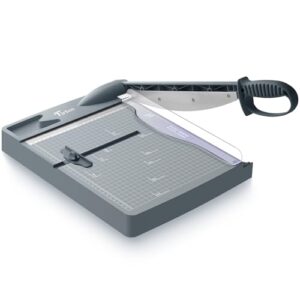
Bulk projects call for a different tool entirely, and that’s where the Firbon 12" Guillotine steps in with a 30-sheet cutting capacity—nearly triple what most rotary trimmers handle.
Its large blade swings down in one motion, ideal for classroom packets or thick cardstock stacks where a rotary wheel would need several passes.
You won’t get decorative edges here, though precision straight cuts through bulk paper are exactly what this design prioritizes for high-volume scrapbooking prep work.
| Best For | This guillotine cutter is best for anyone handling bulk paper cutting jobs, like teachers, office workers, or scrapbookers who need clean, precise straight cuts through thick stacks. |
|---|---|
| Blade Type | Precision rotary |
| Base Material | Steel and plastic |
| Cutting Capacity | 15 sheets |
| Cutting Width | 15 inch |
| Portability | Compact slim design |
| Safety Feature | Slip resistant base |
| Additional Features |
|
- Cuts up to 32 sheets of 80 g/m² paper at once, saving time on high-volume projects
- Durable 30Cr13 stainless steel blade holds its edge for long-term use
- Built-in safety features, including a guard rail and blade latch, make it safe for classrooms and studios
- The ABS plastic base isn’t as sturdy as heavier metal-based cutters
- Thick stacks require manual force to cut, which can be tiring over repeated use
- No option for decorative or specialty edge cuts, just straight lines
6. X-ACTO Heavy Duty Guillotine Paper Trimmer
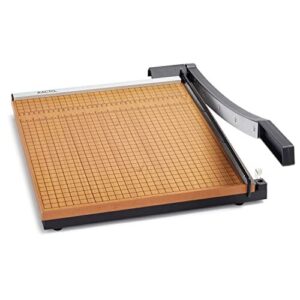
Fifteen sheets at once, with commercial versions pushing 20—that’s the muscle behind the X-ACTO Heavy Duty. Its Perpetual Edge self-sharpening blade stays razor-straight through every pass, no manual honing required.
The solid wood base, offered in maple or brown, absorbs vibration on a 15×15-inch platform with grid lines for square, repeatable cuts.
A multi-level safety system and automatic blade lock keep fingers clear, making this trimmer a solid pick for classrooms or busy craft rooms handling constant, heavy-duty cutting.
| Best For | Schools, offices, and craft rooms that need a reliable trimmer for high-volume, everyday paper and photo cutting. |
|---|---|
| Blade Type | Curved stainless steel |
| Base Material | ABS plastic |
| Cutting Capacity | 32 sheets 80gsm |
| Cutting Width | 12 inches |
| Portability | Portable base |
| Safety Feature | Blade latch hook |
| Additional Features |
|
- Self-sharpening Perpetual Edge blade stays sharp without manual maintenance
- Handles 15–20 sheets at once for efficient, high-volume cutting
- Sturdy 15×15-inch wood base with safety latch keeps cuts steady and fingers protected
- At just 1 pound, it may feel too light for heavy-duty industrial use
- Manual guillotine action takes some physical effort on thick stacks
- Safety latch needs regular checking, especially in classroom settings
How to Choose a Rotary Cutter

Picking the right rotary cutter isn’t just about grabbing whatever’s on the shelf, because blade size, base material, and handle design all affect your results differently. You’ll want a tool that matches your project’s paper weight, your cutting style, and even which hand you favor. Here’s what to look at before you buy.
Blade Sizes Explained
Diameter drives everything on a rotary trimmer, since bigger blades trade precision for power. Standard sizes run 18mm, 28mm, 45mm, and 60mm, with 28mm refill blades suited to curves and moderate layers.
45mm refill blades hit the sweet spot for cardstock, while decorative refill blades in scallop or deckle patterns swap in easily, giving you creative control without sacrificing the ergonomic comfort your hands need. For heavy-duty tasks, a 60mm power blade is optimized for cutting through thick fabric layers.
Cutting Capacity by Sheets
How many sheets can your trimmer handle before it struggles? That’s the real question here.
Standard paper lets most rotary cutters hit their max sheet capacity, but heavy cardstock cuts that number by 30-50%, often to just 3-4 sheets.
Blade length matters too: 12" models manage 6-8 sheets, while 18" versions push past 15 for bulk paper cutting.
Metal Base Vs Plastic
Metal vs. plastic base? Metal wins for serious scrapbooking work. A metal-base rotary paper trimmer, like the Carl Professional, weighs more, dissipates heat faster, and resists long-term alignment drift.
- Weight stability: 8-12 lbs prevents shifting
- Thermal dissipation: 150-200 W/m·K vs. under 1
- Blade tension security: rigid mounts, less wobble
- Warranty coverage: often lifetime vs. one year
That’s real cutting precision you can trust.
Decorative Vs Straight Blades
Which blade fits your project, straight or decorative? For clean lines, a Straight Cut blade delivers 0.125-inch precision at 4-5 inches per second, ideal for cardstock.
| Blade | Speed | Best For |
|---|---|---|
| Straight | 4-5 in/sec | Precision layouts |
| Pinking Cut | 2-3 in/sec | Vintage borders |
| Wave | 2-3 in/sec | Decorative paper edges |
Blade Longevity favors straight blades, since they’re sharpenable and hold Pattern Integrity longer.
Left- and Right-handed Use
Southpaws, don’t settle for a tool built only for right hands. Look for reversible blade installation, where you unscrew the center nut and flip the blade for true left-handed cutting.
Better yet, find ambidextrous design with adjustable handle orientation and ergonomic grip contours matching your natural angle. Check safety guard positioning too, since it should sit opposite your cutting hand regardless of dominance.
Rotary Cutters Vs Guillotine Trimmers

Rotary cutters and guillotine trimmers might look like they do the same job, but the way each one cuts paper is completely different.
Your choice really comes down to whether you need pinpoint precision or raw cutting power for bigger stacks. Let’s break down exactly where each tool shines, so you can match the right one to your next project.
Precision Cutting Differences
Why does one machine slice through cardstock like butter while another leaves ragged edges? It comes down to blade geometry—rotary cutters use 45mm blades with tight bevel angles for straight-line precision, while guillotines rely on longer blades better suited for bulk cuts.
Blade geometry makes the difference: tight-beveled rotary blades deliver precision, while longer guillotine blades power through bulk cuts
| Feature | Rotary Cutter | Guillotine |
|---|---|---|
| Precision | 0.5mm tolerance | Lower accuracy |
| Best for | Detail work | Bulk sheets |
| Micro-adjustment | Yes, fine-tuned | Limited |
Best Use Cases
Grab your rotary trimmer for photo trimming precision, layered cardstock projects, and mixed media crafting where clean edges matter. Guillotines shine for bulk sheets instead.
| Task | Best Tool | Why |
|---|---|---|
| Photo trimming | Rotary | 0.5mm accuracy |
| Fabric edges | Rotary | Clean, tear-free cuts |
| Bulk cardstock | Guillotine | Controls thick stacks |
Travel crafting? Pack the rotary—it’s lighter and precise.
Bulk Cutting Capabilities
Ream slicing efficiency favors guillotines and stack cutters hands-down, since those blades handle a full ream of paper in one pass. Rotary trimmers stay limited to lighter stacks—think 7 to 15 sheets—so they’re not built for industrial sheet capacity.
| Tool | Capacity | Best For |
|---|---|---|
| Rotary | 7-15 sheets | Precision batch cutting |
| Guillotine | Up to 30 sheets | Mixed media stacks |
| Stack cutter | Full ream | Bulk fabric layer cutting |
Portability Comparison
Ever tried tucking a guillotine cutter into a crop-bag pocket? Rotary trimmers win the weight vs stability tradeoff—Fiskars SureCut runs 0.82 lbs, Dahle 508 hits 2.9 lbs with a clamp handle.
| Tool | Weight | Storage |
|---|---|---|
| Fiskars SureCut | 0.82 lbs | Bag-friendly |
| Dahle 508 | 2.9 lbs | Vertical |
| Firbon Guillotine | 2.7 lbs | Flat-only |
For mobile crafting setups, rotary tools travel lighter.
Decorative Edge Cutting Techniques
Once you’ve got the right trimmer, decorative edges turn a plain page into something with real personality. You don’t need a drawer full of tools to get there, just the right blade paired with the right technique. Here’s what you should know before you start cutting.
Deckle and Scallop Styles

Two decorative blades transform your rotary trimmer into a serious paper crafting tool: the scallop (rounded waves) and deckle (dual scallop-peak edges), both 45mm.
Pattern Comparison:
- Scallop = uniform curved edge
- Deckle = mixed peaks/scallops
- Both cut fabric, vinyl, cardstock
- Precision-ground for consistent depth
Material versatility runs deep—denim to quilling cotton—making these blades staples among scrapbooking supplies.
Scoring for Fold Lines

Scoring swaps the cutting blade for a rounded, shallow edge that presses rather than slices, leaving a micro-crease paper folds along cleanly.
It works on 80-110 lb cardstock, even scoring three layers at once, with fold lines landing within 0.5mm of target. That’s precision cutting you can trust for boxes, booklets, and dimensional cards—no cracked fibers, no guesswork.
Interchangeable Blade Dials

One dial, four looks—that’s the magic of interchangeable blade systems on a good Rotary Trimmer. Rotating blade engagement lets you switch between Straight Cut, Deckle Cut, and Perforating Cut without swapping tools.
Dial mechanism precision keeps blade alignment accurate every rotation, while edge rotation benefits mean longer blade life. Material switching efficiency makes decorative refill blades a breeze to change between projects.
Pairing With Cutting Mats

Your blade is only half the equation—the mat underneath decides whether that decorative edge stays crisp. Match 45mm and 60mm blades to a genuine polymer mat, not cardboard, which dulls edges fast. Aim for 3mm thickness, since self-healing technology closes cut marks instantly and protects your blade.
Grip texture stops slipping, and sizing your mat larger than your cardstock keeps every scrapbooking cut controlled.
Rotary Cutter Care and Safety

A sharp, well-kept rotary cutter isn’t just about clean cuts, it’s about keeping your fingers safe while you work. A few smart habits around sharpening, cleaning, and storage will keep your tool performing like new for years. Here’s what you need to know to handle your blades with confidence.
Sharpening Dull Blades
Dull blades drag instead of slice, which signals it’s time to act. For light touch-ups, try the aluminum foil method—fold six layers and cut through repeatedly—or use 400-600 grit sandpaper at a steady 20-degree angle, 15 passes per side.
Serious dullness calls for a professional rotary blade sharpener, matching factory angles exactly. Sharpen every 1-2 years, or after 15-20 cutting hours, to extend blade longevity.
Cleaning The Cutting Slit
Sharpening won’t help much if debris still packs the slit, so clean it every time you swap blades.
Remove the blade, wipe the housing with a microfiber cloth, then work a stiletto tool into corners for trapped fibers.
Spray equal parts vinegar and water, wipe clean, then apply one oil drop per blade side before reassembling—this routine protects blade longevity a lot.
Safe Blade Storage Tips
Once your blade’s clean, storing it right matters just as much. Keep spares in a hard-bodied zippered case (fits 28-60mm blades) to guard against scratches and dust.
For used blades, don’t toss them loose—a snap-lid case like the Olfa DC-7 keeps sharp and dull blades separated, preventing accidental cuts while you organize your cutting tools properly.
Retractable Blade Features
Storing blades safely is only half the job—how your cutter controls the blade during use matters too.
Look for spring-loaded safety mechanisms that retract instantly on release, or smart retraction tech that only extends blades on contact with paper.
Manual lever control and blade position locks add precision, while ambidextrous positioning ensures comfort regardless of your dominant hand.
Frequently Asked Questions (FAQs)
Are rotary cutters good for paper?
Yes, absolutely — rotary paper trimmers deliver clean, tear-free edges on paper and cardstock alike.
The blade-to-paper friction stays low, so you get precision without sacrificing speed, making them reliable paper cutting tools for everyday scrapbooking projects.
What brand is the best rotary cutter?
Fiskars and Dahle lead brand reliability comparisons for scrapbook accessories, thanks to carbon alloy steel and self-sharpening blade material performance.
OLFA’s 8-star user ratings confirm consistent precision cutting, making these three the best rotary paper trimmer picks for serious crafters.
Will a rotary cutter cut through cardboard?
Your manual trimmer works with thin, single-layer cardboard up to 6mm, but material resistance from corrugated layers overwhelms most blades. For anything thicker, stick to cardstock and paper trimming, and save true cardboard cutting for heavy-duty steel guillotine blades instead.
Is there a trick to using a rotary cutter?
Wielding a rotary cutter like a magic wand won’t help — cutting accuracy comes from technique, not wishful thinking.
Hold your Rotary Trimmer at a 45-degree angle, stabilize the ruler firmly, and let steady body mechanics guide clean cardstock cuts every time.
How often should I replace my rotary blade?
Paper cutting blades dull after 10-15 sessions, showing frayed edges or matte shine, so swap them out promptly.
Self-sharpening blade systems and occasional touch-ups with a rotary blade sharpener stretch replacement intervals, keeping precision loss and dullness signs at bay.
Can rotary cutters trim fabric or vinyl safely?
Yes, using 45mm blades for fabric and 60mm blades for vinyl, with slower speeds preventing overheating. Use pattern weights instead of fingers, an acrylic ruler for hand protection, and match blade diameter to material thickness for control.
What paper weight works best with rotary cutters?
Stick with 65-80 lb cardstock for most projects, since it cuts cleanly and layers well. Smooth photo paper works with up to 90 lb, but textured cardstock adds resistance, so drop your cutting capacity accordingly for cleaner results.
Are rotary cutters allowed for airline carry-on travel?
Handheld rotary cutters get checked-baggage only treatment since TSA measures blades pivot-to-tip, and most exceed the 4-inch carry-on limit.
Skip confiscation risk entirely: pack your Rotary Trimmer sheathed in checked luggage, and double-check international rules before traveling with craft-tools abroad.
How do I dispose of old rotary blades safely?
That dull blade in your drawer is sharper than it looks, which is exactly why tossing it loose invites trouble. Wrap it in tape, mark it "SHARPS," and drop it in a rigid sharps container or send it through a blade recycling program.
Conclusion
Funny how a tool this small can humble a scrapbooker who thought scissors were "good enough" for years.
The truth is, rotary cutters for scrapbooking don’t just cut paper, they cut hesitation, turning shaky lines into confident, gallery-worthy edges every single time.
Whether you choose the Carl’s steel base or the Dahle’s featherweight glide, your blade choice shapes your craft’s future.
Sharpen it, store it safely, and let precision become your new signature.