This site is supported by our readers. We may earn a commission, at no cost to you, if you purchase through links.
Your first embroidery project shouldn’t feel like decoding a spaceship manual. I’ve watched too many beginners abandon gorgeous machines after one frustrating afternoon wrestling with tension settings and cryptic error codes.
The truth is, modern embroidery technology has come remarkably far—machines now thread themselves, stop before catastrophic thread tangles, and walk you through designs with color touchscreens. But here’s the catch: the market floods you with options ranging from $400 compact units to $2,000 powerhouses, each promising to be “beginner-friendly.”
The difference between a machine that ignites your creativity and one that collects dust often comes down to matching specific features to your actual needs, not just grabbing the highest-rated model.
Table Of Contents
- Key Takeaways
- Key Factors When Choosing an Embroidery Machine
- Embroidery Machine Types for Beginners
- Essential Features for Beginner Embroiderers
- Top 9 Embroidery Machines for Beginners
- 1. Brother Embroidery Machine PE800
- 2. Brother Embroidery Machine NQ1700E
- 3. Brother Embroidery Machine PE900
- 4. Brother Embroidery Machine
- 5. Brother Embroidery Machine PE545
- 6. Janome Memory Craft Embroidery Machine
- 7. Brother Sewing And Embroidery Machine
- 8. Brother Disney Embroidery Sewing Machine
- 9. Brother Computerized Sewing Embroidery Machine
- Tips for Buying and Maintaining Your First Machine
- Frequently Asked Questions (FAQs)
- Conclusion
Key Takeaways
- Your first embroidery machine should match your actual project needs and workspace—not just chase the highest-rated model—with beginners thriving on machines between $200-$1,200 that offer automatic threading, touchscreen guidance, and 4×4 to 5×7 inch hoop sizes for manageable learning curves.
- The Brother PE800 and PE900 models dominate the beginner space by delivering 138-193 built-in designs, wireless connectivity, automatic needle threaders, and jam-resistant bobbin systems that eliminate the frustrating technical hurdles that make newcomers abandon their machines.
- Combination sewing-embroidery machines like the Brother SE1900 and SE2000 offer genuine versatility for crafters who want both disciplines without buying separate equipment, though they require understanding you’ll need specific bobbin threads and potentially extra accessories not included in the base price.
- Smart purchasing means buying from authorized dealers for valid warranty protection and trained support, then maintaining your investment with regular cleaning every 4 hours of stitching, needle swaps every 8-12 projects, and professional servicing every 12-18 months to avoid costly repairs.
Key Factors When Choosing an Embroidery Machine
Choosing your first embroidery machine isn’t about finding the fanciest model—it’s about matching features to your actual needs and budget.
If you’re mostly doing hats or small items, check out these embroidery machines built for personalization to see what features actually matter.
The right machine will grow with you as your skills develop, offering room to experiment without overwhelming you on day one.
Let’s walk through the five factors that’ll help you make a confident choice.
Skill Level and Ease of Use
Your first embroidery machine should work with you, not against you. When choosing the right embroidery machine, look for ease factors that flatten the learning curve.
Your first embroidery machine should flatten the learning curve, working with you instead of against you
- Color touchscreen user interface guides you through thread paths and bobbin winding
- Automatic needle threader eliminates frustrating threading attempts
- Guided operation modes walk you through hooping and stabilizer choices step-by-step
- Real-time error messages show simple fixes for thread jams
These embroidery machine features transform sewing for beginners into confident skill building.
Embroidery Area and Hoop Size
Your embroidery field determines what you can actually make—think beyond the frame. Most beginner embroidery machines offer 4 by 4 inch to 5 by 7 inch embroidery hoop size options, perfect for monograms and small motifs.
Larger hoops mean fewer rehoopings, better fabric stability, and improved stitch accuracy. That embroidery area choice shapes your design scaling possibilities, so match hoop size limits to your creative ambitions.
Built-in Designs and Fonts
Your design library acts as your creative toolbox right out of the box. Most beginner embroidery machines pack 140 to 1,000 plus built-in designs—florals, monograms, animals—along with font options ranging from block to script.
The Brother PE800 and similar models let you resize, rotate, and manage thread control on-screen, so you can edit stitches and customize color management without extra software downloads.
Budget Considerations
Your machine hunt should start with a clear cost analysis—entry-level embroidery machines usually run between $200 and $800, while combination sewing and embroidery machines push $300 to $1,200.
Budget planning means factoring in those hidden costs: hoops ($20–$40 each), stabilizers ($5–$20 per pack), and design downloads ($2–$15 monthly). Price comparison across embroidery machine reviews helps you spot real value, not just flashy features you won’t use.
Brand Reputation and Support
A solid reputation isn’t marketing hype—it’s backed by numbers. Brother leads with 50 million embroidery machines sold since 1990, plus 24-hour support and a service network spanning 120 countries.
Customer reviews averaging 4.5 stars tell you what warranty options and brand loyalty really mean. Service network quality matters when your machine jams at midnight before a deadline.
Embroidery Machine Types for Beginners
Before you commit to your first machine, you need to understand the three main types available for beginners. Each category suits different needs, from dedicated embroidery work to multi-purpose setups.
Let’s break down what sets these machines apart so you can match your choice to your actual workspace and projects.
Embroidery-Only Machines
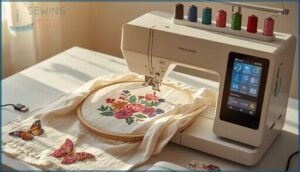
If you already own a sewing machine, an Embroidery-Only Machine gives you dedicated functionality without overlap.
Models like the Brother PE800 focus purely on decorative stitching, offering larger Embroidery Hoop Size options and specialized hooping systems for workflow efficiency.
You’ll import designs via USB or Wi-Fi, then let the machine handle color changes and precise placement—perfect for beginners ready to dive into embroidery for beginners without compromise.
For a deeper understanding of the technology, explore these advanced automation features and brands that are shaping the latest embroidery-only machines.
Combination Sewing and Embroidery Machines
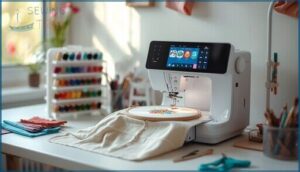
If you’re starting fresh or want to simplify your workspace, a combination machine delivers dual functionality that switches from garment construction to decorative stitching without swapping equipment.
When evaluating your embroidery machine buying guide options, consider:
- Embroidery speed (usually 400-1000 stitches per minute for beginners)
- User interface clarity on the touchscreen
- Stitch quality across both sewing and embroidery modes
Models like the Brother SE1900 balance sewing and embroidery for beginners who value versatility in their machine comparison. Extensive features such as also play a key role in modern combination machines.
Single-Needle Vs. Multi-Needle Machines
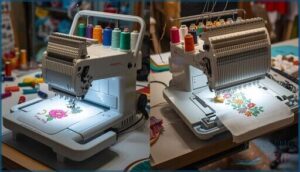
You’ll encounter two needle types in your embroidery machine buying guide research: single-needle and multi-needle machines.
Single-needle setups change threads manually between colors, ideal for beginners tackling simple designs with manageable thread management.
Multi-needle machines hold four to fifteen needles for automatic color changes, boosting production speed and stitch quality on complex work—but they demand higher investment and steeper learning curves for machine comparison.
Essential Features for Beginner Embroiderers
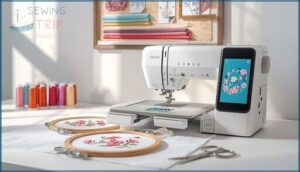
Your first embroidery machine doesn’t need every bell and whistle, but a few key features will save you from wrestling with thread tangles at midnight.
The difference between a frustrating hobby and an enjoyable one often comes down to smart engineering that takes care of the tedious stuff for you.
Here are the essential features that’ll keep you stitching instead of troubleshooting.
Automatic Needle Threader
Your first encounter with needle threading can feel like threading a strand of pasta through the eye of a storm—especially when your enthusiasm is high but your patience is thin. An automatic needle threader eliminates this frustration, letting beginners like you focus on creativity instead of squinting. Models like the Brother PE800 embroidery-only machine include this feature to simplify setup.
Key threader advantages for your embroidery machine:
- One-lever activation guides thread through the needle eye without manual dexterity
- Proper needle alignment ensures the threading mechanism works smoothly every time
- Reduced threading issues mean fewer delays when switching thread colors mid-project
- Simple threader maintenance involves cleaning lint buildup around the mechanism regularly
- Compatible with standard sewing machines if you upgrade to combination units later
Remember, automatic threading isn’t just convenience—it’s confidence. You’ll spend less time troubleshooting and more time mastering your craft.
Jam-Resistant Bobbin System
A jam-resistant bobbin system keeps thread flowing smoothly through your embroidery machine, cutting downtime by 20–40 percent when you’re stitching intricate designs.
Beginners benefit from precise thread tension control and jam detection sensors that pause embroidery before mistakes multiply. Models like the Brother PE800 embroidery machines incorporate floating bobbin designs and low-friction coatings, improving stitch accuracy while you master new techniques—just remember bobbin maintenance matters.
Computer Connectivity and Software
USB connectivity and wireless transfer let you pipe custom designs straight from your laptop to embroidery machines like the Brother PE800, while cloud libraries give you instant access to thousands of patterns.
Firmware updates add new features monthly, and digital embroidery software—think Floriani Total Control U—offers design editing tools that turn your ideas into stitch-ready files without wrestling with confusing interfaces.
Magnetic and Adjustable Hoops
Magnetic hoops hold fabric with strong magnets instead of clamps, auto-adjusting to your material’s thickness so you won’t wrestle with tension tweaks. This hoop technology protects delicate fabrics from puckering and burn marks, and it speeds up your hooping time dramatically—especially helpful if you’re new to embroidery machines like the Brother PE800.
Magnetic systems work across lightweight silk to heavy denim for true hoop compatibility.
Touchscreen Controls and Navigation
Touchscreen responsiveness lets you tap your way through designs with just 120 milliseconds of lag, and haptic feedback confirms every selection with a gentle vibration—no second-guessing.
Machines like the Brother PE800 and PE900 offer screen durability through tempered glass and navigation menus that adapt to your workflow. Gesture recognition manages pinch-to-zoom smoothly, giving beginners confidence without fumbling through clunky buttons.
Top 9 Embroidery Machines for Beginners
You’ve learned what to look for in a beginner embroidery machine, so now it’s time to meet the machines that actually deliver.
I’ve gathered nine solid options that balance ease of use with room to grow your skills. Each one brings something different to the table, whether you need a compact budget pick or a combination machine that accommodates both sewing and embroidery.
1. Brother Embroidery Machine PE800
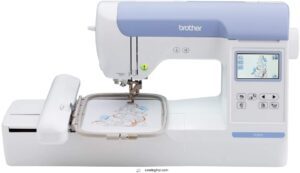
The Brother PE800 gives you a solid 5×7 inch embroidery field—room enough to stitch out a whole quilt block or a statement design across the back of a denim jacket.
You’ll find 138 built-in designs waiting on the machine, plus 11 fonts for monogramming everything from tea towels to tote bags.
The 3.2-inch color touchscreen walks you through each project with on-screen tutorials, and the automatic needle threader saves your eyes and patience when you’re switching between metallic and cotton threads.
| Best For | Home embroiderers who want room to tackle larger projects—from monogrammed linens to full jacket-back designs—without needing to split patterns across multiple hoopings. |
|---|---|
| Brand | Brother |
| Embroidery Field Size | 5″ x 7″ |
| Built-in Designs | 138 |
| LCD Display | 3.2″ touchscreen |
| Built-in Fonts | 11 |
| USB Port | Yes |
| Additional Features |
|
- The 5×7 inch hoop handles bigger designs in one go, so you’re not piecing together sections
- 138 built-in designs and 11 fonts mean you can start stitching right out of the box
- Automatic needle threader and touchscreen tutorials make the learning curve gentler, especially if you’re new to machine embroidery
- On-board editing is pretty basic—you’ll likely need design software on your computer for anything beyond simple tweaks
- Preview thumbnails from a USB drive can be hard to decipher, making it tough to pick the right file without trial and error
- Hoops won’t swap with other Brother models like the PE770, so you’re locked into this machine’s accessories
2. Brother Embroidery Machine NQ1700E
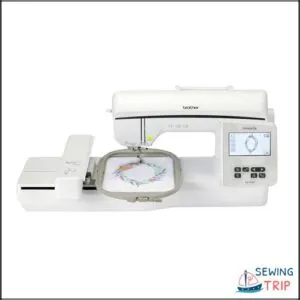
Stepping up to a 6×10 inch embroidery area changes what you can tackle—think jacket backs, wide quilt borders, and full-front shirt designs without re-hooping halfway through.
The NQ1700E delivers 258 built-in designs and 13 fonts, plus wireless transfer so you can send projects from your laptop without hunting for USB cables. That 4.85-inch color touchscreen lets you resize, rotate, and preview on the fly.
Automatic thread trimming takes care of jump stitches for you, and the LED work lights keep your stitching visible when you’re working late.
| Best For | Crafters who want to tackle larger embroidery projects like jacket backs and quilt panels without constantly switching hoops. |
|---|---|
| Brand | Brother |
| Embroidery Field Size | 6″ x 10″ |
| Built-in Designs | 258 |
| LCD Display | 4.85″ touchscreen |
| Built-in Fonts | 11 |
| USB Port | No |
| Additional Features |
|
- 6×10 inch embroidery area handles big designs in one go—no re-hooping mid-project
- Wireless design transfer and automatic thread trimming save you from tedious manual steps
- 258 built-in designs plus 13 fonts give you plenty to work with right out of the box
- Some users report reliability issues and machines needing repairs sooner than expected
- Quality control might vary depending on where you buy—authorized dealers vs. third-party sellers
- Hoop sensor can malfunction with no manual workaround, which stops projects dead
3. Brother Embroidery Machine PE900
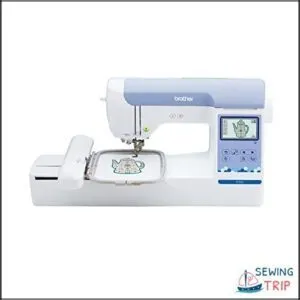
If that 5×7 embroidery field feels just right for your projects—plenty of room without overwhelming your workspace—you’ll appreciate the PE900’s stitching speed. It stitches at 650 stitches per minute, so monograms and full designs finish faster than you’d expect.
You get 193 built-in designs and 13 fonts, wireless connectivity that skips the USB shuffle, and a 3.7-inch touchscreen for quick edits. The automatic threader and jump stitch trimming keep you focused on creating, not fiddling with thread tails.
| Best For | Home embroiderers who want a dedicated machine that handles mid-sized designs quickly without the learning curve of industrial equipment. |
|---|---|
| Brand | Brother |
| Embroidery Field Size | 5″ x 7″ |
| Built-in Designs | 193 |
| LCD Display | 3.7″ touchscreen |
| Built-in Fonts | 13 |
| USB Port | Yes |
| Additional Features |
|
- Stitches at 650 stitches per minute with automatic threading and trimming, so you spend more time creating and less time on setup
- Wireless design transfer through the ARTSPIRA app means no hunting for USB drives every time you want to load a new pattern
- 193 built-in designs and 13 fonts give you plenty of starting options right out of the box
- 5″ x 7″ hoop size limits you on larger projects like jacket backs or full quilt panels
- Embroidery-only functionality means you’ll need a separate sewing machine for regular stitching work
- Some users report quality control issues and outdated design styles in the built-in library
4. Brother Embroidery Machine
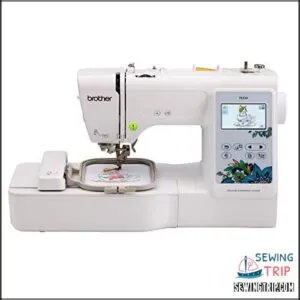
Compactness doesn’t mean compromise. The PE535 packs 80 built-in designs and 9 fonts into a 15-pound machine that won’t hog your table.
Its 4×4 embroidery area accommodates monograms, patches, and small decor projects with ease, while the 3.2-inch LCD touchscreen lets you preview and adjust designs before you stitch. You’ll load custom patterns through the USB port, thread the needle automatically, and watch your ideas take shape.
It’s embroidery-only, so you’ll still need your regular sewing machine for seams and hems.
| Best For | Crafters who want to personalize clothes, accessories, and gifts with embroidery but don’t need a full sewing machine. |
|---|---|
| Brand | Brother |
| Embroidery Field Size | 4″ x 4″ |
| Built-in Designs | 80 |
| LCD Display | 3.2″ touchscreen |
| Built-in Fonts | 9 |
| USB Port | Yes |
| Additional Features |
|
- 80 built-in designs and 9 fonts give you plenty of options right out of the box
- USB port lets you upload custom designs for truly personalized projects
- Automatic needle threading and a touchscreen preview make setup quick and easy
- The 4×4 hoop limits you to smaller projects like monograms and patches
- You’ll need a separate sewing machine for any actual garment construction
- Doesn’t include software for creating or editing custom designs from scratch
5. Brother Embroidery Machine PE545
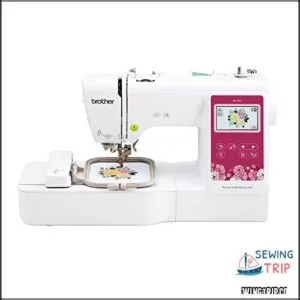
Wireless connectivity elevates your embroidery workflow, and the PE545 delivers with app-based design transfer right to your machine. You’ll drag patterns from your phone or tablet straight into the 4×4 embroidery field, preview them on the 3.7-inch touchscreen, then stitch at 400 stitches per minute.
It includes 135 built-in designs and 10 fonts, an automatic needle threader, and a thread cutter that keeps you moving. Compact at 24 pounds, it’s embroidery-only but budget-friendly for beginners ready to personalize everything.
| Best For | Hobbyists and beginners who want to personalize clothing, gifts, and home decor with custom embroidery designs without needing a full sewing machine. |
|---|---|
| Brand | Brother |
| Embroidery Field Size | 4″ x 4″ |
| Built-in Designs | 135 |
| LCD Display | 3.7″ touchscreen |
| Built-in Fonts | 10 |
| USB Port | Yes |
| Additional Features |
|
- Wireless connectivity lets you transfer designs from your phone or tablet directly to the machine through the Artsipra app
- 135 built-in designs and 10 fonts give you plenty of options right out of the box, plus you can import custom patterns via USB
- Automatic needle threader and built-in thread cutter speed up your workflow so you spend more time creating and less time on setup
- Embroidery-only design means you can’t use it for regular sewing projects like hemming or alterations
- 4×4-inch embroidery field limits the size of designs you can create in a single hooping
- Needle mechanism can jam or freeze during use, which may require troubleshooting or maintenance
6. Janome Memory Craft Embroidery Machine
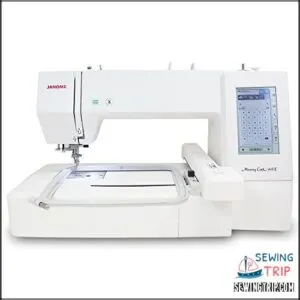
If you’re ready for a bigger canvas, the Janome Memory Craft 400E delivers a spacious 7.9×7.9-inch embroidery field—ideal for quilting blocks and garment backs without rehooping.
You’ll work with 160 built-in designs, 6 fonts, and programmable jump-thread trimming that cuts prep time. The full-color touchscreen lets you resize, rotate, and preview before you stitch at 400-860 stitches per minute.
USB import means you’ll bring custom designs from your PC, though you’ll need to convert files to.jef format first.
| Best For | Embroiderers who want a large workspace for quilts and garments without constant rehooping. |
|---|---|
| Brand | Janome |
| Embroidery Field Size | 7.9″ x 7.9″ |
| Built-in Designs | 160 |
| LCD Display | Full color touchscreen |
| Built-in Fonts | 6 |
| USB Port | Yes |
| Additional Features |
|
- 7.9″ x 7.9″ embroidery field handles bigger projects in one go
- 160 built-in designs plus USB import for custom patterns
- Touchscreen editing and adjustable speed give you full control
- Only reads.jef files, so you’ll need to convert other formats
- Some users report thread breakage and quality control issues
- Embroidery only—not a combo sewing machine
7. Brother Sewing And Embroidery Machine
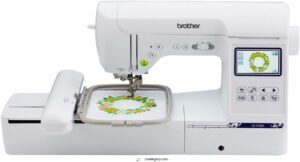
If you want both disciplines under one roof, the Brother SE1900 combination machine gives you 240 sewing stitches and a 5×7-inch embroidery field—no second purchase required.
You’ll switch between modes with a single module swap, working with 138 embroidery designs and 11 fonts built in. The 3.2-inch LCD touchscreen guides you through USB design imports, and the automatic needle threader saves your eyes during long sessions.
At 22 pounds, it’s portable enough for classes yet stable for home quilting and garment embellishment.
| Best For | Crafters who want to tackle both detailed sewing projects and custom embroidery work without buying two separate machines. |
|---|---|
| Brand | Brother |
| Embroidery Field Size | 5″ x 7″ |
| Built-in Designs | 138 |
| LCD Display | 3.2″ touchscreen |
| Built-in Fonts | 11 |
| USB Port | Yes |
| Additional Features |
|
- Switches between sewing and embroidery modes quickly so you can handle different projects in one session
- 138 built-in embroidery designs and 240 sewing stitches give you plenty of creative options right out of the box
- The 5×7-inch embroidery area is large enough for most designs, from monograms to full decorative patterns
- Extension table for sewing sold separately, which adds to the total cost
- Requires specific 60-weight bobbin thread for embroidery, so you can’t just use whatever’s in your stash
- Updates and compatible embroidery files can get pricey if you want to expand beyond the built-in options
8. Brother Disney Embroidery Sewing Machine
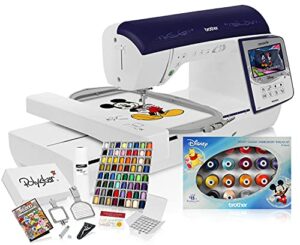
For households with Disney fans, the Brother Disney embroidery model stitches beloved characters directly onto backpacks, towels, and baby gear through preloaded licensed designs.
You’ll work within a 4-to-5-inch square embroidery field—ideal for monograms and small motifs—while the color touchscreen lets you rotate, mirror, and resize before the first stitch drops. Wireless design transfers from your phone simplify project prep, and built-in fonts add individual text alongside Mickey, Minnie, and Frozen characters.
| Best For | Families with Disney fans who want to personalize kids’ gear, backpacks, and home items with licensed character designs. |
|---|---|
| Brand | Brother |
| Embroidery Field Size | 6″ x 10″ |
| Built-in Designs | Not specified |
| LCD Display | Not specified |
| Built-in Fonts | Not specified |
| USB Port | Not specified |
| Additional Features |
|
- Preloaded Disney characters (Mickey, Minnie, Frozen) let you add fun designs without searching for patterns
- Wireless transfers from your phone make it easy to send designs straight to the machine
- Color touchscreen gives you control to rotate, mirror, and resize designs before stitching
- 4-to-5-inch embroidery area limits you to small projects like monograms and patches
- The 50,000-design bundle may not work with this machine due to compatibility issues
- Prewound bobbins in the package might have the wrong thread type for embroidery work
9. Brother Computerized Sewing Embroidery Machine
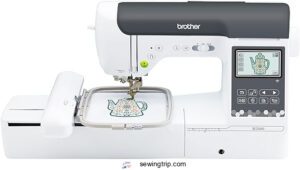
The Brother SE2000 combines sewing and embroidery in one package for $1,399.99, making it a smart choice if you’re ready to tackle both disciplines without buying separate machines.
You get 241 sewing stitches and 193 embroidery designs, plus a 5×7-inch field that accommodates everything from monogrammed pillowcases to machine quilting. The 3.7-inch touchscreen simplifies on-screen editing, wireless LAN transfers files from your computer, and automatic jump-stitch trimming cleans up thread tails while you watch.
| Best For | Sewists who want to explore both traditional sewing and embroidery without investing in two separate machines. |
|---|---|
| Brand | Brother |
| Embroidery Field Size | 5″ x 7″ |
| Built-in Designs | 193 |
| LCD Display | 3.7″ touchscreen |
| Built-in Fonts | Not specified |
| USB Port | No |
| Additional Features |
|
- 241 sewing stitches and 193 embroidery designs give you plenty of creative options right out of the box
- Wireless file transfer and automatic jump-stitch trimming make the embroidery process smoother and less tedious
- 5×7-inch embroidery field handles most common projects, from personalized gifts to home decor
- No carrying case, extension table, or embroidery supplies included—you’ll need to budget for extras
- Machine embroidery has a learning curve that might frustrate absolute beginners
- Only works with US voltage (120V), so international users need a converter
Tips for Buying and Maintaining Your First Machine
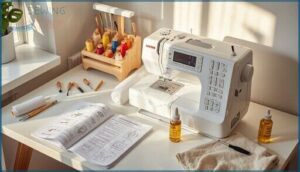
Getting your first embroidery machine home is just the beginning—you’ll want to protect that investment and set yourself up for years of stitching without headaches.
Where you buy matters as much as what you buy, and knowing how to care for your machine will save you from costly repairs down the road. Here’s what you need to know about smart purchasing and keeping your embroidery partner running smoothly.
Shopping From Authorized Dealers
When you’re investing in your first embroidery machine—whether it’s the Brother PE900 or another model—purchasing from authorized dealers protects that investment. Genuine products come with valid warranty claims, and you’ll get access to local support from brand-trained staff who actually know embroidery machines inside out.
Check dealer authenticity through the manufacturer’s website, and you’ll sidestep counterfeit headaches before they start.
Understanding Warranty and Support
Your new embroidery machine comes with warranty claims coverage—most manufacturers offer one year on parts and labor, with extended coverage options running up to five years.
Support channels include phone, chat, and email, giving beginners quick troubleshooting help when threading or tension issues pop up. Look for repair options through authorized service centers, and consider service plans if your sewing technology will power a small business.
Maintenance and Cleaning Essentials
You’ll keep your embroidery machines humming with light cleaning after every 4 hours of stitching—lint builds up fast in feed dogs.
Machine lubrication hits metal parts every 20 hours, while needle care means swapping tips every 8 to 12 projects.
Hoop cleaning with mild soap removes fabric oils, and thread management starts with quality spools. Regular servicing by a tech every 12 to 18 months locks in peak performance.
Accessing Online Tutorials and Communities
You’ll fast-track your embroidery techniques through video tutorials on official manufacturer channels and social media groups where beginners share machine embroidery wins and fails.
Online forums and digital workshops let you post questions, grab practice designs, and troubleshoot in real time. Engage with the sewing community through local maker meetups—you’ll swap sewing and embroidery tips while building confidence with every stitch.
Frequently Asked Questions (FAQs)
How do I know what embroidery machine to get?
You need to match your ambition with your workspace, budget, and skill level—then look at stitch quality, hoop size, thread options, and user reviews before comparing machines side by side.
What is the complete beginner guide to embroidery?
Embroidery basics start with understanding thread types, fabric choices, and design software. Machine embroidery for beginners means learning digitizing, proper machine selection, and stitch fundamentals before tackling complex projects confidently.
What do I need to embroider for the first time?
They say the devil’s in the details—and your first embroidery project proves it.
You need stabilizer types, thread selection, hoop sizes, fabric choice, needle care, and an embroidery machine to master stitch options and thread colors.
What is the easiest embroidery machine for beginners?
The Brother PE900 stands out as the easiest embroidery machine for beginners, offering a user-friendly user interface, reliable thread management, and excellent stitch quality across its built-in embroidery designs.
How do I know which embroidery machine to buy?
Your skill level, budget, workspace size, and project goals guide the decision—beginners thrive with accessible Brother PE900 models offering built-in designs, auto-threading, and community support for confident embroidery machine comparison and purchase.
What do I need to know before buying an embroidery machine?
Before you shop, focus on hoop size, built-in designs, and budget—embroidery machines range from hundreds to thousands. Compare ease-of-use features, warranty support, and whether you need sewing capabilities too.
How much should I spend on an embroidery machine?
Your budget depends on your goals and commitment level. Entry-level machines start around $200, mid-range combination units run $1,000–$7,000, while multi-needle setups cost $5,000–$15,000 for serious home use.
What fabrics work best for embroidery projects?
Cotton and linen offer stable weaves that anchor stitches cleanly, while polyester blends resist stretching during hooping. Knits demand cut-away stabilizers, and denim welcomes dense designs with minimal puckering.
How do I transfer custom designs to machines?
You’ll save your design file formats like PES, DST, or EXP to a FAT32-formatted USB drive, then plug it into your embroidery machines and select the file from the USB menu—machine compatibility matters most.
What accessories improve embroidery machine performance?
The right tool makes all the difference. Stabilizer options, hoop accessories, and needle enhancements transform your embroidery machines from basic to exceptional,
while thread management systems and regular machine cleaning prevent frustrating mid-project failures.
Conclusion
Think of this best embroidery machine for beginners guide as your roadmap through unfamiliar terrain—you’ve now got the landmarks to navigate confidently.
The machine gathering dust in someone’s closet? It likely promised everything but matched nothing to their actual workflow. Your perfect starter machine exists in that sweet spot between your budget, project ambitions, and tolerance for learning curves.
Choose deliberately, start stitching immediately, and let those first wobbly monograms become your foundation for bolder work ahead.