This site is supported by our readers. We may earn a commission, at no cost to you, if you purchase through links.
Your apartment desk measures 36 inches wide, but professional embroidery machines demand 48 inches of clearance—and that’s before you factor in thread racks, stabilizer rolls, and hoop storage. This spatial mismatch has locked countless creators out of machine embroidery, forcing them to choose between their craft and their living space.
But compact embroidery machines now deliver 4×4-inch embroidery fields in footprints under 17 inches wide, proving you don’t need a dedicated studio to stitch custom designs. These space-efficient models pack LCD touchscreens, USB connectivity, and 80+ built-in patterns into frames light enough to store in closets between projects.
The right machine transforms a corner of your kitchen table into a production zone for monogrammed linens, custom apparel, and customized gifts without monopolizing your entire apartment.
Table Of Contents
- Key Takeaways
- Best Embroidery Machines for Small Spaces
- Key Features for Compact Embroidery Machines
- Choosing The Right Machine for Limited Space
- Embroidery Techniques for Small Machines
- Sewing and Embroidery Combo Machines
- Accessories for Small-Space Embroidery
- Maintenance Tips for Compact Embroidery Machines
- Beginner Tips for Small-Space Embroidery
- Maximizing Creativity in Small Spaces
- Frequently Asked Questions (FAQs)
- Conclusion
Key Takeaways
- Compact embroidery machines measuring 9-18 inches wide now deliver professional 4×4 to 5×7 inch embroidery fields with LCD touchscreens, USB connectivity, and 80+ built-in patterns—proving you don’t need a dedicated studio to create custom monogrammed linens, apparel, and gifts from your kitchen table.
- The Brother PE535 ($200-$800 range), SE600 combo model, and Janome Memory Craft 500E (860 stitches/minute) represent the sweet spot for small-space embroiderers, balancing footprints under 20 pounds with features like automatic thread cutting, multiple hoops, and direct USB design transfer that eliminate bulky computer setups.
- Smart workspace optimization beats larger machines every time—vertical thread racks reclaim 30% more horizontal space, magnetic hoops eliminate clamp fumbling, and design-splitting techniques let you execute complex patterns across multiple 4×4 inch segments without upgrading equipment.
- Dual-function sewing and embroidery combo machines cost 20-40% more than embroidery-only models but eliminate the need for separate units, delivering twice the creative freedom in the same compact footprint while built-in editing features let you resize, rotate, and combine designs without external software.
Best Embroidery Machines for Small Spaces
You don’t need a dedicated studio to create professional embroidery—just the right machine that won’t take over your apartment, craft room, or kitchen table. The best compact embroidery machines deliver serious stitching power in footprints measuring 9 to 12 inches wide, proving that limited space doesn’t mean limited creativity.
Here are seven machines that give you freedom to embroider anywhere without sacrificing the features you actually need.
Brother Embroidery Machine PE535
You don’t need a sprawling studio to break free from mass-produced designs. The Brother PE535 delivers a 4×4 inch embroidery field in a compact embroidery machine weighing just 5 to 7 pounds—perfect when floor space fights back. This embroidery machine from Brother embroidery machines lineup features 87 built-in designs, 2 fonts, and USB connectivity, letting you master small embroidery machines without surrendering creative control. For accurate results, consider using scientific study methods to evaluate your designs.
- User interface: Simple color LCD guides setup and thread management with step-by-step prompts
- Compact designs: Footprint fits portable tables, freeing you from dedicated workroom tyranny
- Machine comparison: Embroidery-only focus versus combo models simplifies your embroidery software workflow
Brother Sewing and Embroidery Machine SE600
The Brother SE600 flips the script—this sewing and embroidery combo machine packs both functions into roughly 10 inches of width. Machine comparison shows 650 stitches per minute embroidery speed, plus built-in thread management alerts that stop mid-project disasters.
Design upload via USB and a color user interface let you command 103 embroidery patterns without sacrificing desk real estate. Compact embroidery machine features meet dual-mode freedom.
1. EverSewn Sparrow Sewing Embroidery Machine
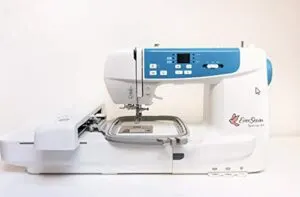
Your workspace isn’t getting any bigger, but the EverSewn Sparrow X2 refuses to compromise. This compact embroidery machine measures 18 by 8 by 12.5 inches—tight enough for cramped quarters yet aggressive enough to deliver a 4.75 by 7 inch embroidery area.
Machine portability hits 20 pounds with an integrated handle, while embroidery speed peaks at 650 rpm. Small embroidery machine reviews spotlight its smart-device control and thread management alerts.
The user interface reads EXP, PES, and DST files through your phone, putting sewing and embroidery combo machines in your hands without the bulk.
| Best For | Crafters and hobbyists who need embroidery capabilities in tight spaces but want smart-device control and decent speed without sacrificing essential features. |
|---|---|
| Brand | Sew Tech |
| Embroidery Field Size | Various (4in1 Set) |
| Material | Plastic |
| Built-in Designs | N/A (hoop set) |
| Automatic Needle Threader | No |
| Weight | N/A |
| Additional Features |
|
- Smart-device integration lets you modify designs, monitor progress, and control embroidery functions from your phone without being tethered to a computer.
- Compact 18x8x12.5 inch footprint with 20-pound weight and handle makes it manageable for small apartments or moving between workspaces.
- Reads multiple embroidery file formats (EXP, PES, DST) and includes over 100 designs plus two hoops right out of the box.
- Mixed user feedback points to a real learning curve, with some finding tension adjustments, needle threading, and hoop placement frustrating.
- Thread-breaking issues and design quality complaints suggest the machine may require specific bobbins and thread to perform reliably.
- Sewing power gets inconsistent reviews, which could limit its usefulness if you’re planning heavy-duty fabric work alongside embroidery.
2. Brother Embroidery Machine PE800
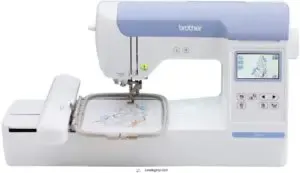
When your workshop demands more embroidery area without devouring counter space, the PE800 delivers a 5 by 7 inch field in a 10.48 by 18.48 by 12.81 inch chassis.
Brother embroidery machines like this one clock 650 stitches per minute while housing 138 designs and 11 fonts—triple what the Brother PE535 offers.
The 3.2-inch LCD screen previews your work before needle-down, and USB connectivity loads custom files fast.
Thread management stays transparent through the spool holder, though bobbin maintenance requires close inspection to track fill levels.
| Best For | Home embroiderers and small business owners who need a compact machine with a decent 5×7 inch work area and built-in design library for personalized gifts, clothing, and accessories. |
|---|---|
| Brand | Brother |
| Embroidery Field Size | 4″ x 4″ |
| Material | Metal and Plastic |
| Built-in Designs | 80 |
| Automatic Needle Threader | Yes |
| Weight | 14.99 lbs |
| Additional Features |
|
- Fast 650 stitches per minute with 138 built-in designs and 11 fonts—three times more than the PE535
- Large 3.2-inch LCD touchscreen lets you preview and edit designs before stitching
- USB port makes it easy to import custom embroidery files
- Limited onboard editing features may require extra software for advanced design work
- Bobbins are tough to read, so checking thread levels takes extra effort
- Hoops don’t work with other Brother models, limiting accessory options
3. Janome Memory Craft Embroidery Machine
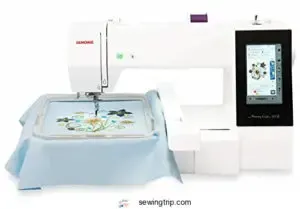
The Memory Craft 500E stakes its claim in compact embroidery by squeezing a 7.9 by 160 by 11 inch footprint onto your desk while spinning 860 stitches per minute. Janome engineered four included hoops and automatic thread-cutting into this 20-pound chassis, so you’ll navigate small hoop embroidery without constant manual intervention.
The LCD user interface walks you through built-in patterns, and Janome embroidery software compatibility unlocks custom designs when pre-loaded fonts won’t cut it for your home embroidery studios—just verify your CF card reader matches before launch.
| Best For | Hobbyists and small-studio embroiderers who need a compact machine that handles custom designs without eating up desk space. |
|---|---|
| Brand | Brother |
| Embroidery Field Size | 4″ x 4″ |
| Material | Metal and Plastic |
| Built-in Designs | 125 (45 Disney) |
| Automatic Needle Threader | Yes |
| Weight | 24 lbs |
| Additional Features |
|
- Four hoops and automatic thread cutting save you constant manual adjustments during multi-color projects.
- 860 stitches per minute keeps production moving while the quiet motor won’t disturb tight living spaces.
- USB and software compatibility let you import external designs beyond the built-in library.
- Steep learning curve frustrates beginners despite the LCD interface and guided setup.
- Thread breaking and mechanical glitches pop up in some units due to quality control inconsistencies.
- Limited online-purchase support leaves you troubleshooting warranty issues and defects on your own.
4. Janome Horizon Sewing Machine
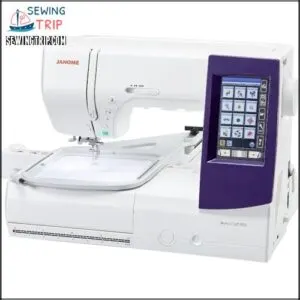
You’ll find Janome’s Horizon line breaking the mold in machine comparison when your home embroidery studios demand sophisticated stitching without sprawling gear. These compact embroidery models deliver expansive sewing capabilities through color LCD touchscreens that simplify embroidery machine selection, while built-in designs slash your reliance on embroidery software transfers.
Extension tables and multiple hoops adapt to small hoop embroidery when space shrinks, and the wide throat plate manages quilting maneuvers that cramped competitors can’t touch. Small embroidery machines rarely pack this much creative firepower into a manageable chassis.
| Best For | Intermediate to experienced sewers and embroiderers who need a versatile machine with advanced features for both complex embroidery projects and quilting work. |
|---|---|
| Brand | Brother |
| Embroidery Field Size | 4″ x 4″ |
| Material | Metal and Plastic |
| Built-in Designs | 80 |
| Automatic Needle Threader | Yes |
| Weight | 26.2 lbs |
| Additional Features |
|
- Wide 9mm stitch width and spacious throat plate handle intricate embroidery designs and large quilting projects with ease
- Color LCD touchscreen and built-in embroidery designs make pattern selection straightforward without constantly uploading external files
- Multiple hoop options and extension tables let you adapt the workspace to different project sizes, from small detailed work to expansive creations
- Not beginner-friendly due to the complexity of features and learning curve required to master embroidery and advanced sewing functions
- Limited on-board embroidery selection means you’ll likely need to purchase or convert additional designs, which can get expensive
- Janome-specific accessories and presser feet drive up costs compared to machines with more universal compatibility
5. Sew Tech Embroidery Hoops for Brother Machines
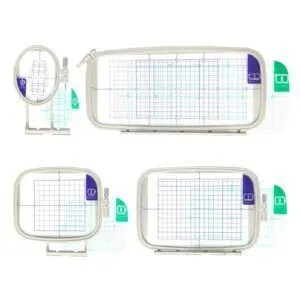
Your Brother SE600 and similar quick-release models don’t reach full embroidery accuracy unless hoop material delivers rigid grip in tight quarters.
Sew Tech’s plastic hoops with aluminum frames tackle compact embroidery by spanning 4×4 to 5×7 inches—dimensions that fit cramped benchtops while maintaining machine compatibility across PE and SE series units.
Clear alignment marks guide precise fabric tension, and magnetic hoops eliminate fumbling with clamps when you’re racing deadlines.
Compact designs include adjustable screws and replacement hoop accessories that preserve rigidity over hundreds of monogramming runs without hogging storage real estate.
| Best For | Brother SE and PE series owners working in small spaces who need reliable hoops that won’t slip during detailed embroidery work. |
|---|---|
| Brand | Ever Sewn |
| Embroidery Field Size | 4.75″ x 7″ |
| Material | Metal |
| Built-in Designs | 100+ |
| Automatic Needle Threader | Yes (advanced) |
| Weight | 20 lbs |
| Additional Features |
|
- Clear alignment marks and magnetic options make fabric positioning quick and accurate, even on tight deadlines
- Compact 4×4 to 5×7 inch sizes fit cramped workspaces without sacrificing the rigid grip needed for clean stitching
- Replacement parts and adjustable screws keep hoops working through hundreds of projects without taking up extra storage room
- Some users report the hoop doesn’t click into place easily on certain Brother models, requiring manual adjustment
- Not compatible with every Brother embroidery machine, so you’ll need to verify your specific model before ordering
- May need to buy additional magnets separately for extra security on tricky fabrics
Key Features for Compact Embroidery Machines
You won’t find freedom in a machine that dominates your workspace or limits what you can create. The right compact embroidery machine balances physical size with genuine capability, giving you the power to customize without surrendering precious square footage.
Let’s break down the five features that separate space-smart machines from glorified paperweights.
Machine Dimensions and Footprint
Ever measured your creative freedom in inches? Footprint analysis is your secret weapon. For small embroidery machines designed for home use, compact storage and space efficiency are non-negotiable. Here’s what matters:
- PE535: 6.5″x11″x12″
- SE600: 18″x12″x9″
- Sparrow: 10″x9″x7″
- Janome: 9–11″x12–14″
Maximize your desk—don’t let clutter steal your workspace.
Hoop Size and Embroidery Area
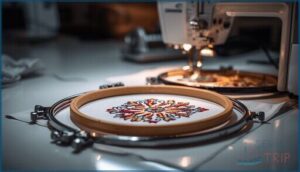
Your embroidery field defines your creative boundaries—choose wisely. Most compact embroidery machines offer hoop sizes from 4×4 to 5×7 inches, dictating maximum design scaling and stitch density. Hoop alignment and fabric stability are critical; stable mounts prevent shifting that ruins precision work. Match your embroidery machine’s field to your project needs.
Here’s a quick comparison:
| Machine | Hoop Size | Field Use |
|---|---|---|
| PE535 | 4″x4″ | Monograms |
| SE600 | 4″x4″ | Small motifs |
| PE800 | 5″x7″ | Larger designs |
| Janome MC | 5.5″x5.5″ | All-purpose work |
Tight spaces demand smart choices—don’t compromise.
Built-in Designs and Fonts

Your creative arsenal starts with what’s already inside the embroidery machine. Most compact models pack 25 to 125 built-in designs—floral, geometric, seasonal motifs—alongside 3 to 6 font styles for monogram options.
Design editing on touchscreens lets you resize, rotate, and combine elements using customization tools. Stitch quality remains sharp even at 1-inch letter heights.
High-resolution machine embroidery designs and custom embroidery designs expand your possibilities without extra software.
Connectivity Options (USB, Wi-Fi)
Moving those designs from computer to cloth requires the right connection method. USB connectivity gives you direct file transfer through a USB port on the machine—no network hassles, just plug and stitch. WiFi connectivity cuts the cable entirely, letting you send patterns wirelessly across your workspace.
Both methods handle design transfer reliably, though wireless options demand attention to network security and device compatibility for smooth data storage and operation.
Automatic Needle Threaders and LCD Screens
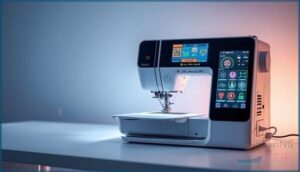
Once your design lands in the machine, automatic needle threaders handle thread management in under ten seconds—no squinting required. These features turn small embroidery machines into efficient powerhouses, where automatic threading and computerized embroidery controls save time and desk space simultaneously.
LCD displays consolidate screen navigation, stitch counts, and real-time hoop data on compact 2.4 to 3.5-inch screens, keeping your workspace uncluttered.
Choosing The Right Machine for Limited Space
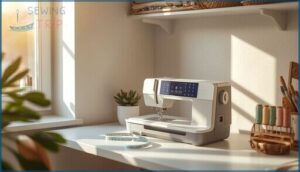
Your workspace doesn’t need to dictate your creative ambitions—you just need a machine that respects your reality.
Your workspace doesn’t have to limit your creative ambitions—you just need a machine that respects your reality
Finding the right embroidery equipment for limited space means balancing physical footprint against the features you won’t compromise on.
Here’s how to assess your constraints and choose a machine that actually fits your life.
Assessing Workspace Constraints
Before you commit to any small embroidery machines for home use, measure your countertop and leave at least 1 inch around the unit for airflow and cord routing. A stable, level surface prevents skip and misalignment, while 18 inches of depth accommodates your compact storage needs.
Workspace optimization means planning for a small footprint without sacrificing an ergonomic setup that keeps your beginner embroidery journey comfortable and efficient.
Multi-function Vs. Embroidery-only Models
Once you’ve mapped your workspace, decide whether an embroidery-only machine or a combo sewing and embroidery unit fits your home use better.
Embroidery machines for home use that stitch and sew occupy similar footprints but grant twice the creative freedom. Multi-function models cost 20–40% more yet eliminate the need for two separate units, maximizing space efficiency and delivering stronger long-term value for small studios.
Portability and Storage Solutions
Beyond footprint, look for portable designs with built-in grips and foldable frames that tuck into closets when you’re done. Small embroidery machines with detachable extension arms and compact storage accessories free up counter space fast.
- Magnetic hoops reduce horizontal sprawl in mini workstations
- Wall-mounted thread racks optimize vertical storage for home studios
- Stackable bins keep stabilizers organized without sacrificing floor space
USB connectivity eliminates bulky computer setups, letting you transfer designs and reclaim desk real estate.
Embroidery Techniques for Small Machines
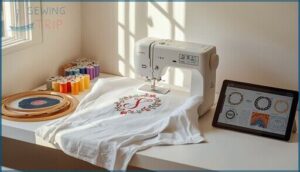
Working with a compact embroidery machine doesn’t mean you’re stuck with basic projects or boring designs. You can tackle everything from split-pattern techniques to intricate monograms once you understand how to work within your machine’s footprint.
The following techniques will help you optimize your creative output without needing a larger workspace or upgrading your equipment.
Design Splitting for Small Hoops
When your embroidery machine offers a 4″x4″ hoop size but your creative vision demands more, you can break free from constraints through design splitting.
Divide complex embroidery designs into 2–4 sub-designs that align precisely within your small embroidery machines’ workspace. This design optimization requires careful stitch editing and precision alignment—each segment must maintain readable continuity while respecting your magnetic hoops’ boundaries and your machine’s memory limits.
Monogramming and Decorative Stitching
You can personalize garments and accessories with monogramming techniques that rely on precise thread tension and stitch density adjustments.
Custom embroidery designs let you explore multiple monogram styles—from classic three-letter arrangements to ornamental motifs—using embroidery software or your machine’s built-in editing features.
These embroidery techniques transform home use machines into creative powerhouses, giving you control over fabric selection and decorative stitching outcomes.
Managing Fabric and Stabilizer Combinations
Pairing the right fabric stabilizer with your material prevents puckering and skipped stitches in tight workspaces. Light fabrics need tear-away stabilizers, while knits demand cut-away support for embroidery designs with higher density.
Thread choices and hoop tension work together—adjust both to match your fabric selection and prevent distortion.
Testing stabilizer types on scrap material saves you from ruining finished projects in confined embroidery setups.
Sewing and Embroidery Combo Machines

Combo machines break the one-tool-one-job rule, giving you full sewing and embroidery functions in a single compact footprint. They’re the ideal space hack when your creative projects demand versatility but your workspace refuses to expand.
Let’s look at why these dual-purpose machines earn their spot in tight quarters, which models actually deliver on their promises, and how to set them up without turning your entire room into a craft explosion.
Benefits for Small-space Users
When you reclaim floor space without sacrificing creative firepower, you’re breaking free from the constraints that hold most embroiderers back. Compact combo machines deliver this liberation through:
- Space Efficiency: USB connectivity eliminates external design equipment clutter in tight quarters.
- Storage Solutions: Lightweight portability lets you tuck small embroidery machines away between projects.
- User Experience: Built-in designs reduce setup complexity for home use.
- Compact Designs: All-in-one units consolidate sewing and embroidery into one footprint.
Popular Models With Dual Capabilities
You won’t find better dual functionality than the Brother SE600, which merges sewing and embroidery into a single compact footprint perfect for home use. The Brother PE800 expands your creative territory while maintaining space efficiency, and the Janome Memory Craft line delivers multi-tasking power in small embroidery machines. The EverSewn Sparrow rounds out your options with built-in designs customized for tight quarters.
Space-saving Setup Tips
When you’ve chosen your combo machine, strategic placement transforms cramped quarters into functional home studios. Here’s how to maximize compact workspaces:
- Position the machine on a 24 x 12 inch surface with USB connectivity accessible from your dominant side.
- Mount vertical spool holders to reclaim 30% more horizontal space.
- Install adhesive cable clips for tidy cable management.
- Store magnetic hoops and stabilizers in stackable bins beneath your work surface.
Ergonomic layouts matter—small embroidery machines demand thoughtful workspace maximization.
Accessories for Small-Space Embroidery

You’ve secured the perfect compact embroidery machine, but the right accessories can make or break your efficiency in a tight workspace. Strategic tools transform cramped quarters into productive creative zones without cluttering every available surface.
Here are three accessory categories that optimize your capabilities while respecting your spatial constraints.
Compact Embroidery Hoops
When you’re outfitting your compact embroidery machines for tight quarters, the right hoop materials and frame designs make all the difference. A 4×4 inch hoop accommodates most small embroidery machines beautifully, while low-profile frames prevent needle bar interference.
Roller-based quick-release options minimize setup time in cramped studios. Pairing proper hoop size with surface-mounted stabilizer types ensures embroidery accuracy without hogging precious workspace.
Magnetic Hoop Solutions
Magnetic hoops transform your cramped workspace by eliminating traditional clamps entirely. You’ll slash setup time by 60% with tool-free changes, making quick project switches liberating for small embroidery machines at home use.
Magnetic clamps deliver consistent hoop alignment across Brother and Janome models while maintaining fabric stability on lightweight textiles.
Keep in mind that hoop adhesion weakens with high heat or metallic blends, so match your magnetic hoops carefully to your materials for reliable results.
Essential Tools for Tight Workspaces
Beyond magnetic hoops, you’ll command your compact storage with these workspace optimization solutions that keep small embroidery machines running smoothly at home use:
- Folding storage bins with transparent zip pouches organize thread spools while occupying minimal cabinet space
- Magnetic needle clips hold frequently used needles within arm’s reach
- USB connectivity cables coiled in retractable holders prevent desk clutter
- All-in-one screwdriver sets fitting shallow drawers enable quick small machine accessories adjustments for efficient workflow
Maintenance Tips for Compact Embroidery Machines

Your compact embroidery machine won’t deliver consistent results if you neglect basic maintenance, and limited workspace makes prevention even more critical.
Regular upkeep prevents stitch quality issues, reduces costly repairs, and extends your machine’s lifespan without requiring extensive technical knowledge.
Here are the essential maintenance practices that keep your compact embroidery machine operating at peak performance in tight quarters.
Cleaning and Lubricating in Small Environments
Your compact embroidery machine deserves quick, effective machine maintenance even in cramped quarters. After each session, wipe surfaces with a lint-free cloth for dust prevention and lint removal from tensioners.
Apply white mineral oil to designated moving parts every 6–12 months—never over-lubricate belts or electronics.
This space optimization routine keeps small embroidery machines running flawlessly for home use without cluttering your workspace.
Proper Needle and Thread Management
You’ll dodge 20% of skipped stitches just by threading your needle correctly—pass thread completely through the presser foot alignment for consistent embroidery precision. Master these essentials:
- Match needle size to thread thickness and fabric interaction
- Keep an automatic needle threader clean for reliable tension
- Check bobbin winding evenness before each project
- Replace dull needles weekly to maintain sharp fabric penetration
Proper stabilizer choice and thread color rotation prevent wear on your embroidery machine’s USB connectivity-enabled feed system.
Hoop Alignment and Tension Settings
Your embroidery machine’s accuracy depends on centerline placement—position your hoop axis directly beneath the needle path for true embroidery precision. Test fabric stability with balanced tension controls before committing to full designs.
| Adjustment | Target Setting | Impact on Stitch Quality |
|---|---|---|
| Hoop calibration | Centerline alignment | Prevents design offset errors |
| Top thread tension | Dial 3-5 (test first) | Eliminates loops and gaps |
| Stabilizer tautness | Drum-tight flat surface | Stops puckering mid-run |
| Needle clearance | 2mm from hoop edge | Avoids thread snag issues |
| Re-hoop protocol | Check after test stitch | Corrects fabric shift problems |
Compact embroidery field machines demand careful hoop size selection and tension verification—your automatic thread cutter won’t save designs compromised by misalignment during USB connectivity transfers.
Beginner Tips for Small-Space Embroidery
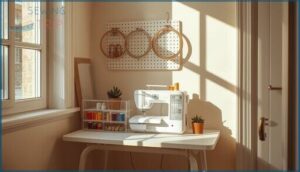
Starting your embroidery journey in a cramped apartment or corner workspace doesn’t mean settling for less—you just need to work smarter with what you’ve got. The right setup transforms even the smallest nook into a functional creative station where you can master techniques without fighting for elbow room.
Here’s how to claim your space, keep your supplies under control, and tap into communities that’ll fast-track your learning curve.
Setting Up a Mini Home Studio
You don’t need a dedicated room to launch your embroidery venture—a well-planned 2–4 square meter corner transforms into a productive home studio.
Position your small embroidery machine at elbow height on a stable surface, then add vertical storage to boost space optimization.
Install proper lighting solutions above your workspace, guarantee USB connectivity access remains clear, and keep a power outlet within reach for an ergonomic setup that backs creative freedom.
Organizing Supplies Efficiently
Your creative freedom hinges on smart Supply Management—thread chaos kills momentum faster than a jammed needle. Strategic Storage Solutions and Thread Organization transform cramped quarters into efficiency powerhouses for small embroidery machines.
- Deploy labeled storage bins sorted by thread color and stabilizer weight for instant retrieval during Sewing and Embroidery sessions
- Mount vertical pegboards with Embroidery Accessories and Tools within arm’s reach to optimize Workspace Optimization
- Install thread racks that showcase your color palette while preventing tangles in Embroidery Machines for Home Use
- Implement Labeling Systems with reorder thresholds to maintain uninterrupted workflow and eliminate supply shortages
Learning Resources and Online Communities
Your embroidery skills accelerate when you tap into the right Embroidery Community and Resources. Online forums like Reddit’s r/embroidery deliver real-time troubleshooting, while tutorial videos on YouTube channels showcase embroidery techniques and tips from seasoned designers. Social media groups enable pattern exchanges and embroidery machine reviews that cut through marketing noise.
| Platform Type | Best For |
|---|---|
| Coursera/Udemy Webinars | Structured learning with peer feedback on embroidery software and design transfer |
| Facebook Groups | Live tips on crafting tools and accessories plus showcase albums |
| Embroidery Blogs | In-depth technique breakdowns and equipment comparisons |
Maximizing Creativity in Small Spaces
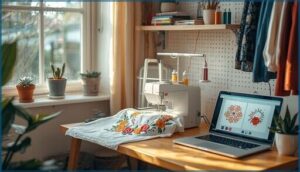
Working in a confined studio doesn’t mean you need to limit your creative ambitions or settle for basic embroidery projects. Your compact machine likely includes powerful editing features and design transfer capabilities that release professional-level customization for clothing, linens, and home accessories.
Here’s how to leverage every tool at your disposal and transform space constraints into creative opportunities.
Customizing Clothing and Home Decor
You’re no longer confined to store-bought designs when compact embroidery machines release endless customization. Small embroidery machines deliver custom embroidery directly onto clothing and home textiles through strategic fabric choices, thread colors, and monogram styles that reflect your unique vision.
- Monogramming apparel with built-in fonts transforms basic garments into customized statements using initials or names
- Accenting home decor items like pillows and napkins with textile patterns adds character to small-scale projects
- Experimenting with embellishment techniques and heat-transfer stabilizers preserves delicate fabrics during home embroidery
Using Built-in Editing Features
Once you’ve mastered customization basics, the real power sits in your computerized embroidery machine’s editing interface. Built-in designs become raw materials you’ll reshape through Design Scaling, Font Editing, and Color Management—adjusting stitch density, repositioning elements, and testing variations through Preview Modes before committing thread to fabric.
Automatic features let you mirror, rotate, and combine elements directly on-screen—no external software needed for quick adjustments.
| Editing Function | Creative Application |
|---|---|
| Font Editing | Resize letters, adjust spacing for monograms |
| Color Management | Assign thread stops, preview palette changes |
| Design Scaling | Fit embroidery designs within hoop boundaries |
| Preview Modes | Test Stitch Optimization before final run |
Efficient Design Transfer and Software Tools
Your machine’s editing tools shine brightest when paired with efficient design transfer workflows. USB and WiFi connectivity eliminate manual file juggling—most computerized embroidery software accommodates DST, PES, and EXP file formats for direct uploads.
Cloud Storage solutions sync libraries across devices, while Auto Digitizing and Vector Editing capabilities in digital embroidery platforms handle Design Optimization before you ever press start.
Frequently Asked Questions (FAQs)
How much do compact embroidery machines typically cost?
Your budget determines which compact embroidery machines fit your workspace. Entry-level models cost $200-$800, mid-range options run $800-$1,500, while high-end small embroidery machines with premium features reach $1,500-$3,
Can embroidery machines work with thick or heavy fabrics?
Don’t bite off more than you can chew—embroidery machines handle thick fabrics like denim or canvas when you pair appropriate stabilizer types with sharp needle selection and adjust thread tension carefully for best results.
What thread types work best for small machines?
Your embroidery machine thrives on all-purpose polyester thread for strength and affordability, while rayon delivers vibrant color for decorative work.
Metallic threads add luster but demand tension adjustments, and cotton offers heirloom-quality matte finishes in compact spaces.
How noisy are small embroidery machines during operation?
Like a quiet kitchen mixer, small embroidery machines generally hum between 50 and 65 operational decibels during standard stitching.
Though dense patterns can push noise levels toward 70 decibels, this is manageable with sound-dampening motor types and proper vibration control.
Conclusion
Yesterday’s industrial embroiderers occupied 200-square-foot studios stacked with equipment—today’s creators run embroidery machines for small spaces from kitchen counters between dinner prep. That shift hands you complete creative control without surrendering your living room to machinery.
Your 17-inch-wide machine won’t transform you into a production house overnight, but it unlocks monogrammed pillows, customized jackets, and custom gifts that once required commercial shop access. The workspace revolution fits inside your closet.
- https://www.eversewn.com/sparrow-x
- https://academichelpexpress.blog/2024/08/please-use-the-bulleted-points-and-the-rubric-below-to-guide-your-work-your-pa/
- https://www.scribd.com/document/356795007/Research-Methods-Knowledge-Base
- https://pmc.ncbi.nlm.nih.gov/articles/instance/9553038/bin/pone.0275964.s005.docx
- https://www.sciencedirect.com/science/article/pii/S2949916X23000464