This site is supported by our readers. We may earn a commission, at no cost to you, if you purchase through links.
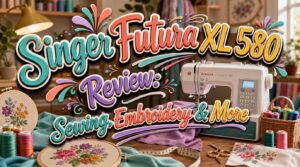
Most sewing machines force a choice: sew well or embroider well. The Singer Futura XL 580 refuses that compromise.
With 215 built-in stitches, 250 embroidery designs, and a metal frame that accommodates marathon sessions without complaint, it’s built for sewists who want one machine to do serious work across every project type. The SwiftSmart threading system cuts setup time, while industry data shows users complete projects 30% faster—numbers that matter when your project list keeps growing.
From monogramming to quilting to decorative stitching, the XL 580 covers ground most machines won’t.
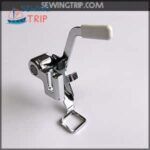
If you’ve ever wrestled with fabric bunching during free-motion embroidery, you know how frustrating it gets. This EverNice darning foot (part #86625) for Singer Futura machines solves that problem in a straightforward way. The low shank design locks in cleanly — no wobbling, no guesswork. Once it’s on, you’ll notice the open visibility right away. You can actually see where you’re stitching, which makes a real difference when you’re tracing monogram curves or stippling tight quilt patterns.
The integrated guide gives you more control than you’d expect from a plastic foot at this price point. Fabric stays flat and stable, so your darning lines come out clean rather than puckered. The one thing to check before you buy: compatibility. This foot only works with specific Singer Futura and Viking Husqvarna low shank models, so confirm your machine number first. It’s a targeted tool — and when it fits, it works exactly as it should.
Best For: Embroiderers and quilters using compatible Singer Futura or Viking Husqvarna low shank machines who want better visibility and control during free-motion work.
- High visibility design lets you see your needle path clearly during detailed embroidery and stippling
- Integrated guide improves directional control, especially useful for curved monogram stitching
- Keeps fabric flat and stable, reducing bunching and puckering during darning passes
- Only compatible with specific Singer Futura and Viking Husqvarna low shank models — check your machine number before ordering
- Plastic construction feels functional but not particularly durable under heavy daily use
- No adjustment flexibility; it’s a fixed-position foot with no customization options
Table Of Contents
Key Takeaways
- The Singer Futura XL 580 handles both sewing and embroidery in one metal-frame machine, giving you 215 stitches and 250 built-in designs without buying two separate units.
- Its multi-hooping system lets you embroider designs far larger than any single hoop allows, using registration marks to keep every stitch aligned across sections.
- AutoPunch and HyperFont software convert standard images and Windows fonts into stitch-ready embroidery files directly through a USB connection—but only on Windows machines.
- Consistent maintenance—cleaning the hook area every 8–12 hours and applying a single drop of oil to the hook race—keeps the machine running reliably through long, heavy-use sessions.
Singer Futura XL 580 Overview
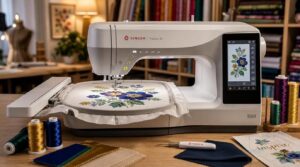
The Singer Futura XL 580 isn’t just a sewing machine — it’s a full creative workstation that accommodates both stitching and embroidery without breaking a sweat. Whether you’re a hobbyist leveling up or a seasoned sewist chasing precision, this machine was built with you in mind. Here’s what you need to know before you thread your first needle.
If you’re newer to the craft and not quite ready for that leap, checking out the best sewing machines for beginners can help you build the skills that make a machine like this really shine.
Sewing and Embroidery Combo
The Singer Futura XL 580 doesn’t make you choose between sewing and embroidery — it manages both. With 215 built-in stitches and 250 embroidery designs, including an endless hoop option, this machine runs a complete integrated design workflow from garment construction to decorative monogramming. One machine, two modes, zero compromises.
The Singer Futura XL 580 masters both sewing and embroidery — one machine, two modes, zero compromises
Additionally, these machines can increase project completion speed by 30% per industry surveys.
Best User Fit
This machine suits a specific kind of maker. If you’re balancing creative ambition with real-world limits — time, space, and budget — the XL 580 meets you there.
- Skill level match: guides beginners without boring experienced users
- Space footprint fit: compact enough for a dedicated corner
- Feature relevance match: embroidery, monogramming, and quilting in one
- Budget compatibility: reduces the need for multiple machines
Key Specifications
The XL 580 packs serious hardware into one unit. You get 215 built-in stitches, 250 embroidery designs, and a large embroidery field with multi-hooping capability.
The SwiftSmart threading system and automatic needle threader cut setup time fast. A color touch screen controls settings, while built-in memory keeps your designs ready.
High-speed performance means less waiting, more making.
Included Accessories
The XL 580 ships with a well-stocked accessory box right out of the box. You get an embroidery hoop, multiple presser feet, stabilizer sheets, and a thread color set — everything to start sewing and embroidering immediately.
The needle threader tool, design transfer cable, and maintenance kit items handle setup, connectivity, and upkeep. A knee lifter and extension table round out the package.
Overall Value
The SINGER FUTURA XL580 punches well above its mid-range price tag. You get 215 built-in stitches, 250 embroidery designs, and multi-hooping capability in one machine — no need to buy separate units.
- AutoPunch software converts images to embroidery without extra tools
- Built-in automation cuts setup time on every project
- Metal frame construction holds up through long work sessions
Sewing Features and Stitch Options
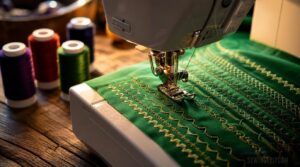
The Singer Futura XL 580 doesn’t hold back regarding sewing versatility. Whether you’re stitching a straight seam or pushing into more creative territory, this machine gives you serious options to work with. Here’s a closer look at what you’ll find on the sewing side.
215 Built-in Stitches
With 215 built-in stitches, the SINGER FUTURA XL-580 covers every project you’ll throw at it. Utility, decorative, and stretch stitch types are all here. You can adjust stitch length and width in real time, save your settings to memory, and pull them back up instantly. It’s full control, right at your fingertips.
Pair the machine with dedicated home embroidery software to fine-tune designs before they ever reach your fabric.
Automatic Buttonholes
Buttonholes can make or break a finished garment — and the Singer Futura XL580 manages them without the guesswork. Using the One Step Button Hole Foot, the Buttonhole Sensor detects fabric thickness and adjusts automatically. Here’s what that means in practice:
- Automatic Measurement sizes each hole to your exact button
- Fabric Thickness Detection prevents puckering on light or heavy materials
- End Reinforcement secures both ends against stress
Select your style via the Stitch selection dial on the Control panel, and Quick Recall Settings save your preferred size for repeat projects.
Stretch Stitch Settings
Stretch fabric doesn’t forgive mistakes — a snapped seam on a knit top means starting over. On the SINGER XL580, your stitch selection dial gives direct access to stretch stitch options built for exactly this.
Set stitch width and length between 2.0–3.0mm depending on fabric weight, and use thread tension adjustment to avoid puckering. Always pair with a ballpoint needle and run a sample test stitch first.
Decorative Stitch Choices
With 192 decorative stitches inside a library of 215 total, the XL580 hands you real creative range.
- Satin stitch fills broad areas with smooth, even coverage
- Buttonhole style creates dense, secure edge borders
- Chain stitch traces outlines with continuous looping lines
- Blanket stitch borders appliqué edges with spaced precision
- Feather stitch adds soft, wispy textured curves
Every stitch pattern is dial-accessible — no guesswork.
Stitch Programming Controls
Stitch programming on the XL580 lets you sequence commands, store macros, and trigger complex routines with a single button press. The LCD display shows your settings in real time — stitch width, length, and density included.
Calibration routines keep fabric feed accurate across material types, while automatic tension adjustment manages the rest.
You stay in control. The machine manages the math.
Embroidery Performance and Hoops
The Singer Futura XL 580 doesn’t just sew — it embroiders with real precision and range. Whether you’re personalizing a gift or tackling a quilting project, the embroidery system gives you serious room to work. Here’s what you get on the embroidery side.
250 Built-in Designs
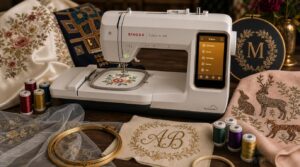
The Singer Futura XL580 ships with 250 built-in embroidery designs — and they’re not filler. Here’s what’s actually in the library:
- Floral motifs for cotton and satin
- Geometric patterns for modern appliqués
- Holiday and seasonal themes
- Animal silhouettes and nature motifs
- Monogram and script styles
Design organization keeps categories sorted on-machine, so selection stays fast.
Three Hoop Sizes
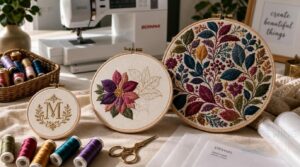
The 250 designs are only as useful as your hoop lets them be.
The XL 580 includes three embroidery hoop sizes paired with its embroidery unit:
| Hoop | Area | Best For |
|---|---|---|
| A | 4" × 4" | Monograms, small motifs |
| B | 6.75" × 4" | Mid-sized appliqués |
| C | 10" × 6" | Large fills, logos |
Your hoop selection guide starts with design size — match it first.
Multi-hooping Capability
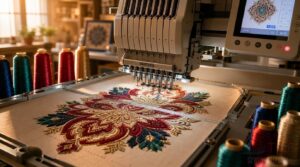
One hoop can only take you so far. That’s where multi-hooping capability shines — it splits a large embroidery design across multiple areas, letting you cover surfaces far beyond any single hoop’s reach.
Here’s how it works in three steps:
- Design splitting divides your artwork into segments that each fit within one embroidery hoop.
- Registration marks guide precise fabric realignment between hoopings, keeping stitch continuity smooth.
- Overlap strategy ensures adjacent sections connect cleanly, with no visible gaps or misaligned edges.
Fabric stabilization is non-negotiable here — any shift between hoopings breaks the flow. The XL 580 ensures design file compatibility across formats, so your software manages hoop placement automatically, reducing manual guesswork considerably.
Monogramming Font Options
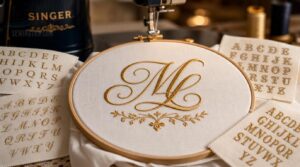
Monogramming on the XL 580 goes beyond basic initials. With 20 embroidery fonts and 30 lettering frames, you have real creative range. Script fonts deliver flowing, elegant connections — perfect for wedding gifts or individualized linens. Serif and sans serif options cover everything from classic to modern. Display fonts add bold decorative flair.
HyperFont software processes font conversion directly into digitized embroidery files, keeping your formats clean and stitch-ready.
Stippling for Quilting
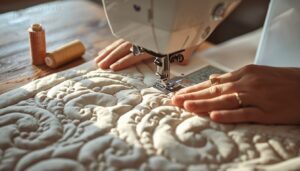
Quilting on the XL 580 takes a meaningful step forward with its stippling embroidery designs built for free motion work. Drop your feed dogs, attach the Free Motion Darn Embroidery Foot, and control Stippling Density Control by adjusting your movement speed.
Use Thread Color Choice to blend or contrast. Practice on scraps first, then expand large patterns using multihooping capability.
Software, Connectivity, and Compatibility
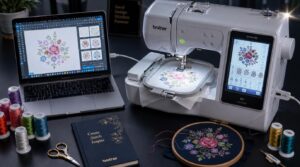
The Singer Futura XL 580 doesn’t stop at stitching — it connects directly to your computer, giving you real control over your designs. A handful of built-in software tools and broad file format support make that connection genuinely useful. Here’s what you need to know about how it all works together.
USB Computer Connection
The Singer Futura XL 580 connects to your computer through a direct USB cable, making design transfers quick and straightforward. Here’s what that connection gives you:
- Transfer digital embroidery designs from your PC to the machine
- Access AutoPunch and Enhanced Editing software tools
- Run digitizing software to convert images into stitch files
- Manage embroidery file formats before sending them over
- Enjoy USB 2.0 speeds for fast, reliable data transfers
Supported Embroidery Files
The XL 580 processes 14 embroidery file formats, including DST, PES, JEF, VIP, HUS, XXX, and more — so you’re rarely stuck with an incompatible file.
| Format | Brand Association | Key Strength |
|---|---|---|
| DST | Universal/Tajima | Cross-brand compatibility |
| PES | Brother | Color + hoop data |
| JEF | Janome | Broad editing support |
| VIP | Husqvarna/Viking | Color change preservation |
| XXX | Singer | Native machine transfers |
AutoPunch Software
AutoPunch digitizing does the heavy lifting for you. Drop in a BMP or JPG, and the software analyzes shapes automatically — assigning colors, suggesting stitch types like satin or fill, and processing multiple sections through batch processing in one pass.
The built-in wizard walks you through block classification, so you’re converting raw images to stitch-ready files fast, then refining them in the Professional Editing software.
HyperFont Lettering Tools
HyperFont turns any Windows font into embroidery-ready lettering — no manual digitizing needed. Launch the HyperFont wizard from the Create menu, type your text, and choose a font from your Windows pool.
Five things to know:
- Font Conversion Process runs automatically
- Fill Column Options shape stitch density
- Text Stitch Preview confirms results before stitching
- Multi-language Font Support via Windows fonts
- Tension Adjustment Guide prevents thread breaks on small letters
Windows-only Compatibility
One hard limit shapes everything in this section: Windows-only compatibility.
The embroidery software, AutoPunch, HyperFont, and Professional Editing tools all require a Windows runtime environment — Mac and Linux users simply can’t run the official drivers needed for USB computer connection.
| Compatibility Factor | Windows Status |
|---|---|
| Driver Requirements | Officially supported |
| OS Restrictions | Windows only |
| Update Process | Windows utility only |
| Troubleshooting Tools | Windows Event Viewer |
| Legacy Support | Compatibility mode available |
If connection issues arise, the Singer Futura Forum and official support channels redirect you to a Windows-based software reinstall. Plan accordingly.
Accessories, Maintenance, and Support
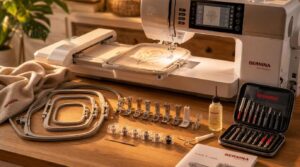
The Singer Futura XL 580 doesn’t just perform well — it’s also built to stay that way. Knowing what’s included and how to care for your machine makes a real difference in how long it lasts. Here’s what you need to know about the accessories, upkeep, and support that come with it.
Presser Feet Included
The Included Foot Set covers a surprising range of techniques. You get a Blind Hem Foot for near-invisible hems, a Satin Stitch Foot for dense decorative work, and a Walking Foot for feeding multiple quilt layers evenly.
- Zipper Foot for precise seam alignment
- Straight Stitch Foot for clean topstitching
- Overcast foot for clean, fray-free edges
Bobbins and Needle Types
The XL 580 uses SINGER Class 15J bobbins — a reliable standard that keeps bobbin tension consistent and thread visibility clear, especially with the plastic design.
For needles, stick to size 14 embroidery needles for embroidery work, and switch to the appropriate type for your fabric — ball point for knits, sharp for wovens.
Cleaning The Hook Area
Keep the hook area clean after every 8 to 12 hours of sewing. Power off and unplug first. Use a lint brush to clear the feed dogs and hook race — front to back. A lint-free cloth removes leftover residue after brushing.
Skipped stitches or thread bunching? That’s your sign to clean immediately.
Oiling The Hook Race
After the dust is cleared, it’s time to feed the machine what it needs — one drop of SINGER Brand oil on the hook race surface. Nothing more.
Follow these steps for safe hook race lubrication:
- Unplug the machine completely.
- Open the hook cover and remove the bobbin case.
- Rotate the handwheel to position the hook.
- Apply a single drop of light sewing machine oil.
- Wipe away any excess immediately.
Never over-oil. Lint attraction and thread gumming follow fast when you do.
Manuals and Repair Support
The owner’s manual comes in PDF format from Singer’s official site — download it free, anytime. Printed copies ship with the machine or can be requested through customer support.
For sewing machine repair, Singer’s support portal lists authorized centers by region. Warranty service requires an authorized technician using OEM parts. Phone, email, and live chat options are all available if troubleshooting hits a wall.
Frequently Asked Questions (FAQs)
Can the Singer Futura XL 580 sew leather?
Yes, it can handle light to medium leather — around 8–2 mm thick. Use a leather needle, walking foot, and bonded thread at moderate speed for clean, reliable seams.
What is the machines maximum sewing speed?
The exact maximum sewing speed isn’t publicly specified, but the machine’s high-end motor delivers stable, high-RPM performance. Its foot control and automatic tension keep stitch density consistent at full speed.
Does it work with a quilting extension table?
A quilting extension table fits around most domestic machines with standard throat depth. Check your model’s accessory chart first. A compatible table gives you extra-large sewing space and accommodates multi-hooping capability with better stability.
How loud is the XL 580 during operation?
During standard stitching, noise sits between 60 to 75 decibels. Dense embroidery can push that to 80 dB. Sound dampening housing and rubberized feet keep vibration low. Most users find it comfortable for long sessions.
Can thread color be changed mid-embroidery design?
Stop at each color stop prompt, trim the top thread, then rethread with your new color. Mid-design switching stays accurate when you maintain registration accuracy and keep thread tension control consistent throughout.
Conclusion
Picture a quilter finishing a custom wedding gift: monogrammed linens, decorative borders, precision seams—all done on one machine. That’s exactly what the Singer Futura XL 580 makes possible.
It doesn’t ask you to choose between sewing and embroidery; it accommodates both without compromise. The metal frame holds steady through long sessions, the software expands what you can design, and the stitch library rarely leaves you short.
One machine. Every project.